
Learning Paths
Last Updated: April 1, 2026 at 19:15
What Is Single Sign-On (SSO)
Centralized identity, the trust relationships that make it work, and the risks of putting all your eggs in one basket
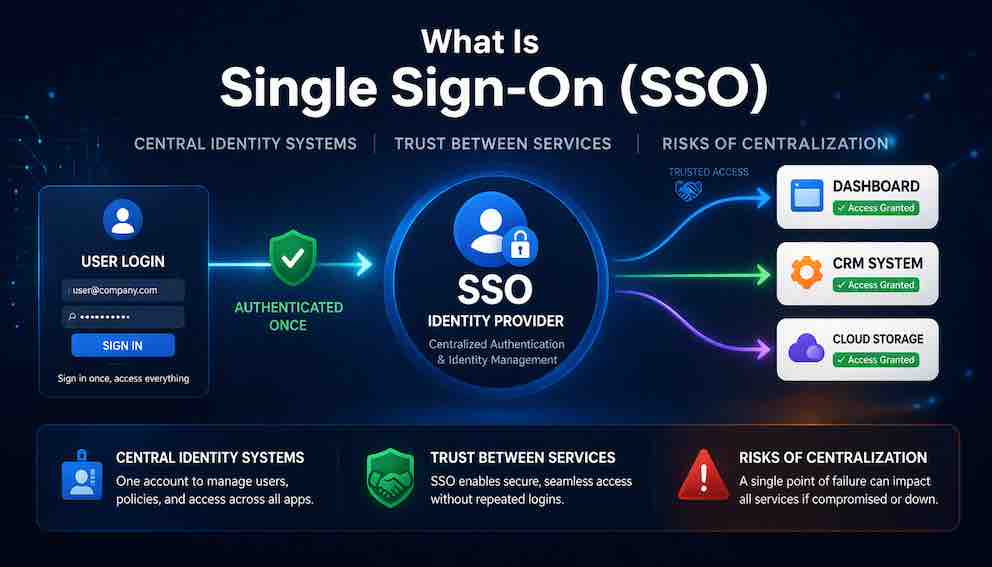
Every time you log into your work laptop and find yourself already signed into Salesforce, Workday, and your email, you are experiencing Single Sign-On. SSO is an authentication architecture that lets users prove their identity once — to a central identity provider — and gain access to every connected application without logging in again. Beyond the convenience, it delivers real security gains: consistent MFA enforcement, instant offboarding, and a single place to audit every authentication event across the organization. The trade-off is concentration of risk — the identity provider becomes the most valuable target in your infrastructure, which means it also demands your strongest security controls
A Story: The Office Building
Imagine you work in a large office building. Every morning, you arrive at work and approach the front desk. The security guard checks your ID badge, verifies your photo, and confirms you are an employee. You are now inside the building.
Throughout the day, you need to access different parts of the building — the finance department on the third floor, the engineering lab in the basement, the cafeteria on the ground floor, the data center in the back. Instead of showing your ID at every single door, you simply swipe your badge. The badge works everywhere you are authorized to go. You never have to prove your identity again after that first check at the front desk.
This is Single Sign-On (SSO) in the physical world.
Now imagine the alternative. Every time you need to enter a different department, you have to go back to the front desk, show your ID again, and get a separate badge for that specific area. You would spend half your day waiting in line. You would carry a handful of badges. You would forget which badge works for which door. And every department would need its own security guard checking IDs.
This is what life was like before SSO.
What Is Single Sign-On?
Single Sign-On (SSO) is an authentication scheme that allows a user to log in once with a single set of credentials and gain access to multiple independent applications without being prompted to log in again.
In plain language: you log in one time, and you are automatically logged in to everything else.
SSO is not a protocol itself — it is a concept, an architectural pattern, implemented using protocols like SAML, OpenID Connect, and Kerberos. When you use "Sign in with Google" across multiple websites, you are experiencing SSO. When you log into your work laptop and automatically have access to Salesforce, Workday, and your email, you are experiencing SSO.
The core idea is that SSO separates authentication from authorization. Authentication happens once, at a central identity provider. Authorization happens per application, based on the identity established by that provider. This separation is what makes SSO powerful. Applications no longer need to manage passwords. They no longer need to implement their own login screens. They simply trust the identity provider to tell them who the user is.
Why SSO Exists — The Problems It Solves
Before SSO, organizations faced a set of problems that made using software frustrating and insecure.
Password fatigue. A typical enterprise employee uses dozens of applications. Before SSO, each required a separate username and password. Employees wrote passwords on sticky notes, reused them across applications, and chose simple ones because they could not remember complex ones. One compromised password could give an attacker access to multiple systems.
Inconsistent security. Each application implemented its own authentication. Some used weak password policies. Some did not support MFA. Some stored passwords in plain text. The overall security of the organization was only as strong as the weakest application.
Slow onboarding and offboarding. When a new employee joined, IT had to create accounts in every application they needed — a process that often took days or weeks. When an employee left, IT had to disable accounts across dozens of applications. This was slow and error-prone. Former employees often retained access for weeks or months after leaving.
SSO addresses all of this. Users manage a single set of credentials. Security — password complexity, MFA, account lockout — is centralized at the identity provider and applied consistently everywhere. New users get access to all applications automatically based on their role. When a user leaves, disabling their identity provider account removes access to everything, instantly.
The Architecture of SSO
SSO is built on a three-player architecture.
The user is the person trying to access applications. They have an identity stored in the identity provider and want to access services without logging in repeatedly.
The identity provider (IdP) is the central authority that authenticates the user and asserts their identity to other systems. The IdP stores credentials, authenticates users via password, MFA, or biometrics, issues authentication assertions, manages sessions, logs authentication events, and enforces security policies. Examples include Microsoft Entra ID, Okta, Google Workspace, and PingIdentity.
Service providers (SPs) are the applications the user wants to access. They trust assertions from the IdP and do not manage their own passwords. When a service provider receives a valid assertion, it creates a local session for the user and authorizes access based on user attributes like role or department. Examples include Salesforce, Workday, ServiceNow, and custom enterprise applications.
The key to SSO is the trust relationship between the IdP and each SP. Before an SP can accept assertions from an IdP, the two parties exchange metadata — a document containing the entity's unique identifier, endpoint URLs, and the public certificates used for signature verification. Once this trust is established, the SP will accept any valid assertion from the IdP as proof of identity.
How SSO Works — The Common Flows
SP-Initiated SSO
This is the flow you experience when you try to access an application and are redirected to a login page.
The user navigates to a service provider — say, Salesforce. Salesforce detects that the user has no active session and redirects them to the identity provider's login endpoint. The IdP checks whether the user already has an active session. If they do, it skips the login screen entirely. If not, it presents a login form, and the user authenticates — entering credentials and completing MFA if required.
After successful authentication, the IdP generates an authentication assertion containing the user's identity and attributes, and sends it back to Salesforce. Salesforce validates the assertion — checking the signature, expiration, and intended audience — and creates a local session. The user is now logged in to Salesforce without ever entering a Salesforce password.
IdP-Initiated SSO
This flow is common in enterprise environments where users start from a corporate portal.
The user navigates to the identity provider's portal, logs in with their corporate credentials, and sees a dashboard of all applications they are authorized to access. Clicking an application icon causes the IdP to generate an assertion and send it directly to that application. The application validates the assertion and logs the user in — without the user ever visiting the application's own login page.
The Role of Sessions
SSO relies on two types of sessions. The IdP session is created when the user first authenticates and is the source of truth for whether the user is logged in. SP sessions are created when each service provider receives a valid assertion — they are typically short-lived and refreshed using the IdP session. When a user accesses a new SP, the IdP checks for an existing IdP session, and if one exists, issues a new assertion without prompting the user to log in again.
The Protocols Behind SSO
SSO is implemented using several protocols, each suited to different contexts.
SAML (Security Assertion Markup Language) is the most common protocol for enterprise SSO. It is XML-based, mature, and well-understood, with excellent support in enterprise applications and strong single logout capabilities. Its weaknesses are complexity and poor mobile support. SAML is the right choice for traditional enterprise applications, federated identity between organizations, and legacy systems.
OpenID Connect (OIDC) is the modern protocol for SSO, built on OAuth 2.0 and JSON-based. It is simpler than SAML, has excellent mobile and API support, and integrates naturally with OAuth 2.0 for authorization. Its logout standards are less mature than SAML's. OIDC is the right choice for modern web applications, mobile apps, consumer-facing applications, and APIs.
Kerberos is the protocol used in Microsoft Active Directory environments for desktop SSO. It provides seamless integration with Windows desktops with no password prompts once a user is logged into the domain, but is Windows-centric and complex to configure across networks. It is best suited for internal corporate networks with Active Directory.
WS-Federation is Microsoft's older web SSO protocol, primarily used with ADFS. It integrates well with the Microsoft stack but is being phased out in favor of SAML and OIDC.
Most organizations today use both SAML and OIDC. SAML connects legacy enterprise applications to the corporate IdP. OIDC serves mobile apps, single-page applications, and public APIs. A mature identity provider handles both protocols, presenting a unified interface to users.
The Risks of Centralization — Putting All Your Eggs in One Basket
SSO introduces a critical trade-off: convenience versus risk. By centralizing authentication, you create a single point of failure — and a single point of attack.
The IdP becomes a high-value target. If an attacker compromises the identity provider, they gain access to every application connected to it. In 2022, Okta suffered a breach where an attacker gained access to a support engineer's laptop. While the breach was contained, it made the stakes clear: identity providers are prime targets precisely because compromising them gives attackers access to everything. The mitigation is to apply your strongest security controls to the IdP — MFA for all administrators, privileged access workstations, regular security audits, and continuous monitoring for suspicious activity.
Account compromise becomes catastrophic. If a user's IdP account is compromised, the attacker gains access to every application that user can reach. A single stolen password unlocks the entire enterprise. The 2020 Twitter breach illustrates this well — attackers used spear-phishing to compromise employee credentials, then used access to internal tools to take over high-profile accounts. Enforce MFA for all users, prefer phishing-resistant factors like hardware keys or biometrics over SMS or push notifications, and implement conditional access policies that block logins from unusual locations or devices.
IdP outages cause widespread disruption. When the identity provider goes down, users cannot log in to anything — no email, no internal tools, no third-party applications. A 2021 Okta outage prevented thousands of organizations from accessing their applications for hours. Deploy a highly available IdP with redundancy across multiple regions, maintain backup authentication mechanisms for emergency access, and have a communication plan ready for when outages occur.
Insider threats are amplified. An administrator with access to the IdP can grant themselves access to any application, impersonate any user, and cover their tracks. The IdP is the most powerful system in the organization. Implement strict separation of duties, log all administrative actions, and require approval from a second administrator for sensitive operations.
Session hijacking. If an attacker steals a user's IdP session cookie, they can impersonate that user across all applications without ever knowing the password. Use short session lifetimes, monitor for impossible travel (the same session appearing from two geographically distant locations), and revoke sessions when suspicious activity is detected.
SSO bypass as a direct attack vector. Attackers sometimes target service providers directly, exploiting fallback login mechanisms that exist outside the IdP. If a service provider maintains a local admin account or a legacy login endpoint alongside SSO, that becomes an alternative path that bypasses all of the IdP's security controls. Audit every service provider for fallback authentication paths and disable or tightly restrict them.
The risks of centralization are real, but they are not a reason to avoid SSO. They are a reason to treat the identity provider as the most critical system in your infrastructure. If you centralize authentication, you must also centralize security.
SSO and MFA — A Critical Partnership
SSO and MFA are not alternatives — they are complementary. SSO actually enables better MFA adoption.
Without SSO, users might be prompted for MFA dozens of times per day, every time they open a different application. They quickly become frustrated, find ways to bypass MFA, and adoption suffers. With SSO, users complete MFA once per session at the IdP, then access all applications without further prompts. MFA becomes less burdensome, and adoption improves.
The best practice is to require MFA at the IdP for all users, use phishing-resistant MFA — hardware keys or biometrics — for high-risk users like administrators and executives, and implement conditional access policies that require step-up authentication for sensitive applications or unusual sign-in patterns. Be alert to MFA fatigue attacks, where attackers bombard users with push notifications hoping for an accidental approval.
SSO in the Enterprise vs SSO for Consumers
SSO manifests differently depending on the context.
Enterprise SSO is managed by the organization, mandatory for employees, and policy-driven. Security policies are enforced centrally. Accounts are often created and disabled automatically through integration with HR systems. SAML has historically dominated enterprise SSO due to legacy application support.
Consumer SSO is user-choice driven — users decide whether to authenticate with Google, Apple, or Facebook, or create a new account. It is focused on reducing friction rather than enforcing policy, and typically implemented with OpenID Connect due to mobile and web requirements. Privacy considerations are more prominent: users control what information is shared.
The lines are blurring. Enterprises are adopting OIDC for modern applications. Consumer services like Google Workspace provide enterprise-grade SSO. Many organizations now use both protocols against the same identity provider.
Provisioning — The Other Half of the Picture
SSO handles authentication, but it does not handle directory synchronization. When a new employee joins, how do their accounts get created in each service provider? When they leave, how are those accounts removed?
This is handled by Just-in-Time (JIT) provisioning and SCIM. With JIT provisioning, user accounts are created in a service provider automatically the first time a user successfully authenticates via SSO — no manual setup required. SCIM (System for Cross-domain Identity Management) is a protocol that keeps user directories synchronized between the identity provider and each service provider in real time, handling creation, updates, and deprovisioning automatically.
Understanding that SSO and SCIM work together is important. SSO solves the authentication problem. SCIM solves the lifecycle management problem. Together they deliver the onboarding and offboarding benefits that make SSO so valuable for organizations.
Common SSO Pitfalls
Even with mature protocols, SSO implementations frequently run into the same problems.
Inconsistent user identifiers. Different service providers identify users differently — one uses email address, another uses employee ID, a third uses a GUID. If identifiers are inconsistent, the same user appears as different people in different systems. Use a consistent, immutable identifier across all service providers. Map email addresses to this identifier, but do not use email as the primary key — emails change.
Token and session expiration mismatches. The IdP session expires after eight hours, but the SP session is valid for thirty days. Users remain logged into the service provider long after their IdP session has expired. Align session lifetimes and use the IdP as the source of truth for session validity.
Poor single logout implementation. Users click "Logout" in one application but remain logged into other applications and the IdP. They believe they are logged out everywhere, but they are not. Implement single logout properly by redirecting users to the IdP's logout endpoint and handling logout failures gracefully.
Not supporting IdP-initiated SSO. If an application only supports SP-initiated SSO, users who start at the corporate portal cannot click through to it. Support both flows — this is especially important for enterprise applications.
Hardcoded IdP configuration. When the IdP rotates certificates or changes endpoints, applications with hardcoded configuration break. Use metadata discovery instead. For OIDC, fetch the discovery document dynamically. For SAML, support metadata URL ingestion.
Misconfigured attribute mapping. Service providers depend on specific claims or attributes in the assertion — role, department, email, group membership. When these are misconfigured or missing, users authenticate successfully but are denied access or given incorrect permissions. Validate attribute mapping thoroughly during integration testing and treat claim configuration as a first-class part of any SSO deployment.
The Future of SSO
SSO is evolving in several directions worth tracking.
Passwordless authentication is the logical endpoint of SSO's trajectory. Rather than managing a single strong password at the IdP, users authenticate with biometrics, hardware keys, or device-based passkeys. Applications benefit from this improvement without any changes on their end.
Continuous authentication challenges the assumption that a single login event is sufficient for an entire session. Emerging approaches continuously verify the user's identity throughout the session — monitoring behavioral patterns, device posture, and risk signals. If something changes, the user may be prompted to re-authenticate mid-session.
Decentralized identity explores whether a central IdP is necessary at all. Blockchain-based models allow users to control their own identity credentials without relying on a central authority. While still maturing, decentralized identity could eventually change the SSO landscape by distributing the trust that today sits in a single provider.
Identity-first security is already underway. Zero Trust models — which assume the network is compromised and require strong verification for every access request — place identity at the center of every security decision. SSO is the foundation of this model, providing the identity layer that all other security controls build upon.
What You Should Take Away
Single Sign-On is an authentication architecture that allows users to log in once and access multiple applications without repeated authentication. It solves real problems — password fatigue, inconsistent security, slow onboarding and offboarding — and it makes the entire organization more secure when implemented well.
But it introduces a concentrated risk. The identity provider becomes the front door to your entire digital organization. If it is compromised, everything is compromised. If it goes down, everything goes down. Centralizing authentication demands that you also centralize security controls, monitoring, and resilience.
SSO is not just a convenience feature. It is a fundamental security architecture. The security of your SSO implementation is the security of your entire organization. Treat it accordingly.
Closing: The Front Door
Let us return to the office building.
The security guard at the front desk is the most important person in the building. If they let the wrong person in, that person can access every department. If they are not at the desk, no one can get in. If their system is compromised, the entire building is compromised.
This is SSO. The identity provider is the front door to your digital organization. It makes life easy for employees — one badge, one check, access everywhere. But it also concentrates risk in a single place.
When SSO works well, users do not think about it. They log in once and get to work. They move between applications seamlessly. They never wonder why they have to type their password again.
When SSO fails, everything fails.
The power of SSO is convenience. The responsibility of SSO is security. That is the deal. That is the trade-off. And now you understand it.
About N Sharma
Lead Architect at StackAndSystemN Sharma is a technologist with over 28 years of experience in software engineering, system architecture, and technology consulting. He holds a Bachelor’s degree in Engineering, a DBF, and an MBA. His work focuses on research-driven technology education—explaining software architecture, system design, and development practices through structured tutorials designed to help engineers build reliable, scalable systems.
Disclaimer
This article is for educational purposes only. Assistance from AI-powered generative tools was taken to format and improve language flow. While we strive for accuracy, this content may contain errors or omissions and should be independently verified.