
Learning Paths
Last Updated: April 1, 2026 at 12:30
What Is SAML and Why Enterprises Use It
The XML-based standard for federated identity that still powers authentication in enterprises, governments, and legacy systems
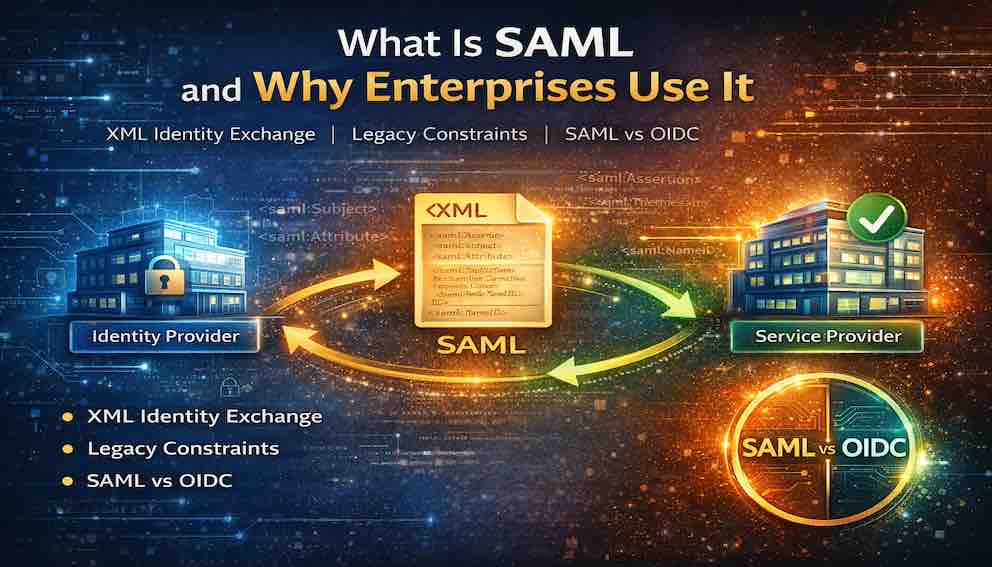
SAML (Security Assertion Markup Language) is a standard that allows applications to trust a central login system instead of managing authentication themselves. A user first logs in with an Identity Provider (IdP), which then generates a signed XML “assertion” confirming the user’s identity. This assertion is sent to a Service Provider (SP)—the application the user is trying to access—which verifies the signature before granting access. Because the apps never see or store the user’s password, authentication is centralized, more secure, and enables single sign-on across multiple systems
A Story: The University Portal
Imagine you are a student at a large university. You wake up in the morning and open your laptop. You need to check your grades, access the library database, submit an assignment, print a document, and check your campus email.
Five different systems. Five different logins. Five different passwords to remember.
Now imagine you are the university's IT department. You have thousands of students, faculty, and staff. Each person needs access to dozens of systems. Managing separate accounts for every system is a nightmare. When a student graduates, you need to disable access across fifteen different services. When a faculty member changes departments, you need to update permissions everywhere.
This is the problem SAML was built to solve.
Before OAuth and OpenID Connect became popular, before the cloud, before mobile apps, there was SAML. It emerged in the early 2000s when enterprises needed a way to connect their internal systems to external services without managing separate accounts for each one.
SAML is still everywhere. If you have ever logged into a corporate portal and clicked a link to Salesforce, Workday, or Concur without entering a password, you have used SAML. If you work in government, healthcare, or higher education, you use SAML daily.
This article explains what SAML is, why it still matters, how it compares to other authentication mechanisms, and when you should choose it over the alternatives.
What Is SAML?
SAML (Security Assertion Markup Language) is an XML-based open standard for exchanging authentication and authorization data between an identity provider and a service provider.
In plain language: SAML lets one system tell another that a user has authenticated and who that user is. It does this using XML documents called assertions.
SAML was created in 2001 by OASIS (Organization for the Advancement of Structured Information Standards). SAML 2.0, released in 2005, is the stable version still used today.
The Core Concept
Think of SAML as a trusted messenger.
The Identity Provider (IdP) is the trusted authority that authenticates users. In the university example, the university runs the IdP.
The Service Provider (SP) is the application the user wants to access — the library database, email system, printing service.
When a user tries to access a service provider, the SP does not ask for a password. Instead, it redirects the user to the IdP. The IdP authenticates the user and then sends a SAML assertion back to the SP. The assertion is a signed XML document that says: "This user has authenticated. Here is who they are. You can trust this because I signed it."
The user never creates a password for the service provider. The service provider never stores a password. Trust is established through the assertion.
Why SAML Exists — The Problems It Solves
Before SAML, enterprises faced problems that made managing user access painful and insecure.
Every application required its own username and password. Users had dozens of passwords, reused them across applications, wrote them down, and forgot them constantly. IT departments spent enormous resources on resets.
Each application also implemented its own authentication. Some used weak password policies. Some did not support MFA. Some stored passwords insecurely. The overall security of the enterprise was only as strong as the weakest application.
When a new employee joined, IT had to create accounts in every system manually. When someone left, accounts had to be disabled across dozens of applications — slowly, error-prone, often leaving orphaned accounts active for years. And if a security incident occurred, each application had its own logs, making investigation difficult and incomplete.
SAML addressed all four problems at once. Users authenticate once at the IdP and need no password for individual applications. Security is centralised — MFA, password policies, and account lockout are enforced at a single point. User provisioning can happen automatically through SAML attributes (and complementary standards like SCIM). And the IdP logs all authentications, providing a single audit trail.
SAML Roles — The Three Players
SAML defines three distinct roles.
The Principal is the user — the person trying to access a service.
The Identity Provider (IdP) is the trusted authority that authenticates the user and issues signed assertions. It stores credentials, handles MFA, manages sessions, and logs authentication events. Examples include Microsoft Entra ID, Okta, PingIdentity, ADFS (Microsoft's on-premises federation service), and Google Workspace.
The Service Provider (SP) is the application the user wants to access. It accepts assertions from the IdP, validates the signature, extracts the user's identity and attributes, and creates a local session. Examples include Salesforce, Workday, Concur, Box, and ServiceNow.
The key to SAML is the trust relationship between IdP and SP. Before they can exchange assertions, they exchange metadata — XML documents containing their public keys, endpoints, and configuration. After that, the SP accepts any validly signed assertion from the IdP as proof of identity.
The SAML Flow — How It Works
Here is a complete SP-initiated flow — the most common pattern, where the user starts at the service provider.
Step 1: The user requests access. The user navigates to a service provider, such as Salesforce. They are not yet authenticated.
Step 2: The SP generates an AuthnRequest. Salesforce determines the user needs to authenticate and generates a SAML AuthnRequest — an XML document describing what the SP needs. It then redirects the user's browser to the IdP's SSO endpoint, with the AuthnRequest embedded as a parameter.
Step 3: The IdP processes the request. The user's browser arrives at the IdP. If the user has no active session, the IdP presents a login screen. It authenticates the user and validates the AuthnRequest.
Step 4: The IdP issues a SAML assertion. After authentication, the IdP generates a signed XML assertion containing who the user is, how they authenticated, their attributes (name, email, department, roles), and the time window during which the assertion is valid.
Step 5: The IdP returns the assertion. The IdP redirects the browser back to SP's AssertionConsumerService URL with the assertion attached.
Step 6: The SP validates the assertion. SP verifies the signature using the IdP's public certificate, checks that the assertion has not expired, confirms it was issued for the SP and not another SP, and checks the assertion ID against a cache to prevent replay attacks.
Step 7: The SP creates a session. If all validation passes, SP extracts the user's identity and attributes and logs them in. The user never entered a password for the SP. The SP never stored one.
SAML Assertions — The Heart of the Protocol
The SAML assertion is the core data structure. Here is a simplified example:

The key components are:
the Issuer, which identifies the IdP;
the Subject, which identifies the user via a NameID;
the Conditions, which define the valid time window and restrict the audience to the intended SP;
the AuthnStatement, which describes how and when the user authenticated;
the AttributeStatement, which carries user data the SP needs to make authorisation decisions;
and the Signature, which proves the assertion came from a trusted IdP and has not been tampered with.
The AuthnStatement includes a context class that tells the SP how the user authenticated — whether by password, certificate, smart card, Kerberos, or MFA. A sensitive application can reject an assertion if the authentication method is insufficient for its requirements.
SAML Single Logout
One of SAML's strengths is its well-defined Single Logout (SLO) capability. When a user logs out of one application, SAML propagates that logout to all applications they are signed into.
The user clicks Logout in one SP. That SP sends a LogoutRequest to the IdP. The IdP forwards LogoutRequests to all other SPs with active sessions for that user. Each SP terminates the session and returns a LogoutResponse. The IdP confirms logout to the initiating SP.
This matters for security — if a user forgets to log out on a shared machine, a single logout from any application ends their session everywhere. It also matters for compliance in industries where session termination must be demonstrable across all systems.
SAML Single Logout is complex to implement correctly and requires all SPs to support it. Many organisations implement it selectively for their most critical applications.
SAML Security Considerations
Assertion signing. Always require signed assertions. Validate the signature using the IdP's public certificate and reject anything unsigned or with an invalid signature. Without this, an attacker can modify the assertion and claim any identity.
Assertion encryption. Sign alone is not sufficient for sensitive deployments. Encrypting the assertion with the SP's public key ensures that only the intended SP can read the user's attributes — important if the assertion travels through intermediaries.
Replay prevention. Validate the NotOnOrAfter condition and cache recently received assertion IDs. An attacker who intercepts a valid assertion can replay it within its validity window unless the SP checks for prior use.
TLS everywhere. All SAML communication must occur over TLS. Validate that the assertion's Recipient field matches the expected SP endpoint to prevent man-in-the-middle substitution.
XML signature wrapping. A sophisticated attack adds a second XML element that is not covered by the signature but gets processed by the SP. Use well-maintained SAML libraries that are hardened against this class of attack, and validate that the signed elements are exactly the ones you expect.
SAML vs Other Authentication Mechanisms
This is the question every developer and architect faces. SAML does not exist in isolation — it sits alongside OpenID Connect, Kerberos, LDAP, and basic username/password authentication. Each has a context where it makes sense.
SAML vs OpenID Connect
OpenID Connect (OIDC) is the modern successor for many use cases. The fundamental differences are architectural: SAML uses XML assertions transported through browser redirects and HTTP POST bindings; OIDC uses JSON Web Tokens (JWTs) and REST APIs. SAML is heavier, more complex, and requires XML parsing and careful configuration. OIDC is lighter, simpler to implement, and was designed from the start for mobile apps and APIs.
Choose SAML over OIDC when:
- You are integrating with enterprise applications (Salesforce, Workday, ServiceNow, Oracle) that have mature SAML support and may not yet support OIDC
- You need to federate with other organisations through an established trust network — the major higher education and government federations (InCommon, eduGAIN) are built entirely on SAML with no OIDC equivalent
- Your organisation has an existing SAML infrastructure (Okta, Entra ID, ADFS) and the cost of introducing a second protocol outweighs the benefits
- Regulatory or compliance requirements mandate SAML because it has been audited and approved in your industry
- Your application does not call APIs on behalf of the user (SAML has no OAuth equivalent — it handles authentication only)
Choose OIDC over SAML when:
- You are building a new web application, mobile app, or API-driven service with no legacy constraints
- You need social login (Sign in with Google, Apple, GitHub) — these providers support OIDC, not SAML
- You need to call APIs on behalf of the user — OIDC includes OAuth 2.0 for resource delegation
- You want simpler integration without XML tooling and metadata exchange
- Your users are consumers rather than enterprise employees
SAML vs Kerberos
Kerberos is the authentication protocol used inside Windows Active Directory networks. It is fast, well-understood, and deeply integrated into the Microsoft ecosystem. But it is fundamentally an internal network protocol — it requires all parties to be on the same network and joined to the same domain.
Choose SAML over Kerberos when:
- Users need to access applications outside the corporate network (cloud SaaS, partner systems, external portals)
- You need to span multiple organisations with different directory systems
- Users work remotely or from personal devices where Kerberos ticket-granting is unavailable
In many enterprise environments, Kerberos and SAML coexist: employees authenticate to Active Directory via Kerberos, and ADFS or Entra ID bridges that identity to external applications via SAML.
SAML vs LDAP
LDAP (Lightweight Directory Access Protocol) is a directory lookup protocol, not an authentication federation standard. Applications that use LDAP directly query an Active Directory or other directory to verify credentials. This works, but it means each application must have network access to the directory, must handle credentials directly, and cannot participate in SSO — logging into one application does nothing for the others.
Choose SAML over LDAP when:
- You need SSO across multiple applications
- Applications are cloud-hosted or outside the corporate network
- You want to centralise authentication logic rather than replicate it in each application
- You need to carry user attributes beyond a simple username
LDAP is appropriate for internal applications that are tightly coupled to the corporate directory. SAML is appropriate for anything requiring federation, SSO, or cross-organisational trust.
SAML vs Username and Password
Direct username and password authentication is straightforward to understand and implement, but it creates every problem SAML was designed to solve: password proliferation, inconsistent security, manual provisioning, and no centralised audit trail. For enterprise environments with more than a handful of applications or users, it scales poorly and presents serious security risks.
Choose SAML over direct credentials when:
- Users need access to more than one application
- The organisation needs centralised control over who can access what
- MFA is a requirement — enforcing it in every application separately is impractical
- You need to revoke access quickly across all systems when someone leaves
Why SAML Persists
Given that OIDC is simpler and more modern, the natural question is why SAML has not been replaced. The answer is a combination of investment, ecosystem, and regulation.
Large enterprises have spent millions building SAML-based identity infrastructure. They have ADFS deployed. They have Okta or PingIdentity configured with hundreds of SAML integrations. There is no business case to replace it.
Many enterprise applications — particularly older or specialised ones — support SAML but not OIDC. For these applications, SAML is the only enterprise SSO option. And in higher education, government, and healthcare, organisations federate with hundreds of peers. These federations are built on SAML. InCommon (US higher education), eduGAIN (global research and education), and similar networks would be impossible to migrate quickly.
Some industries also have regulatory requirements that name SAML specifically. Healthcare, financial services, and government contracts often mandate it because it is well-understood and has been audited extensively.
The result is that most major identity providers — Okta, Entra ID, Auth0 — support both SAML and OIDC. Organisations use both: SAML for internal enterprise applications and federation, OIDC for modern customer-facing applications and APIs.
Just-In-Time Provisioning
One practical SAML feature worth understanding is Just-In-Time (JIT) provisioning. When a user authenticates via SAML for the first time, the SP can automatically create a local account using the attributes in the assertion — name, email, department, role — without any prior setup.
This means the organisation does not need to pre-provision every user in every application. As soon as someone authenticates successfully, their account exists. When they leave and their IdP account is disabled, they simply cannot authenticate again, and access across all connected applications is immediately revoked.
JIT provisioning, combined with attribute-driven authorisation, is one of the most operationally useful aspects of SAML in large enterprises.
Closing: The Language of Enterprise Identity
Let us return to the university student.
Because of SAML, that student wakes up, logs into the university portal once, and accesses the library, the grade system, the printing service, and the email system without a single additional password. The IT department manages one identity per student, not fifteen. When the student graduates, one action disables access everywhere.
This is the promise of federated identity. SAML was the first standard to deliver it at scale, and it continues to deliver it today.
OpenID Connect is simpler, more modern, and better suited for the API-driven world. If you are building a new application with no constraints, start there. But if you work in an enterprise, if you integrate with legacy systems, if you participate in a federation, or if your organisation has invested in a SAML-based identity infrastructure — you will encounter SAML. You will configure it, debug it, and rely on it.
Understanding SAML means understanding how identity works across the systems where governments, universities, hospitals, and large enterprises operate. That is why it still matters.
About N Sharma
Lead Architect at StackAndSystemN Sharma is a technologist with over 28 years of experience in software engineering, system architecture, and technology consulting. He holds a Bachelor’s degree in Engineering, a DBF, and an MBA. His work focuses on research-driven technology education—explaining software architecture, system design, and development practices through structured tutorials designed to help engineers build reliable, scalable systems.
Disclaimer
This article is for educational purposes only. Assistance from AI-powered generative tools was taken to format and improve language flow. While we strive for accuracy, this content may contain errors or omissions and should be independently verified.