
Learning Paths
Last Updated: April 1, 2026 at 19:30
What Is Multi-Factor Authentication (MFA)
Something you know, something you have, something you are — and the usability versus security tension that defines modern authentication
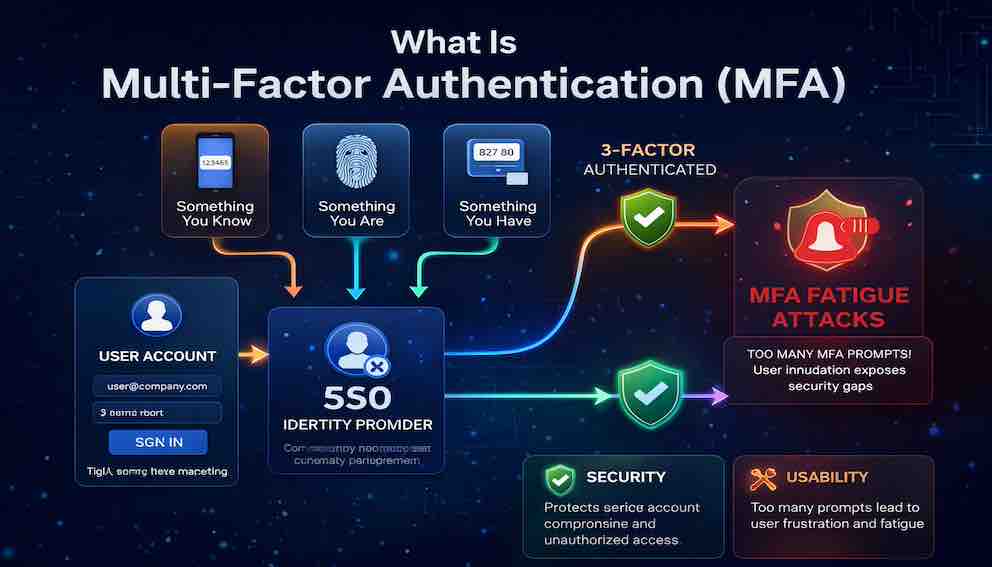
Multi-factor authentication requires users to verify their identity using two or more factors from distinct categories — something you know, something you have, or something you are. A stolen password alone is not enough to break in; without the second factor, the attacker is stopped cold. According to Microsoft, MFA blocks over 99% of automated account compromise attacks, making it the single most effective security control available for user accounts. Whether you deploy TOTP, push notifications, or phishing-resistant hardware tokens, the principle is the same: make the cost of a successful attack so high that attackers move on
A Story: The Bank Vault
Imagine you are responsible for the security of a bank vault. The vault holds millions of dollars in cash, gold, and priceless customer assets. You need to ensure that only authorised people can open it.
You install a heavy steel door with a combination lock. The combination is a secret known only to the bank manager. This is something you know.
But you worry. What if someone watches the manager enter the combination? What if the manager writes it down and loses the paper? What if an employee who knows the combination leaves the bank?
So you add a second requirement. To open the vault, you now need the combination and a physical key. The key is kept by a different person. This is something you have.
Now an attacker needs both. They cannot simply watch the manager type the combination. They cannot simply steal the key. They need both — and they need to compromise two different people to get them.
This is multi-factor authentication.
But you are not done. What if the manager is forced to open the vault? What if the key holder is coerced?
You add a third requirement: a retina scan. Only the bank manager's unique eye pattern can unlock the final mechanism. This is something you are.
Now an attacker needs the combination, the key, and the manager's physical presence. The bar is extremely high.
This is the essence of MFA. It is not about making authentication impossible to bypass. It is about making it so difficult that attackers move on to easier targets.
What Is Multi-Factor Authentication?
Multi-Factor Authentication (MFA) is an authentication method that requires a user to provide two or more verification factors from distinct categories to gain access to a resource.
The key phrase is from distinct categories. Using two passwords is not multi-factor — both are "something you know." Using a password and a security question answer is not multi-factor either — both are still knowledge factors. True MFA requires factors from at least two of these categories:
Something you know — a password, PIN, or passphrase.
Something you have — a phone, hardware token, smart card, or authenticator app.
Something you are — a fingerprint, face scan, iris pattern, or voice recognition.
Some frameworks add a fourth category — something you do — covering behavioural patterns like typing rhythm or gait analysis. This is used in continuous and risk-based authentication systems, though it is rarely the primary MFA mechanism in standard applications.
The core principle remains the same regardless of which categories you use: if an attacker compromises one factor, they still cannot access the account.
Why MFA Matters
A widely cited Microsoft finding puts it plainly: MFA blocks over 99% of automated account compromise attacks. The implication is significant. If an attacker steals a user's password — through a data breach, phishing, credential stuffing, or social engineering — that password alone is useless. Without the second factor, they cannot get in.
This holds true regardless of password strength. It does not matter if your users reuse passwords across services. It does not matter if your database is breached. With MFA in place, a stolen credential is an incomplete credential.
MFA is the single most effective security control you can implement for user accounts. Everything else you do around password hashing, account lockouts, and breach monitoring is valuable — but none of it comes close to the protection that MFA provides.
The Three Factor Types
Something You Know
Passwords, PINs, and passphrases fall here. This is the oldest and most common factor. It is easy to implement, requires no additional hardware, and users understand the concept well.
The weaknesses, however, are significant. Users choose weak passwords. They reuse them across services. Passwords can be stolen through phishing, captured by keyloggers, or obtained wholesale from data breaches. On its own, the knowledge factor is dangerously fragile.
When combined with another factor, passwords become far more useful. A password plus a hardware token is strong. A password alone is not.
Something You Have
This factor requires the user to possess a physical object. The most common implementations are:
SMS text messages send a one-time code to the user's registered phone number. SMS is easy to deploy because users already have phones and no app installation is required. The weaknesses are real though: phone numbers can be hijacked through SIM swapping, where an attacker convinces a mobile carrier to transfer the victim's number to a SIM card they control. SMS is better than no MFA, but it is the weakest form of it. Use it only when no better option is available or when you need maximum accessibility.
TOTP (Time-based One-Time Passwords) are generated by an authenticator app such as Google Authenticator, Authy, or Microsoft Authenticator. During setup, the user scans a QR code that seeds a shared secret into the app. The app then generates a six-digit code every 30 seconds. TOTP works offline, requires no phone number, and is not vulnerable to SIM swapping. The main friction points are initial setup and the fact that users must type codes manually. It provides a solid balance of security and usability.
Push notifications send a prompt to the user's phone requiring a tap to approve or deny. The user experience is excellent, but push notifications are vulnerable to MFA fatigue attacks — covered in detail below — where attackers repeatedly trigger prompts hoping for an accidental approval. Push is best deployed with additional safeguards like numeric matching.
Hardware tokens (FIDO2 / WebAuthn) represent the strongest form of possession-based authentication. Devices like YubiKeys use public-key cryptography: the user inserts the key or taps it to their phone, and authentication happens cryptographically without any code entry. Critically, the authentication is domain-bound — the key will not respond to a login page that is not the real site. This makes hardware tokens entirely phishing-resistant, which no code-based method can claim. The trade-off is cost and the requirement for users to carry the device.
Passkeys deserve a specific mention as a newer and increasingly mainstream implementation of FIDO2. Built into iOS, Android, macOS, and Windows, passkeys allow users to authenticate using device biometrics while the underlying mechanism is a cryptographic key pair — combining the convenience of biometrics with the phishing resistance of FIDO2. Apple, Google, and Microsoft all support passkeys natively. For new applications, they are worth serious consideration as a primary or supplementary method.
Something You Are
Biometric factors include fingerprint scanners (Touch ID, Windows Hello), face recognition (Face ID), iris scanning, and voice recognition. They are extremely convenient — users authenticate with a touch or glance, they cannot be forgotten, and they cannot be lost.
The core limitation is that biometrics cannot be revoked. If a fingerprint database is breached, users cannot get new fingerprints. Modern sensors address spoofing concerns with liveness detection, but biometrics remain best used as a second factor on personal devices rather than as a standalone authentication mechanism.
Comparing MFA Methods
Rather than treating all MFA as equivalent, it helps to think about these methods across a few key dimensions: security, usability, phishing resistance, and deployment cost.
SMS offers high usability and low deployment cost, but low security. It is vulnerable to SIM swapping and codes can be entered on fake websites. Best reserved for applications with broad accessibility requirements or users without smartphones.
TOTP is the practical middle ground. It works offline, has no phone number dependency, and the per-setup cost is negligible. Codes can still be entered on phishing sites, but eliminating SIM swap risk is a meaningful improvement. This should be the minimum standard for most applications.
Push notifications offer the best day-to-day usability but require mitigations against fatigue attacks. The addition of numeric matching — where the user must confirm a number displayed on the login screen — substantially raises the bar without significantly degrading the experience.
Hardware tokens (FIDO2 / WebAuthn) are the gold standard. They are phishing-resistant (the key will not authenticate against a fake website), offline-capable, and cryptographically strong. The friction of carrying a dedicated physical device makes them impractical for general consumer use, but they are the right answer for administrators, executives, and anyone with access to critical infrastructure.
Passkeys are a modern evolution of hardware tokens that deserve their own category. Instead of a separate physical device, passkeys use the device the user already carries — their phone, laptop, or tablet. The private key is stored in the device's secure enclave and synced across the user's devices via cloud services (iCloud, Google Password Manager). Passkeys offer the same phishing resistance and cryptographic strength as hardware tokens, with significantly lower friction. They are rapidly becoming the recommended standard for consumer applications.
Device biometrics (fingerprint, face recognition) offer high usability and work offline. They are most effective as a second factor rather than a primary one, and their security depends heavily on device and sensor quality. On modern devices with secure enclaves, biometrics provide strong protection against casual attackers but are not phishing-resistant on their own.
MFA Fatigue Attacks
MFA fatigue — also known as push bombing — is an increasingly common attack technique and deserves detailed attention.
The attacker already has the victim's password, obtained through phishing, a data breach, or credential stuffing. What they lack is the second factor. Their method: trigger MFA push notifications repeatedly, sometimes dozens or hundreds of times in quick succession, until the victim approves one out of annoyance, confusion, or exhaustion.
This attack works because push notifications require almost no cognition to approve. A single tap. The attacker counts on the victim not thinking carefully about why they are receiving the prompt, or simply wanting the buzzing to stop.
In 2022, a major technology company was compromised this way. Attackers obtained employee credentials through phishing, then bombarded the employee with push notifications over several hours. The employee eventually approved one. Internal systems were breached.
The defences are well understood.
Rate limiting. Limit the number of MFA prompts a user can receive per hour. After a threshold of failures, lock the account or require escalation to a support process.
Numeric matching. Instead of a simple approve/deny prompt, display a number on the login screen. The user must enter that number in the authenticator app. This forces active engagement and prevents approval of out-of-context prompts.
Contextual information. Show the login location, device type, and timestamp in the push notification. A user seeing a login attempt from an unfamiliar country has the context to deny it.
Phishing-resistant MFA. Hardware tokens and passkeys do not have an approve button. The cryptographic key will not respond to the wrong domain. This is the most complete defence against fatigue attacks.
User education. Users should know to never approve an unexpected MFA prompt. An unexpected prompt almost certainly means someone has their password. The right response is to deny, report to security, and change the password immediately.
Recovery and Backup
MFA creates a new problem: what happens when a user loses access to their second factor?
If someone loses their phone, their TOTP codes are gone. If they lose their hardware key, they are locked out. Failing to plan for recovery leads to floods of support tickets and users locked out of critical systems for days at a time.
Backup codes are the primary solution. When a user enrols in MFA, generate a set of single-use codes. The user stores them securely — ideally in a password manager or printed and kept somewhere safe. Each code can be used once to bypass MFA. When a set is exhausted, the user generates a fresh batch.
Multiple enrolled methods provide resilience without requiring codes at all. A user enrolled in both TOTP and SMS can lose one and still access their account. Where possible, encourage or require users to register at least two methods.
Trusted devices allow a user who has lost their phone to log in from a previously authenticated device — a work laptop, for example — and manage their MFA settings from there.
Administrative override is necessary for critical applications. Define a secure, documented process for administrators to reset MFA for a user. That process must require strong identity verification: a video call, manager approval, or out-of-band identity check. An insecure reset process is a social engineering attack vector — attackers will call your help desk and impersonate locked-out users.
Balancing Usability and Security
MFA introduces friction. That friction is the point — it is the barrier that stops attackers. But too much friction leads to user frustration, reduced productivity, and workarounds that undermine security entirely.
The goal is not maximum friction. It is appropriate friction, applied where it matters.
Adaptive (risk-based) MFA is the most effective approach for consumer-facing applications. Rather than requiring MFA on every login, require it only when the login looks risky. Low-risk signals include a known device, familiar location, and normal time of day. High-risk signals include a new device, unusual geography, multiple failed password attempts, or a high-value action like a bank transfer or privilege escalation. When risk is low, skip MFA. When risk is high, require it.
Session persistence reduces friction without reducing security. After a successful MFA challenge, mark the device as trusted for a set period — 30 days is common for consumer apps, shorter for enterprise systems. The user does not see another MFA prompt on that device until the trust period expires.
Step-up authentication reserves MFA for sensitive actions. A user can browse their account with a password alone, but transferring money, changing an email address, or accessing sensitive data triggers an MFA challenge. This works well for applications where most activity is low-risk.
User choice matters too. Some users prefer TOTP. Some prefer push notifications. High-security users may want hardware keys. Offering multiple methods reduces abandonment and support volume without compromising the security guarantee.
MFA in Different Contexts
Consumer applications — SaaS products, e-commerce, social platforms — should offer MFA without necessarily mandating it. Provide multiple methods, apply risk-based MFA for suspicious logins, and use "remember this device" to reduce friction for trusted users. Educate users about why MFA matters rather than forcing it on them without context.
Enterprise applications require a harder stance. MFA should be mandatory for all users. Phishing-resistant methods should be required for privileged accounts: administrators, executives, and anyone with access to sensitive data. Number matching should be enforced for push notification users. MFA should integrate with the corporate identity provider.
Development and infrastructure access is one of the highest-risk surfaces in any organisation. Cloud console access, code repositories, CI/CD pipelines, and production environments should all require MFA. Root and break-glass accounts should require hardware tokens. Automation should use short-lived service tokens rather than user credentials — not MFA bypass disguised as convenience.
Common MFA Mistakes
Offering SMS as the only option. SMS is better than nothing, but it leaves users exposed to SIM swapping and international delivery failures. Always offer at least one alternative — TOTP or push — and make it easy for users to switch.
No recovery mechanism. Users will lose their second factors. Without backup codes, trusted devices, or an administrative reset process, you will lock users out of their accounts. Design recovery before you need it, not after your first lockout ticket arrives.
No rate limiting. TOTP codes are short-lived but without rate limiting, an attacker with a stolen password can brute-force attempts in the valid window. Limit MFA attempts to a small number per hour and lock or escalate after repeated failures.
No protection against push fatigue. Deploying push notifications without number matching or rate limiting is an invitation for fatigue attacks. Both controls are simple to implement and significantly raise the cost of the attack.
Storing TOTP secrets insecurely. TOTP shared secrets must be encrypted at rest. If your database is breached and secrets are in plain text, an attacker can generate valid codes for every enrolled user. Use a secrets management service where possible.
Skipping MFA for API access. Implementing MFA for web logins but not for API access leaves a gap. An attacker with stolen credentials can bypass the login form entirely and call your APIs directly. Apply MFA requirements to API access through OAuth claims or short-lived token scoping.
Implementation Checklist
A sound MFA implementation covers several areas that are easy to overlook.
During user enrolment, allow multiple MFA methods per account, generate backup codes before finalising setup, verify the chosen method actually works before marking enrolment complete, and let users manage their enrolled methods — adding, removing, and setting a preference.
In the authentication flow, verify the password before triggering an MFA challenge, support fallback to backup codes, and apply rate limiting on MFA attempts. Error messages should not reveal whether the password or the MFA code was the failing component — that distinction helps attackers narrow their approach.
For security hygiene, encrypt TOTP secrets in the database, never log MFA secrets or codes, implement number matching for push notifications, and monitor for fatigue patterns — high volumes of MFA prompts for a single account in a short window are a reliable signal of an active attack.
For user experience, explain why MFA is required, show which methods are supported, allow users to mark trusted devices, and send a notification any time MFA settings change. Unexplained changes to authentication settings are a major source of support contacts and user anxiety.
MFA and the Unbroken Chain
Without MFA, authentication relies entirely on the password. If the password is stolen, the chain breaks. With MFA, the chain requires two independent links, and the attacker must compromise both.
The flow looks like this:
The MFA step is where the strongest security guarantee is made. It is not just proving that the user knows a secret. It is proving that the user has possession of a trusted device, a cryptographic key, or a unique physical characteristic — something a credential database breach cannot provide.
What to Take Away
Multi-factor authentication is the single most effective security control for protecting user accounts. After reading this article, you should be able to:
- Explain the three factor categories and why they must be distinct
- Evaluate the trade-offs between SMS, TOTP, push notifications, hardware tokens, and passkeys
- Recognise MFA fatigue attacks and know how to prevent them
- Design a recovery strategy for users who lose their second factor
- Balance usability and security through adaptive MFA, session persistence, and step-up authentication
- Avoid the common implementation mistakes that undermine the protections MFA is meant to provide
MFA is not optional for any system that stores sensitive data or user accounts. It is the difference between a credential breach that compromises accounts and a credential breach that goes nowhere.
Closing: The Second Lock
The combination lock was good. But it was not enough. The key made it better. The retina scan made it nearly unbreakable.
Each additional factor increased security. Each additional factor also added friction. The bank manager had to remember the combination, carry the key, and be present for the scan. That was acceptable because the vault held millions of dollars.
Your application may not hold millions of dollars. But it holds your users' data, their trust, and their security.
The question is not whether to implement MFA. The question is which methods to implement, and how to balance security with the experience your users require.
Start with TOTP or push notifications as your baseline. Add hardware tokens or passkeys for privileged users. Implement backup codes. Rate limit attempts. Use number matching. Monitor for fatigue attacks.
Authentication is an arms race. The combination lock was once considered secure. Then attackers learned to watch the numbers. The key was added. Then they learned to duplicate keys. The retina scan was added. The passkey came next.
MFA is your best defence in this race. Use it, use it well, and never stop improving it.
About N Sharma
Lead Architect at StackAndSystemN Sharma is a technologist with over 28 years of experience in software engineering, system architecture, and technology consulting. He holds a Bachelor’s degree in Engineering, a DBF, and an MBA. His work focuses on research-driven technology education—explaining software architecture, system design, and development practices through structured tutorials designed to help engineers build reliable, scalable systems.
Disclaimer
This article is for educational purposes only. Assistance from AI-powered generative tools was taken to format and improve language flow. While we strive for accuracy, this content may contain errors or omissions and should be independently verified.