
Learning Paths
Last Updated: June 1, 2026 at 14:00
Micronaut RabbitMQ Messaging for Spring Boot Developers: Producers, Consumers, and Testing Explained
Learn how Micronaut handles RabbitMQ messaging using compile-time generation, and how its producer/consumer model compares with Spring Boot's runtime approach
Messaging is where the differences between Micronaut and Spring Boot become most visible — and most worth understanding. This guide covers RabbitMQ integration from first principles: how Micronaut generates producer and consumer implementations at compile time, how to declare broker topology correctly, and how to handle the failure modes that every production messaging system encounters. Testing gets equal treatment, with a pragmatic approach that separates fast unit tests of consumer logic from Testcontainers integration tests that prove the wiring works. Every concept maps back to a Spring Boot equivalent, so the transition feels like a translation rather than a rewrite.
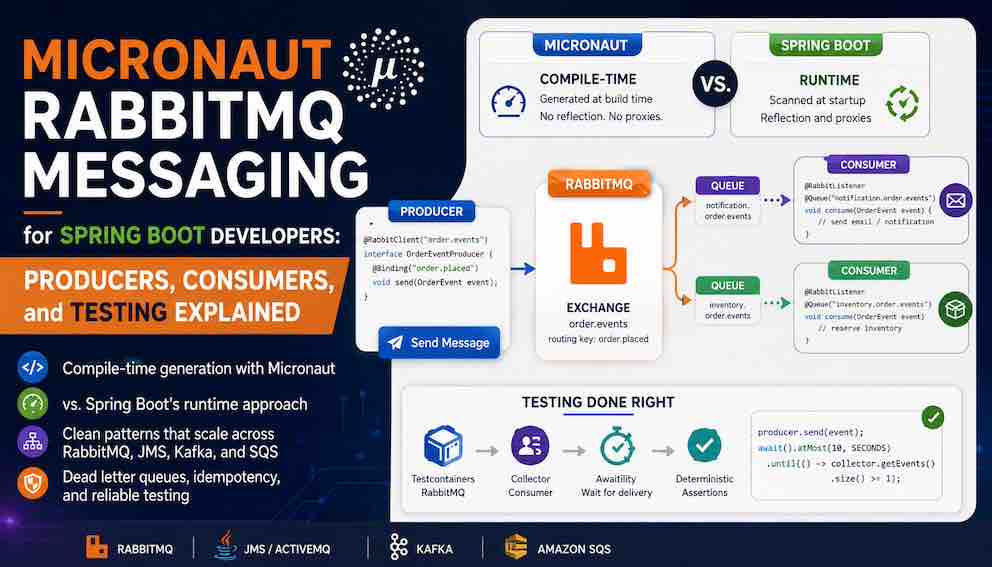
REST APIs answer questions synchronously. Messaging systems carry work asynchronously — a producer sends a message and moves on, and one or more consumers process it whenever they are ready. This decoupling is what makes event-driven microservices resilient: a slow downstream service does not block the upstream one, and a consumer that is temporarily offline does not lose messages.
Micronaut supports multiple messaging transports — AMQP via RabbitMQ, Kafka, JMS, and cloud-native services like Amazon SQS. The programming model stays consistent across all of them: only the transport and topology change. In this guide you will learn how to produce and consume messages with RabbitMQ using Micronaut's compile-time model, how it compares to Spring Boot's runtime approach, and how to test messaging code properly. The patterns here — producer interfaces, listener classes, dead letter routing, and the collector consumer test pattern — carry forward structurally if you later move to ActiveMQ, SQS, or any other broker.
The mental model
Micronaut's messaging support is annotation-driven and compile-time. You declare what you want to send and receive using annotated interfaces and classes, and Micronaut generates the broker client implementation at build time. By the time your application starts, the wiring already exists as bytecode on disk — there is no reflection scanning at startup, no proxy generation while the JVM is warming up.
Spring Boot's messaging support works differently. RabbitTemplate is a runtime object you inject and call directly. @RabbitListener is scanned at startup and processed through reflection-based post-processors that inspect method signatures and wire up the listener infrastructure while the application is initialising.
The practical differences:
Spring Boot uses RabbitTemplate for sending, @RabbitListener on a method for receiving. Configuration typically lives in a @Configuration class that declares Queue, Exchange, and Binding beans — Spring Boot's AmqpAdmin can auto-declare this topology on startup.
Micronaut uses a @RabbitClient interface you declare (Micronaut writes the implementation) for sending. For consuming, @RabbitListener defines a message-driven bean, and individual methods are bound to queues using @Queue. An important difference from Spring Boot is that Micronaut does not auto-create full broker topology by default — queues, exchanges, and bindings must be declared explicitly in your application configuration or provisioned in infrastructure. The annotation names occasionally overlap but the mechanics are different. Understanding this upfront prevents confusion when reading Micronaut documentation alongside Spring documentation.
Serialisation: @Serdeable
Before writing any producer or consumer code, there is one concept every Spring developer needs to understand: @Serdeable.
Spring Boot uses Jackson for serialisation via runtime reflection. You create a POJO, Jackson inspects it at runtime using reflection, and messages are serialised and deserialised automatically.
Micronaut eliminates runtime reflection as a core design goal. Instead of Jackson reflection, Micronaut generates serialisers and deserialisers for your types at compile time. To opt a class into this, you annotate it with @Serdeable.
If you prefer Java records (Java 16+):
Any class you intend to send or receive as a message must be annotated with @Serdeable. Forgetting it produces a compile-time error, which is exactly the point — serialisation problems surface at build time rather than in production.
1. Setup
Dependencies (build.gradle)
Broker configuration (application.yml)
With @Serdeable on your DTOs, Micronaut's RabbitMQ integration infers serialisers automatically. For most use cases you will not need to configure them explicitly.
2. What you need to know about RabbitMQ's model
RabbitMQ routes messages through exchanges, not directly to queues. A producer publishes to an exchange with a routing key; the exchange forwards the message to bound queues based on that key. Consumers read from queues.
This is why @RabbitClient takes an exchange name and @Binding takes a routing key, and why the ChannelInitializer in the next section declares both exchanges and queues. That is the full mental model you need to follow this article — for a deeper dive into exchange types and routing strategies, the RabbitMQ documentation is the right starting point.
One thing worth noting upfront: Micronaut does not auto-create broker topology. The exchanges, queues, and bindings your producers and consumers reference must already exist or be declared at startup — which is what ChannelInitializer is for.
3. Declaring topology with ChannelInitializer
Before your producers and consumers can work, the exchanges, queues, and bindings they reference must exist in the broker. Unlike Spring Boot's AmqpAdmin, Micronaut does not auto-create topology from annotations. You declare it programmatically using ChannelInitializer — a Micronaut-managed bean that runs during connection setup and gives you direct access to the AMQP Channel:
ChannelInitializer is the Micronaut equivalent of Spring Boot's @Bean Queue / @Bean Binding topology declarations. Place it in your application as a singleton and Micronaut will call it when the connection is established. The declarations are idempotent — declaring an exchange or queue that already exists with the same arguments is a no-op, so this is safe to run on every startup.
4. Publishing messages with @RabbitClient
A RabbitMQ producer in Micronaut is a plain interface annotated with @RabbitClient. You declare the methods and Micronaut generates the implementation at compile time.
@RabbitClient marks the interface as a messaging producer bean and names the exchange. @Binding specifies the routing key used when forwarding the message from the exchange to bound queues.
You might expect @Binding to take a queue name rather than a routing key. The reason it does not is by design: a producer should not need to know which queues exist. It publishes to an exchange with a routing key, and the broker's bindings decide which queues receive it. This matters in practice — in the complete example later in this article, a single producer.send(...) call delivers the same message to both the notification queue and the inventory queue, because both are bound to the same exchange with the same routing key. Adding a third consumer means adding a new queue and binding in ChannelInitializer; the producer is untouched. If producers addressed queues directly, every producer would need updating whenever a new consumer was added.
Inject and use it like any other Micronaut bean:
A note on @Transactional and messaging
Notice the method above does not use @Transactional. This is intentional.
If you wrap a database save and a message publish in a single @Transactional method, they are not part of the same atomic transaction. In Micronaut, database transactions and message publishing are independent unless you explicitly introduce a coordination pattern — the transaction controls only the database. It is entirely possible for the database commit to succeed and the publish to fail, or vice versa.
For introductory use cases this is often acceptable. For production systems requiring guaranteed consistency between a database write and a published message, the Transactional Outbox Pattern is the standard approach: write the event to a database outbox table within the same transaction as your business data, then have a separate process reliably publish it to the broker. This eliminates the dual-write problem entirely.
Sending to a dynamic exchange or routing key
When the exchange or routing key is not known until runtime:
Sending with message properties
Reactive producer
The reactive producer returns a Mono<Void> instead of blocking the calling thread. Use this when your service is built on Project Reactor and you want to avoid introducing a blocking call into an otherwise non-blocking flow:
5. Consuming messages with @RabbitListener
@RabbitListener defines a message-driven bean. @Queue on the handler method binds that method to a specific queue. You can have multiple @Queue-annotated methods in the same @RabbitListener class, each consuming from a different queue — unlike Spring Boot, where each method carries its own @RabbitListener.
The Spring difference: in Spring Boot, @RabbitListener goes on the method. In Micronaut, @RabbitListener marks the class and @Queue marks the handler method.
Accessing message properties
Micronaut automatically binds message metadata to method parameters by annotation — you declare what you need and the framework injects the values for each message. This is useful for correlation tracing, routing logic, or structured logging:
Manual acknowledgement
By default, Micronaut acknowledges a message automatically once your handler method returns without throwing an exception. Disabling this gives you full control — you acknowledge only after confirming your business logic succeeded, which prevents message loss on failure. The trade-off is that if your service crashes after processing but before acknowledging, the message will be redelivered, so your consumer should be designed to handle duplicates:
6. Dead letter queues
When a consumer cannot process a message — due to a schema mismatch, missing data, or an unrecoverable downstream error — retrying indefinitely stalls the consumer. The standard solution is to route unprocessable messages to a dead letter queue (DLQ): a regular queue where failed messages sit until someone investigates or replays them.
In RabbitMQ, you configure a dead letter exchange on the queue itself. Messages that are nacked without requeue are automatically forwarded to the dead letter exchange, which routes them to the DLQ. Messages can also be dead-lettered due to TTL expiry or queue length constraints, not just explicit rejection — so the DLQ can receive messages your consumer never touched.
Dead letter configuration must be set programmatically when declaring the queue. If you are using the ChannelInitializer topology approach described in the previous section, you pass the dead letter arguments at queue declaration time:
The DLQ consumer is a standard @RabbitListener pointing at the dead letter queue. You can replay, alert, or log from there:
The x-death header is populated automatically by RabbitMQ and contains metadata about why the message was dead-lettered, including the original queue name, exchange, routing key, and rejection reason.
7. Delivery semantics, idempotency, and failure modes
At-least-once delivery
Micronaut RabbitMQ follows at-least-once delivery semantics. The broker guarantees that a message will be delivered, but not that it will be delivered exactly once — under failure conditions such as a consumer crash after processing but before acknowledging, the broker will redeliver the message. Duplicate messages are a normal operating condition, not an edge case.
This means consumers must be idempotent — processing the same message twice must produce the same result as processing it once. The most practical approach is to include a unique event ID in your message payload and record processed IDs in a database or cache. If the ID has already been seen, skip processing and acknowledge normally:
This idempotency requirement applies regardless of whether you use automatic or manual acknowledgement.
Failure taxonomy
Understanding the failure modes your messaging code can encounter helps you design for resilience from the start:
Publish failure — the producer cannot reach the broker, or the broker rejects the message. Use connection retry configuration and consider the Transactional Outbox Pattern for critical publishes.
Consumer exception — your handler throws an uncaught exception. By default, Micronaut will nack the message. Configure a dead letter queue so these messages are captured rather than lost.
Serialisation failure — the incoming message payload does not match the expected @Serdeable type, typically because a producer published a schema version the consumer does not understand. These will not deserialise correctly and should be routed to a DLQ with the raw bytes preserved for inspection.
Poison messages — a message that always causes the consumer to fail, triggering infinite redelivery. A DLQ with a max-retry limit is the standard defence; without it, a single bad message can stall an entire queue indefinitely.
Network partition — the consumer loses connectivity to the broker mid-session. RabbitMQ will eventually close the channel; Micronaut's connection factory handles reconnection automatically, but any unacknowledged messages in flight will be redelivered when the consumer reconnects.
8. A complete Micronaut RabbitMQ example
An order placement flow where one service publishes an event and two downstream consumer groups react independently:
Both queues — notification.order.events and inventory.order.events — are bound to the same order.events topic exchange with the routing key order.placed, as declared in the ChannelInitializer above. Every message published with that routing key is delivered independently to both queues. The notification service and inventory service are completely decoupled from each other; adding a third consumer is a matter of declaring a new queue and adding a binding in ChannelInitializer, with no changes to the producer or existing consumers.
9. Testing Micronaut RabbitMQ applications
Why you cannot assert immediately after send()
Message delivery is asynchronous. The consumer runs in a separate thread polling the broker on its own schedule. Your test thread and the consumer thread are completely independent. This means:
You cannot assert immediately after calling producer.send(). Thread.sleep(3000) is fragile — too short on a slow machine, needlessly slow when the message arrives in 50ms.
The standard solution is Awaitility, which lets you express "wait until this condition is true, up to a timeout":
The test passes the moment the condition is satisfied — typically within a few hundred milliseconds — rather than waiting out a fixed sleep.
The collector consumer pattern
The cleanest pattern for messaging integration tests is a collector consumer — a test-only bean that consumes from the queue and stores messages in a thread-safe list:
CopyOnWriteArrayList is thread-safe — the consumer thread writes while your test thread reads without synchronisation problems. @Requires(env = "test") ensures this bean is never instantiated in production.
Test configuration
src/test/resources/application-test.yml:
The URI is overridden per-test with the Testcontainers container address.
Integration test: producer → consumer
@MockBean is a Micronaut Test annotation. If it is not already pulled in transitively, add testImplementation("io.micronaut.test:micronaut-test-core") to your test dependencies.
Integration test: verifying a service publishes as a side effect
Unit test: consumer logic in isolation
The consumer's consume() method is a plain Java method. For unit tests of the consumer's business logic, you do not need a broker at all:
This is the cheapest test to write and the fastest to run. Favour unit tests for consumer logic and reserve the Testcontainers integration tests for verifying that the messaging infrastructure is wired up correctly end-to-end.
10. Taking these patterns to other brokers
Everything you have learned in this article sits on top of Micronaut's general messaging philosophy: declare a producer interface, declare a listener class, annotate with @Serdeable, test with the collector consumer pattern and Awaitility. None of that is RabbitMQ-specific. What changes between brokers is the transport dependency and annotation names — not the application structure.
For any JMS-compliant broker — ActiveMQ, IBM MQ, TIBCO EMS, or Artemis — Micronaut's JMS module provides @JMSProducer and @JMSListener annotations that follow exactly the same pattern. You declare a producer interface annotated with @JMSProducer, Micronaut generates the implementation at compile time, and your consumer class uses @JMSListener at the class level with @Queue on the handler method. The JMS standard handles the broker-specific transport underneath; your application code sees the same produce-and-consume model regardless of which compliant broker you are running.
For Amazon SQS, Micronaut's AWS integration provides @SqsClient for producers and @SqsListener for consumers, following the same compile-time generation approach. The main structural difference is that SQS is purely point-to-point with no exchange layer — topology and dead letter configuration live in AWS infrastructure rather than application code.
In all cases, @Serdeable on your DTOs, the @Transactional warning and Outbox Pattern, idempotency requirements, the collector consumer test pattern, and Awaitility-based assertions carry across unchanged. The transport is a dependency and configuration decision; the application code structure is not.
11. Spring to Micronaut quick reference
Messaging producer: Spring uses RabbitTemplate injected directly; Micronaut uses a @RabbitClient interface whose implementation is generated at compile time.
Messaging consumer: Spring uses @RabbitListener on the method; Micronaut uses @RabbitListener to define a message-driven bean at the class level, with @Queue binding individual methods to specific queues.
Multiple consumers in one class: Spring requires one @RabbitListener per method; Micronaut uses one @RabbitListener on the class with multiple @Queue methods.
Message headers: Spring uses @Header in listener method parameters; Micronaut uses the same @Header annotation — one of the few places the APIs match.
Manual acknowledgement: Spring uses Acknowledgment.acknowledge() injected as a method parameter; Micronaut uses the raw AMQP Channel with basicAck / basicNack.
Topology creation: Spring Boot's AmqpAdmin can auto-declare queues, exchanges, and bindings from @Bean declarations at startup; Micronaut requires programmatic topology declaration via ChannelInitializer — there is no annotation-driven auto-create equivalent.
Dead letter routing: Spring Boot auto-configuration supports dead letter queues via DeadLetterPublishingRecoverer; Micronaut relies on RabbitMQ's native x-dead-letter-exchange queue argument combined with a standard consumer on the DLQ.
Delivery semantics: Both Spring Boot and Micronaut provide at-least-once delivery — duplicate messages are possible and consumers must be idempotent.
Test broker: Spring Boot supports @SpringBootTest with a Testcontainers auto-configuration module; Micronaut provides first-class Testcontainers support via @MicronautTest combined with the micronaut-test-junit5 module, which handles container lifecycle and property injection. The RabbitMQContainer bootstrap address is wired into the application context automatically when using @MicronautTest(environments = "test") with the appropriate test configuration.
Serialisation: Spring relies on Jackson reflection at runtime; Micronaut generates serialisers at compile time via @Serdeable.
About N Sharma
Lead Architect at StackAndSystemN Sharma is a technologist with over 28 years of experience in software engineering, system architecture, and technology consulting. He holds a Bachelor’s degree in Engineering, a DBF, and an MBA. His work focuses on research-driven technology education—explaining software architecture, system design, and development practices through structured tutorials designed to help engineers build reliable, scalable systems.
Disclaimer
This article is for educational purposes only. Assistance from AI-powered generative tools was taken to format and improve language flow. While we strive for accuracy, this content may contain errors or omissions and should be independently verified.