
Learning Paths
Last Updated: May 31, 2026 at 10:00
Kafka in Micronaut: A Practical Guide for Spring Developers
Build message-driven microservices with Micronaut's compile-time Kafka integration — and see exactly how it compares to Spring Boot
Modern microservices rarely communicate through REST alone. Event-driven architectures built on Kafka have become the backbone of scalable systems, and Micronaut provides first-class support for it. In this guide you will learn how Micronaut's compile-time messaging model works, how to publish and consume messages, and how these patterns compare to the Spring Boot approaches you may already know.
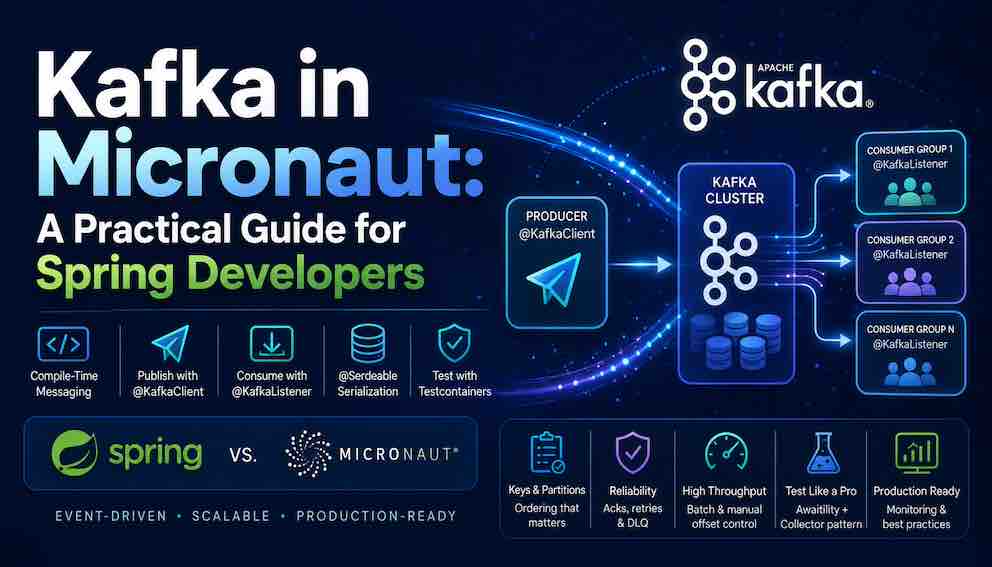
The mental model
Micronaut's messaging support follows the same annotation-driven philosophy as the rest of the framework. Producers and consumers are declared as annotated interfaces and classes, and Micronaut generates the implementation at compile time. You describe what you want to send and receive, and the framework handles the client lifecycle, threading, serialisation, and offset management.
If you are coming from Spring, the structural difference is:
- Spring Kafka uses KafkaTemplate for sending and @KafkaListener on methods for receiving.
- Micronaut uses @KafkaClient on an interface you declare (Micronaut generates the implementation) and @KafkaListener on a class with @Topic on the handler method.
The annotation names overlap, but the underlying model is different. When Micronaut sees @KafkaClient on your interface, it generates a concrete implementation class at compile time — bytecode written to disk as part of your build. By the time your application starts, that implementation already exists as a .class file. Spring Kafka, by contrast, uses runtime reflection to scan annotations, inspect method signatures, and build proxy objects while the JVM is already running. Micronaut does not eliminate runtime work — network I/O, connection management, and message delivery all still happen at runtime — but it eliminates the reflection-based framework machinery that would otherwise run at startup.
Serialisation in Micronaut: @Serdeable
Before writing a single producer or consumer, there is one concept that every Spring developer needs to understand: @Serdeable.
In Spring Boot, Jackson handles serialisation via runtime reflection. You create a POJO, Jackson inspects it at runtime, and everything works automatically.
Micronaut works differently. One of its core design goals is to eliminate runtime reflection entirely. Instead of Jackson reflection, Micronaut generates serialisers and deserialisers for your types at compile time. To tell Micronaut to generate these for a class, you annotate it with @Serdeable.
If you prefer records (Java 16+), @Serdeable works there too:
Any class you intend to send or receive as a Kafka message must be annotated with @Serdeable. If you forget it, you will get a compile-time error — which is exactly the point.
1. Setup
Dependencies (build.gradle)
Kafka configuration (application.yml)
With @Serdeable on your DTOs, Micronaut's Kafka integration infers the correct serialisers automatically. You do not need to configure them explicitly for basic usage.
2. Kafka keys and partitions
Before looking at producers, it is worth understanding Kafka's partitioning model, because it directly affects how you declare your producer methods.
A Kafka topic is divided into partitions. Producers assign each message to a partition, and Kafka guarantees ordering only within a single partition. Consumer group instances each own one or more partitions — so ordering is preserved within a partition but not across the whole topic.
The message key determines which partition a message lands in. Messages with the same key always go to the same partition, which means messages with the same key are always processed in order. A common pattern is to use a business entity ID — such as orderId or customerId — as the key so that all events for one entity are ordered correctly.
This becomes relevant immediately when you look at @KafkaKey in the producer declaration below.
3. Publishing messages with @KafkaClient
A Kafka producer in Micronaut is a plain interface annotated with @KafkaClient. You declare the methods; Micronaut generates the implementation at compile time.
@KafkaClient marks the interface as a Kafka producer bean. @Topic specifies the topic. @KafkaKey marks which parameter to use as the message key — which, as explained above, controls partition assignment.
The generated implementation handles serialisation, connection management, and error handling. Inject and use it like any other bean:
A note on @Transactional and Kafka
Notice the method above does not use @Transactional. This is intentional.
If you wrap a database save and a Kafka publish in a single @Transactional method, they are not part of the same atomic transaction. The database operation and the Kafka publish are completely independent — the transaction controls only the database. It is entirely possible for the database commit to succeed and the Kafka publish to fail, or vice versa.
For introductory use cases this is often acceptable. For production systems that require guaranteed consistency between a database write and a Kafka event, the Transactional Outbox Pattern is the standard approach: you write the event to a database outbox table within the same transaction as your business data, and a separate process reliably publishes it to Kafka. This avoids the dual-write problem entirely.
Producing to dynamic topics
When the topic is not known until runtime:
Producing with headers
Waiting for broker acknowledgement
By default, send() returns immediately after handing the message to the Kafka client buffer — at that point, the message has not necessarily reached the broker yet. The client will deliver it asynchronously in the background.
If you need stronger guarantees before continuing, Kafka provides acknowledgement modes controlled by the acks setting:
acks = 0 — the producer does not wait for any acknowledgement from the broker. The message is considered sent the moment it leaves the client buffer. Fastest, but no delivery guarantee.
acks = 1 — the leader broker writes the message to its local log and acknowledges. Fast, but if the leader fails before the message is replicated, it can be lost.
acks = all (or -1) — the leader waits until all in-sync replicas have written the message before acknowledging. Slowest, but guarantees the message survives a broker failure. This is the setting to use when delivery must be confirmed.
In Micronaut, you set this on @KafkaClient and change the return type to RecordMetadata to block until the acknowledgement arrives:
RecordMetadata is what the broker returns once it has acknowledged the write. It contains the topic name, the partition the message was assigned to, and the offset at which it was written — the message's permanent address in the Kafka log. You can log these for tracing or use the offset for correlation in downstream systems.
Reactive producer
The reactive producer returns a Mono<RecordMetadata> instead of blocking the calling thread while waiting for broker acknowledgement. This fits naturally into a reactive pipeline — you can chain the send with downstream operations and let the Reactor scheduler handle the threading. Use this when your service is already built on Project Reactor and you want to avoid introducing a blocking call into an otherwise non-blocking flow.
4. Consuming messages with @KafkaListener
groupId is the Kafka consumer group — all instances with the same group ID share the partition load. offsetReset controls what happens when no committed offset exists: EARLIEST starts from the beginning of the topic, LATEST starts from new messages only.
The Spring difference: in Spring Kafka, @KafkaListener goes on the method. In Micronaut, @KafkaListener marks the class and @Topic marks the handler method. You can have multiple @Topic-annotated methods in the same @KafkaListener class, each consuming from a different topic.
Accessing message metadata
Micronaut automatically binds Kafka metadata to method parameters by type and annotation — you simply declare what you need and the framework injects the values for each message. This is useful for structured logging, tracing correlation IDs across services, or routing logic that depends on which partition or offset a message came from. The parameter names do not matter; Micronaut resolves them by type (long for offset, int for partition, String for topic) and by annotation (@KafkaKey, @Header).
Batch consumers
Rather than invoking the handler once per message, Micronaut delivers all messages polled in a single fetch cycle as a list. This reduces per-message overhead and is particularly effective when the processing cost is dominated by I/O — such as bulk database writes or external API calls — where batching amortises that cost across many records. The trade-off is that a failure in the batch requires you to decide whether to retry the entire batch or implement your own per-record error handling.
Manual offset acknowledgement
By default, Micronaut commits the offset automatically once your handler method returns without throwing an exception — meaning Kafka considers the message processed. Disabling this with OffsetStrategy.DISABLED gives you full control: you commit only after confirming your business logic succeeded, which prevents message loss on failure. The downside is that if your service crashes after processing but before committing, the message will be redelivered — so your consumer should be designed to handle duplicates.
Error handling and dead letter topics
When a consumer throws an uncaught exception, Micronaut's default behaviour is ErrorStrategy.SEEK — it seeks back to the failed message's offset and retries it. This is fine for transient failures, but for messages that repeatedly fail (poison pills), retrying forever will stall the partition.
The standard solution is to route unprocessable messages to a dead letter topic (DLT) — a regular Kafka topic where failed messages sit until someone investigates or replays them. In Micronaut, you do this manually by implementing KafkaListenerExceptionHandler and injecting a producer that forwards the message:
Error handling in Micronaut Kafka goes significantly deeper than what is covered here — including retry strategies, exponential backoff, and more granular exception handling. These will be covered in a later article; in the meantime refer to the Micronaut Kafka documentation for the full picture.
Note: The KafkaListenerExceptionHandler API has evolved across Micronaut Kafka releases. As of Micronaut Kafka 5.0+, the preferred approach is using @KafkaListenerErrorHandler as an annotation rather than implementing the interface directly. Verify the correct approach against the Micronaut Kafka documentation for the version you are targeting before using this in production.
5. A complete Kafka example
An order placement flow where a service publishes an event and two downstream consumer groups react independently:
Because notification-service and inventory-service have different group IDs, both consumers receive every message independently. Kafka fan-out at the consumer group level is free — you just subscribe with a different groupId.
6. Testing Kafka applications in Micronaut
Why you cannot assert immediately after send()
Kafka message delivery is asynchronous. The consumer runs in a separate thread, polling the broker on its own schedule. Your test thread and the consumer thread are completely independent. This means:
- You cannot assert immediately after calling producer.send()
- Thread.sleep(3000) is fragile — too short sometimes, unnecessarily slow when the message arrives in 50ms
The standard solution is Awaitility, which lets you express "wait until this condition is true, up to a timeout":
The test passes the moment the condition is satisfied — typically within a few hundred milliseconds — rather than waiting out a fixed sleep.
The collector consumer pattern
The cleanest pattern for Kafka integration tests is a collector consumer — a test-only bean that consumes from the topic and stores messages in a thread-safe list:
CopyOnWriteArrayList is thread-safe — the Kafka consumer thread writes while your test thread reads. @Requires(env = "test") ensures this bean is never instantiated in production.
Test configuration
src/test/resources/application-test.yml:
The bootstrap servers are overridden per-test with the Testcontainers container address.
Integration test: producer → consumer
Integration test: verifying a service publishes as a side effect
Unit test: consumer logic in isolation
The consumer's consume() method is a regular Java method. For unit tests of the consumer's business logic, you do not need Kafka at all:
This is the cheapest test to write and the fastest to run. Favour unit tests for consumer logic and reserve the Testcontainers integration tests for verifying that the messaging infrastructure is wired up correctly end-to-end.
7. Spring to Micronaut quick reference
Kafka producer: Spring uses KafkaTemplate; Micronaut uses a @KafkaClient interface whose implementation is generated at compile time.
Kafka consumer: Spring uses @KafkaListener on a method; Micronaut uses @KafkaListener on the class and @Topic on the handler method.
Message key: Spring uses the ProducerRecord constructor; Micronaut uses the @KafkaKey parameter annotation.
Batch consumer: Spring accepts List<ConsumerRecord> as a parameter; Micronaut uses batch = true in @KafkaListener.
Test Kafka broker: Spring supports both @EmbeddedKafka and Testcontainers; Micronaut uses Testcontainers KafkaContainer.
Serialisation: Spring relies on Jackson reflection at runtime; Micronaut generates serialisers at compile time via @Serdeable.
About N Sharma
Lead Architect at StackAndSystemN Sharma is a technologist with over 28 years of experience in software engineering, system architecture, and technology consulting. He holds a Bachelor’s degree in Engineering, a DBF, and an MBA. His work focuses on research-driven technology education—explaining software architecture, system design, and development practices through structured tutorials designed to help engineers build reliable, scalable systems.
Disclaimer
This article is for educational purposes only. Assistance from AI-powered generative tools was taken to format and improve language flow. While we strive for accuracy, this content may contain errors or omissions and should be independently verified.