
Learning Paths
Last Updated: April 2, 2026 at 19:30
Kerberos Explained: The Authentication Engine That Powers Enterprise Single Sign-On
The authentication engine under Active Directory — ticket-based authentication, mutual trust, and how enterprise SSO works under the hood
Kerberos is the authentication engine running quietly beneath most corporate networks — it's why you log into your work laptop once and spend the rest of the day opening file shares, printing documents, and accessing internal tools without typing a password again. It works by issuing cryptographic tickets rather than transmitting your password across the network, with a trusted middleman called the Key Distribution Center brokering access to every resource you touch. But Kerberos has hard limits: it only works inside closed, managed networks, which is why modern internet applications, mobile apps, and cloud services rely on OIDC instead, while SAML bridges the gap for enterprise B2B integrations. Understanding all three — when to use each and why — is one of the most practical pieces of knowledge a developer working in enterprise environments can have
Before We Start: A Simple Analogy
Imagine you work in a large office building with a front desk. On your first arrival each morning, you show your ID to the receptionist. They verify it and hand you a visitor pass — a laminated card with your name and today's date. For the rest of the day, you use that pass to get through every door in the building. You never show your ID again. Security guards at each door just check the pass.
That visitor pass is a Kerberos ticket. The receptionist is the Key Distribution Center. And your ID is your password — which stays in your wallet all day.
This is the core idea behind Kerberos. Prove who you are once, get a ticket, use the ticket everywhere.
What Is Kerberos?
Kerberos is an authentication protocol. It answers one question: how does a server know you are who you claim to be, without you having to send your password over the network every time?
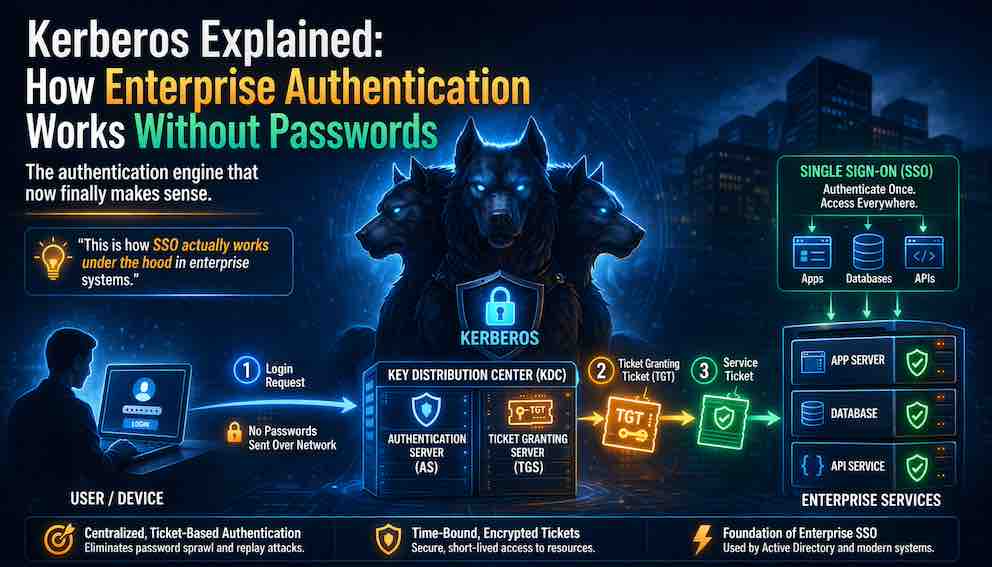
It was built at MIT in the 1980s, named after the three-headed dog from Greek mythology that guarded the gates of the underworld. The three heads map to the three parts of the system: the client, the server, and the trusted middleman.
Today, Kerberos is the default authentication protocol inside Microsoft Active Directory — which means it quietly handles login for most large companies, hospitals, universities, and government organisations worldwide. When an employee logs into their work laptop and then opens a shared drive, prints a document, and checks their email — all without typing a password again — that is Kerberos working in the background.
The Three Players
Every Kerberos interaction involves three parties.
The Client is you — or more precisely, the application acting on your behalf. You want to access something.
The Service is the resource you want to reach. A file server, a printer, an internal web application.
The Key Distribution Center (KDC) is the trusted middleman that sits in the middle and issues tickets. In Active Directory, the KDC runs on the domain controller — the central server that manages your organisation's users and computers. The KDC never goes away. Every ticket in the system traces back to it.
The KDC itself has two jobs: the Authentication Server (AS) deals with your initial login and proves you are who you say you are; the Ticket-Granting Server (TGS) issues you specific access passes for each service you want to reach.
How It Actually Works
Let us walk through a real example. You sit down at your work laptop and type your username and password.
Step 1: Prove yourself to the KDC
Your laptop does not send your password across the network. Instead it uses your password to encrypt a small piece of data — a timestamp — and sends that to the KDC along with your username.
The KDC looks up your account, uses its own copy of your password hash to check the encrypted timestamp, and if it matches, it knows you are genuine. It never needed your actual password. It just needed to verify that you encrypted something correctly — which only someone who knows the password could do.
If that check passes, the KDC hands you a Ticket-Granting Ticket (TGT). This is your all-day visitor pass. It is encrypted with the KDC's own secret key, so nobody can tamper with it. It contains your identity, your group memberships, and an expiry time — typically eight to ten hours.
Step 2: Use your TGT to get access to a specific service
Later in the morning you try to open a file share. Your laptop does not ask you for a password. Instead it takes your TGT and sends it to the KDC, saying: I have a valid TGT — please give me a ticket to access the file server.
The KDC checks the TGT, sees it is valid and not expired, and creates a service ticket specifically for that file server. The service ticket is encrypted with the file server's own secret key — only the file server can open it.
The KDC sends the service ticket back to your laptop.
Step 3: Present the service ticket to the resource
Your laptop hands the service ticket to the file server. The file server decrypts it using its own secret key, reads your identity and permissions from inside, and decides whether to let you in. If yes, you get access. No password required. No round trip back to the KDC.
The file server also sends back a small confirmation message encrypted with a temporary key you both now share. This is how you know the file server is legitimate — only the real server could have decrypted the ticket and produced that confirmation. This two-way verification is called mutual authentication, and it is one of Kerberos's strongest features.
The whole flow in plain terms:
Why This Is Better Than Sending a Password
In a naive system, every time you access a service you send your username and password. Every service stores passwords. Every transmission is a risk.
Kerberos eliminates all of that. Your password is used exactly once — locally, on your machine, to prove yourself to the KDC at login. After that, only encrypted tickets travel across the network. Tickets are time-limited, so a stolen ticket has a short window before it is useless. And because the service never sees your password, compromising a single service does not expose your credentials.
Where Kerberos Is Used
Kerberos is the right tool in specific environments. Understanding where it fits will save you from trying to force it somewhere it does not belong.
Corporate networks with Active Directory. This is Kerberos's natural home. If your organisation runs Windows servers, uses Microsoft 365 on-premises, or has a traditional IT setup with a domain controller, Kerberos is almost certainly already running. Every Windows login, every shared drive access, every internal web application using Integrated Windows Authentication uses Kerberos under the hood.
Internal enterprise applications. Any application running inside the corporate network that needs to trust who the user is can leverage Kerberos through Integrated Windows Authentication. The browser or desktop client presents the Kerberos ticket automatically — the user sees no login prompt at all. This is common for internal dashboards, reporting tools, and legacy line-of-business applications.
Linux systems joined to an Active Directory domain. Modern Linux machines can join an Active Directory domain using tools like sssd or winbind, and authenticate users via Kerberos. This is common in mixed-OS enterprise environments.
SSH with GSSAPI. Kerberos integrates with SSH via the GSSAPI interface, allowing users to SSH into servers without entering a password if they already have a valid TGT.
Database access. Some databases, including Microsoft SQL Server and PostgreSQL, support Kerberos authentication. This allows applications to connect to databases using the logged-in user's identity rather than a separate database password.
Where Kerberos Is Not Suitable
Kerberos has hard constraints that make it the wrong choice in several common situations.
Public internet applications. Kerberos requires all three parties — client, service, and KDC — to be able to reach each other on the network. If your users are on the internet and your KDC is inside a corporate firewall, Kerberos will not work. It was designed for closed, trusted networks, not the open internet.
Mobile apps and native desktop apps outside a domain. A phone app cannot participate in Kerberos. It has no domain membership, no way to hold a TGT, and no path to the KDC. The same is true for consumer desktop apps installed outside a corporate environment.
Third-party SaaS and cloud services. When a user at your company wants to log into Salesforce, Slack, or AWS, those services do not have access to your internal KDC. You cannot issue them a Kerberos service ticket. This is exactly the problem that SAML and OIDC were built to solve.
Cross-organisation authentication. If a user from one company needs to authenticate to a service owned by a different company, Kerberos is not the right tool. Each organisation has its own KDC and there is no shared trust model for external parties.
Microservices and APIs. REST APIs typically communicate over HTTP with Bearer tokens or API keys. Kerberos does not fit naturally into this model, and most API clients have no mechanism to present Kerberos tickets.
Kerberos vs OIDC vs SAML: Knowing Which to Use
These three protocols are all about authentication, but they solve different problems for different environments. As a developer, you will encounter all three, often in the same organisation.
Kerberos
Kerberos is for internal networks where there is a shared, trusted KDC. Everything happens within the same trust boundary. Authentication is invisible to the user after login. The protocol is baked into the operating system — on Windows, your applications get Kerberos for free just by being domain-joined.
The key characteristic: Kerberos requires network access to the KDC. Everything must be within the same managed environment.
SAML (Security Assertion Markup Language)
SAML was built in the early 2000s to solve a specific enterprise problem: how do you let employees log into external web applications (like Salesforce or your health insurance portal) using the same credentials they use at work, without giving those external services access to your internal systems?
SAML works through a browser redirect dance. When you try to access a SAML-protected application, it redirects you to your organisation's Identity Provider (IdP) — which might be Active Directory Federation Services (ADFS), Okta, or Azure AD. You log in there. The IdP issues a SAML Assertion — an XML document signed with the IdP's private key — and posts it back to the application. The application trusts assertions from your IdP, grants you access, and you never gave the application your password.
SAML is XML-heavy and primarily built for browser-based login flows. It is well-established in enterprise software and is still the standard you will encounter when integrating with older SaaS platforms and enterprise B2B tools.
Use SAML when you are integrating with enterprise applications that require it — particularly older ones. It is not something you typically choose from scratch today; you support it because the other party demands it.
OIDC (OpenID Connect)
OIDC is the modern standard for authentication on the internet. It is built on top of OAuth 2.0 and uses JSON and JWTs rather than XML. When you click "Sign in with Google," "Sign in with GitHub," or "Continue with Apple," that is OIDC.
The flow is similar to SAML conceptually — a redirect to an Identity Provider, authentication there, a token sent back — but the tokens are compact JWTs rather than large XML documents, and the protocol is designed to work equally well in browsers, mobile apps, single-page apps, and APIs.
OIDC is the right choice for almost any new application you build that needs external authentication: consumer apps, SaaS products, mobile apps, and cloud-native services. It is well-supported by every major identity provider — Google, Microsoft, Okta, Auth0, and others.
Choosing Between Them
The decision is largely driven by context, not preference.
If you are building something that runs entirely inside a corporate Windows network and your users are domain-joined employees, Kerberos (via Integrated Windows Authentication) gives you seamless, passwordless SSO with no additional infrastructure required.
If you are integrating a web application with an enterprise customer's existing identity system — particularly for B2B SaaS — you will likely need SAML support, because many enterprise IT departments have SAML-based IdPs already configured.
If you are building a new application for the internet, for mobile users, or for a cloud-native environment, OIDC is the right choice. It is simpler, more flexible, and has far better library support across modern languages and frameworks.
In practice, large organisations use all three simultaneously. Kerberos handles internal SSO. SAML federates access to legacy enterprise SaaS tools. OIDC handles cloud applications and new integrations. A user at a large company might authenticate with Kerberos when they open their laptop in the morning, have that session bridged to a SAML assertion for one vendor tool, and use an OIDC flow to access another cloud service — all without ever seeing a login prompt after 9 AM.
Common Attacks to Know About
You do not need to be a security specialist, but as a developer working in enterprise environments you should know these attacks exist.
Kerberoasting targets service accounts. An attacker with any domain account can request a service ticket for any service in the domain. The ticket is encrypted with the service account's password hash. The attacker takes it offline and tries to crack the hash. Service accounts with weak passwords are highly vulnerable. The fix is to use Managed Service Accounts, which have automatically rotated, 120-character passwords that make cracking infeasible.
AS-REP Roasting targets user accounts where pre-authentication has been disabled. Pre-authentication is the step where your client proves it knows the password before the KDC sends back a ticket. Without it, an attacker can request a ticket for any account and attempt to crack it offline. Make sure pre-authentication is enabled on all accounts.
Pass-the-Ticket is when an attacker extracts a ticket from a compromised machine's memory and uses it to authenticate to other services. The ticket is valid until it expires. This is why endpoint security, short ticket lifetimes, and Credential Guard on Windows matter.
What You Should Remember
Kerberos is elegant in its domain: a closed, trusted corporate network where the KDC is always reachable. In that environment it gives you seamless, passwordless single sign-on that is genuinely difficult to beat. Your password touches the network exactly once, tickets are time-limited, and mutual authentication protects against impersonation.
Outside that environment — on the internet, in mobile apps, across organisational boundaries, in cloud-native systems — Kerberos is the wrong tool. OIDC handles those cases in modern systems. SAML handles enterprise federation, particularly with legacy tools.
As a developer, the practical takeaway is simple: if you are building internal tools for a Windows domain environment, lean on Integrated Windows Authentication and let Kerberos do the work invisibly. If you are building anything that faces the internet or integrates with cloud services, use OIDC. If an enterprise customer requires SSO integration with their existing infrastructure, be prepared to support SAML.
You will likely work with all three at some point. Now you know what each one is actually doing.
About N Sharma
Lead Architect at StackAndSystemN Sharma is a technologist with over 28 years of experience in software engineering, system architecture, and technology consulting. He holds a Bachelor’s degree in Engineering, a DBF, and an MBA. His work focuses on research-driven technology education—explaining software architecture, system design, and development practices through structured tutorials designed to help engineers build reliable, scalable systems.
Disclaimer
This article is for educational purposes only. Assistance from AI-powered generative tools was taken to format and improve language flow. While we strive for accuracy, this content may contain errors or omissions and should be independently verified.