
Learning Paths
Last Updated: April 2, 2026 at 12:30
What Is LDAP (Lightweight Directory Access Protocol)
The central directory where identity lives, how users and groups are organized, and why authentication systems don't invent users — they query them
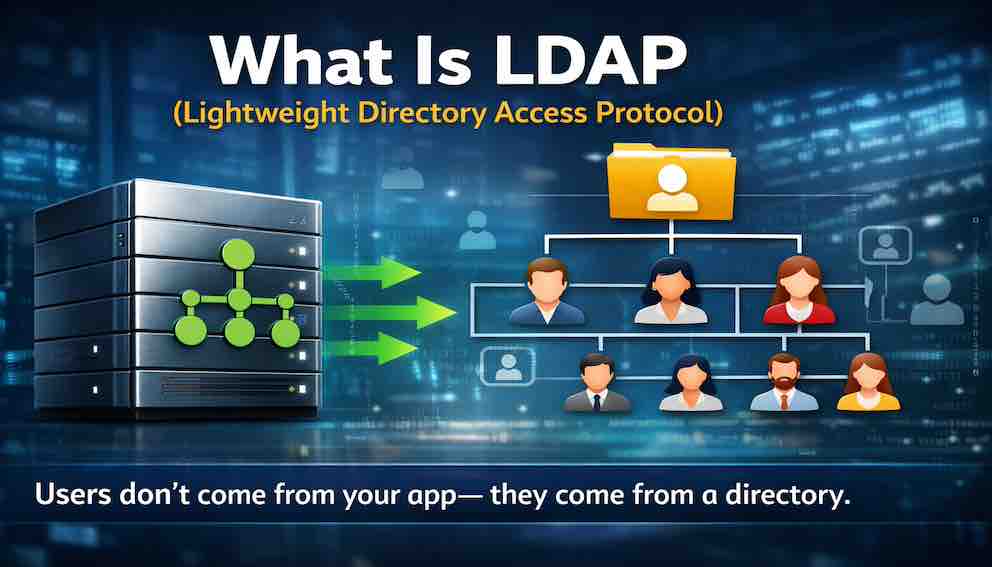
Every time you log into your work laptop, access a corporate portal, or search for a colleague's contact details, you're using LDAP — the quiet protocol that powers identity in virtually every large organization. LDAP (Lightweight Directory Access Protocol) is the standard language applications use to talk to a directory: a central, authoritative record of every user, group, and device in an organization. Rather than storing their own user lists, applications simply query this single source of truth — which means when someone joins or leaves, one update propagates everywhere. It's the invisible backbone that authentication systems, single sign-on, and access control are all built on top of
A Story: The University Registrar
Imagine you are a new student at a large university. You have been accepted, you have paid your tuition, and you are ready to start classes. You walk to the registrar's office to get your student ID card.
The registrar pulls up your record in a massive file system. Your name, your student ID number, your department, your courses, your dorm assignment — everything is in one central place. The registrar prints your ID card, and now you can access the library, the dining hall, the gym, and your dorm room. All from that one card.
Now imagine that every system on campus maintained its own copy of student records. The library would have its own list of who is enrolled. The dining hall would have its own list. The gym would have its own list. When you graduate, you would need to be removed from every system individually. When you change your name, you would need to update it in a dozen places. The chaos would be unmanageable.
This is why directories exist. A directory is a single, authoritative source of truth about the people, devices, and resources in an organization. It is the registrar's office of the digital world.
LDAP is the protocol that applications use to talk to that directory.
If you have worked in any organization with more than a few hundred employees, you have used LDAP. Every time you log into your work laptop, every time you access the corporate portal, every time you search for a colleague in the company directory — you are using LDAP. It is the quiet, invisible backbone of enterprise identity.
This article explains what LDAP is, how it works, and why it matters. It is the conceptual bridge between the authentication systems you have learned about and the enterprise identity infrastructure that powers them.
What Is a Directory?
Before we talk about LDAP, you need to understand what a directory is.
A directory is a specialized database designed for reading, searching, and organizing hierarchical information about people, devices, and resources. Unlike a relational database — which is optimized for complex transactions and frequent updates — a directory is optimized for fast reads and searches. The trade-off is intentional. Directories are queried millions of times a day and updated relatively rarely. That asymmetry shapes everything about how they work.
Think of a directory as a phone book. A phone book is organized alphabetically, optimized for looking up a person's number quickly. You do not update it frequently. You do not perform complex joins across multiple tables. You look up information by name. This is the directory model.
In practice, this means a directory stores information differently from a relational database. Where a relational database uses tables with rows and columns and is built for operations like INSERT, UPDATE, and DELETE, a directory uses a hierarchical tree of objects and is built for SEARCH, BIND (authentication), and the occasional MODIFY. They are different tools for different purposes, and understanding this difference explains why organizations maintain both.
In an organization, the directory stores users — every employee, contractor, student, or member. It stores groups, which represent teams, departments, roles, and distribution lists. It stores devices such as computers, printers, and servers. It stores resources like shared drives and applications, and it mirrors organizational structure through departments, divisions, and locations.
Once a user exists in the directory, every application in the organization can query that central source of truth. The user does not need to be created separately in each application. The application simply looks up the user in the directory. This is the core promise of centralized identity: one record, one source of truth, one place to make changes.
What Is LDAP?
LDAP (Lightweight Directory Access Protocol) is a standard protocol for accessing and maintaining directory services over a network.
The "Lightweight" in LDAP refers to the fact that it was designed as a simpler, more efficient alternative to the earlier X.500 directory protocol. X.500 was powerful but complex. LDAP stripped away the complexity.
It is worth being precise about what LDAP is and is not. LDAP is not a directory. It is the language that applications use to talk to a directory. The directory is the data store — the filing cabinet full of identity records. LDAP is the protocol for opening that cabinet and asking questions of it. The directory could be OpenLDAP running on a Linux server, Microsoft Active Directory, Oracle Directory Server, IBM Security Directory Server, or any number of cloud-based directory services. The protocol remains the same.
What LDAP provides is a standard way to connect to any compliant directory, a standard data model that defines how objects are structured, a standard naming convention so that every object has a unique address, and a standard set of operations — bind (authenticate), search, add, modify, delete — that any compliant directory must support. Because of this standardization, an application written to use LDAP can talk to a directory from any vendor without changing its underlying logic. The same LDAP query that finds a user in OpenLDAP will find a user in Active Directory. The same bind operation that authenticates against a cloud LDAP service works against an on-premises directory. This interoperability is the enduring value of the protocol.
The Three Core LDAP Operations
In practice, LDAP is used for three primary operations.
Authentication, known as binding, is the most common LDAP operation. When a user logs into an application, the application uses LDAP to verify the user's credentials. The user enters their username and password. The application opens an LDAP connection to the directory server — typically on port 389 or 636 — and performs an LDAP bind using those credentials. If the bind succeeds, the user is authenticated. If it fails, they are rejected. The application never stores the user's password. It passes the credentials to the directory and asks: "Is this user legitimate?" The directory answers yes or no.
Applications often connect to the directory using a dedicated service account before they can look up the user being authenticated. This service account — sometimes called a bind user — has limited, read-only access to the directory. It exists solely to perform searches on behalf of the application. This is an important operational detail: the application first binds as the service account to find the user's full directory entry, then attempts a second bind using the user's own credentials to verify their password.
Searching is the second major operation. Once a user is authenticated, applications frequently need to retrieve information about them or about other objects in the directory. An application might ask: What is this user's email address? What department do they belong to? Is this user a member of the Finance group? Who works in the London office? LDAP searches are flexible — they can target a specific location in the directory tree and filter by any combination of attributes. The directory returns the matching entries.
Direct lookup is the third operation. Sometimes an application knows exactly which object it needs and retrieves it by its unique identifier rather than running a broader search. An email system delivering a message, for example, might look up a recipient directly rather than searching the entire directory. The distinction is subtle but matters for performance: a direct lookup is faster than a search when you already know exactly where you are going.
The LDAP Data Model
The directory stores information as objects, and every object has a type and a set of attributes.
Object classes define what kind of object something is. The most common object class for a person is inetOrgPerson, which represents an employee, contractor, or member. groupOfNames represents a collection of users. organizationalUnit represents a department or division. Each object class defines which attributes are required and which are optional. Organizations can also extend the standard schema with custom attributes — a healthcare company might add a licenseNumber attribute to their person objects, for example.
Attributes are the data fields attached to an object. For a person object, cn holds the common name, sn holds the surname, uid holds the username, mail holds the email address, telephoneNumber holds a phone number, title holds the job title, department holds the department name, and manager holds a reference to the person's manager. This last attribute is worth noting: LDAP attributes can reference other objects in the directory, which is how organizational hierarchies are represented.
Distinguished Names (DNs) are how every object is uniquely identified. The DN describes the object's location in the directory tree. A typical DN looks like this:
Reading from right to left: in the com domain, in the company domain, in the Engineering organizational unit, there is an object with the common name Alex Johnson. The DN is essentially a path through the directory tree, from root to the specific object.
The directory tree itself is a hierarchy that mirrors organizational reality. At the top are domain components representing the organization. Under those, you find organizational units for People, Groups, Devices, and so on. Within each unit are the actual objects. A simplified tree might look like this:

This structure makes it easy to search within a specific part of the directory — you can search only within ou=People if you are looking for a user, rather than scanning the entire tree.
Groups: The Glue of Authorization
Groups are one of the most important concepts in LDAP, and they deserve particular attention because they are the bridge between identity and access control.
A group is an object in the directory that contains references to other objects, usually users. When you define an access control rule in an application, you rarely specify individual users. You specify a group. "Members of the Engineering group can access the build server." "Members of the Finance group can view payroll data." This is how LDAP enables role-based access control across an entire organization without requiring each application to maintain its own permission lists.
There are two types of groups. Static groups have membership that is explicitly defined — an administrator adds and removes users manually. Dynamic groups have membership determined by a search query: any user whose department attribute is set to Engineering is automatically a member of the Engineering group, with no manual management required. Dynamic groups are powerful because they stay accurate as the directory changes. When someone joins the engineering team and their department attribute is updated, they immediately gain the access that goes with it.
The practical flow is straightforward: a user authenticates via LDAP bind, the application searches LDAP to find which groups the user belongs to, the application maps those groups to permissions, and the user's access is determined by their memberships. The application itself does not need to understand the organization's structure. It simply queries the directory and respects what it finds.
Replication and High Availability
One operational detail that practitioners encounter quickly: production LDAP directories are almost never a single server. Because authentication depends on the directory being available, organizations deploy directories with replication — multiple servers that maintain synchronized copies of the data.
In a primary/replica model, one server accepts writes and the replicas receive updates. In a multi-master model, any server can accept writes and changes propagate to all others. Either way, the result is the same: if one directory server goes down, others continue to answer queries. For an infrastructure that every login in the organization depends on, this redundancy is not optional.
LDAP also supports referrals, where one directory server redirects a client to another server that has the information being requested. This is common in large organizations with multiple directory servers covering different regions or divisions. Applications generally handle referrals transparently, but it is worth knowing they exist when debugging unexpected connection behavior.
LDAP vs. Directories (Including Active Directory)
One of the most common points of confusion is the difference between LDAP and the directories that use it, and it is worth addressing directly.
LDAP is a protocol — a language for talking to directories. A directory is the actual data store that holds user records, group memberships, and organizational information. The distinction is similar to the difference between SQL and a database: SQL is the query language, while a database like PostgreSQL, MySQL, or Oracle is the system that stores the data and understands the language. LDAP is the language. The directory is the system that understands it.
Microsoft Active Directory is one directory service that speaks LDAP, but it is far from the only one. OpenLDAP is an open-source directory service commonly used on Linux systems. Oracle Directory Server, IBM Security Directory Server, and NetIQ eDirectory are other enterprise-grade options. Cloud directory services like JumpCloud and Okta's LDAP interface also speak LDAP. All of these directories understand LDAP, so an application written to use LDAP can work with any of them without changing how it makes directory queries.
Where Identity Comes From: The Bridge to SSO
This brings us to the question that single sign-on systems inevitably raise: where does identity actually come from?
When you log into an application using SSO, your identity does not originate in the application. The application does not have a "create user" button that an administrator clicks for each person who needs access. Instead, the application consumes identity from a central directory.
The flow works like this: a user is created in the directory when they join the organization — typically fed by HR systems. That directory record becomes the source of truth for their identity. The SSO system connects to the directory, either reading directly from it or synchronizing a copy of its data. When the user logs into an application via SSO, the application receives an assertion of identity from the SSO system. The SSO system derived that identity from the directory. The application never creates the user. It receives them.
This is the conceptual bridge: authentication systems do not invent users. They query them from a directory, and LDAP is the protocol that makes that query possible.
The layered architecture looks like this:
LDAP in Modern Identity Infrastructure
One important nuance: while LDAP remains foundational in traditional enterprise environments, the relationship between LDAP and modern identity systems is not always as direct as the description above implies.
Many organizations — particularly newer ones or those that have migrated to the cloud — use cloud-native identity platforms like Microsoft Entra ID (formerly Azure AD), Okta, or Google Workspace. In these environments, LDAP may be entirely absent, or it may be available as an optional compatibility layer for legacy applications that cannot speak modern protocols. The source of truth for identity lives in the cloud platform, not in an on-premises LDAP directory.
In traditional enterprise environments, however, LDAP directories remain the foundation. The modern identity platform sits on top of the directory, synchronizing data and providing contemporary APIs — SAML, OAuth 2.0, OpenID Connect — on top of the directory foundation. Understanding LDAP is understanding what these modern systems are built on, even when they abstract it away.
LDAP Security Considerations
LDAP was designed in the 1990s when security was a secondary concern. Modern deployments must address several issues that were not part of the original design.
Encryption in transit is the most urgent concern. Plain LDAP sends credentials and data as clear text. An attacker on the same network can capture passwords. There are two ways to encrypt LDAP connections: LDAPS wraps the entire connection in TLS from the start, operating on port 636. StartTLS begins as a plain connection on port 389 and upgrades to TLS before any sensitive data is exchanged. Both approaches are common; LDAPS is simpler to configure correctly, but StartTLS is widely deployed in legacy environments. The important rule is the same in either case: never use plain, unencrypted LDAP on any network you do not fully control.
Service account security is the second major concern. Applications connect to LDAP using dedicated service account credentials, often stored in configuration files or environment variables. These credentials grant read access to the directory — potentially including email addresses, phone numbers, organizational data, and group memberships for every person in the organization. If compromised, an attacker can enumerate your entire organization. Service accounts should have the minimum access necessary, read-only where possible, and scoped to only the portions of the directory the application actually needs.
Anonymous binds allow connections to the directory without any credentials. Some LDAP servers permit this to serve public information, but anonymous binds can inadvertently expose directory contents to anyone who can reach the server. Disable anonymous binds unless there is a specific, understood reason to allow them, and if they are required, carefully control what data is accessible without authentication.
LDAP injection is the directory equivalent of SQL injection. LDAP search filters are built from strings, and if user input is inserted directly into a filter without sanitization, an attacker can modify the filter's logic. A search for a username like admin)(|(password=* could transform an innocent lookup into a query that returns all users with any password — effectively bypassing authentication logic. The defense is input sanitization: escape special characters before inserting user input into LDAP filters, and use LDAP libraries that support parameterized filters where available.
LDAP Operations in Practice
It helps to see what these operations look like in concrete terms.
A bind works as follows: the application sends a bind request containing the user's Distinguished Name and password. The server validates the credentials. If valid, a session is established. If not, the bind fails and the application receives an error code that distinguishes between "user not found," "invalid credentials," and "account locked," among others. Each error code tells the application something different about why authentication failed.
A search requires four pieces of information: the base DN (where to start in the directory tree), the scope (whether to search only the immediate level or the entire subtree below the base), a filter (the criteria objects must match), and a list of attributes to return. A search for all users in the engineering department might start at ou=People,dc=company,dc=com, search the full subtree, filter by (department=Engineering), and request the cn, mail, and telephoneNumber attributes. The server returns every matching object with only the requested fields — no more data than necessary.
A modify operation specifies the DN of the object to change, the type of modification (add an attribute, delete an attribute, or replace an attribute's value), and the new data. Modify operations are infrequent in most deployments — directories are read far more than they are written.
Why LDAP Still Matters
In a world of cloud APIs, JSON, and modern identity platforms, a protocol from the 1990s deserves scrutiny. Why does it persist?
The most practical answer is that most large organizations have decades of investment in LDAP-based infrastructure. Their HR systems feed into LDAP directories. Their applications authenticate against them. Their access control policies are expressed in terms of LDAP groups. Replacing this infrastructure would cost millions and take years, and the current system works reliably.
LDAP handles millions of users, thousands of authentication requests per second, and years of continuous uptime. It is not glamorous, but it is dependable. And because it is an open standard owned by no single vendor, an application built to use LDAP can work with any compliant directory — Microsoft's, a Linux-based one, or a cloud provider's — without modification.
Finally, understanding LDAP is understanding the foundation that modern identity systems build on. When Okta synchronizes with your Active Directory, it uses LDAP. When your VPN authenticates you, it likely queries LDAP. When a legacy application checks whether you belong to the right group before granting access, it queries LDAP. The protocol is quiet and invisible precisely because it works.
Closing: The Registrar's Office
Let us return to the university registrar.
Every student, faculty member, and staff member has a record in the registrar's office. That record is the source of truth. The library does not maintain its own list of students. The dining hall does not maintain its own list. The gym does not maintain its own list. They all query the registrar.
When you graduate, the registrar marks your record as alumni. Every system in the university immediately knows you are no longer a current student. You do not need to be removed from twenty different systems. The single source of truth handles everything.
This is the power of a directory. And LDAP is the language that makes it all work.
In the articles that follow, you will learn about Kerberos, which uses the directory to enable seamless, ticket-based authentication. And you will see how modern identity systems connect to these directory foundations to provide the seamless login experiences you use every day.
The directory is where identity begins. LDAP is how you ask the directory who someone is.
About N Sharma
Lead Architect at StackAndSystemN Sharma is a technologist with over 28 years of experience in software engineering, system architecture, and technology consulting. He holds a Bachelor’s degree in Engineering, a DBF, and an MBA. His work focuses on research-driven technology education—explaining software architecture, system design, and development practices through structured tutorials designed to help engineers build reliable, scalable systems.
Disclaimer
This article is for educational purposes only. Assistance from AI-powered generative tools was taken to format and improve language flow. While we strive for accuracy, this content may contain errors or omissions and should be independently verified.