
Learning Paths
Last Updated: April 3, 2026 at 19:30
What Is ABAC (Attribute-Based Access Control)? Dynamic Policies, Flexibility vs Complexity, and When to Choose ABAC Over RBAC
Dynamic policies, flexibility versus complexity, and when to choose ABAC over traditional role-based models
Role-Based Access Control breaks down when authorization needs go beyond 'what type of user is this?' ABAC evaluates every request dynamically against attributes of the user, resource, action, and environment. The result is fine-grained, context-aware authorization that scales — and stops automatically when conditions change
A Story: The Research Hospital
Imagine a world-class research hospital. Not like the one we visited in the previous article. This hospital handles patient care, cutting-edge medical research, clinical trials, and partnerships with universities and pharmaceutical companies.
The authorization needs of this hospital are far more complex than simple roles.
A doctor needs access to patient records — but only for patients assigned to their care team, and only for the duration of the patient's treatment, and only if the patient has not opted out of research data sharing.
A researcher needs access to patient data — but only anonymized data, and only for approved studies, and only after completing ethics training, and only during the approved research period.
A pharmaceutical partner needs access to clinical trial data — but only for the specific trial they are sponsoring, and only aggregated data, never individual patient records, and only while the trial agreement is active.
A patient needs access to their own records — but not to mental health notes if they are a minor, and not to research data they have not consented to share.
A hospital administrator needs access to billing information — but only for the departments they oversee, and only during business hours, and only from the corporate network.
RBAC cannot handle this complexity. You would need thousands of roles: DoctorForPatientX, ResearcherForStudyY, PartnerForTrialZ. The role explosion would be catastrophic.
What the hospital needs is a different model. Instead of assigning static roles, it needs to evaluate attributes — characteristics of the user, the resource, the action, and the environment — and make authorization decisions based on policies that combine these attributes.
This is Attribute-Based Access Control. ABAC.
Part One: What Is ABAC?
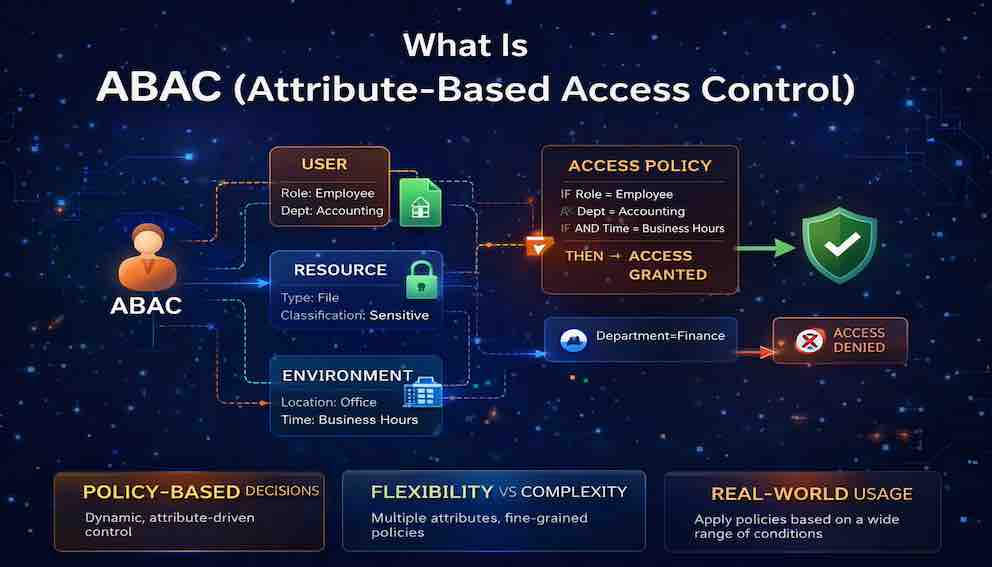
Attribute-Based Access Control is an authorization model that grants or denies access based on attributes of the user, the resource, the action being performed, and the environmental context, evaluated against a set of policies.
In ABAC, there are no fixed roles. Instead, every access request is evaluated dynamically against policies that consider multiple attributes simultaneously.
The core elements of ABAC are four attribute categories.
Subject attributes describe the user making the request — their department, clearance level, job function, physical location, and so on.
Resource attributes describe the thing being accessed — its sensitivity level, its owner, its classification, its status.
Action attributes describe what the user is trying to do — read, write, delete, approve, transfer, export.
Environment attributes describe the context of the request — the time of day, the network the request originates from, the device being used, the current threat level.
A policy combines these attributes into a rule. If the rule evaluates to true, access is granted. If false, access is denied.
Here is how a single request evaluation looks in practice:
Request: User Alice wants to READ PatientRecord X
Attributes:
- User: role = "doctor", department = "cardiology", training = "HIPAA certified"
- Resource: type = "patient record", sensitivity = "confidential", assigned_department = "cardiology"
- Action: "read"
- Environment: time = "14:30", location = "hospital_network"
Policy: Doctors can read patient records only for patients assigned to their
department, from the hospital network, during business hours.
Evaluation:
- User is doctor ✓
- Patient assigned to cardiology ✓ (matches user department)
- Time is within business hours ✓
- Location is hospital network ✓
Result: GRANT
The policy does not need to know who Alice is. It does not need a special role created for Alice. It simply evaluates attributes.
Part Two: Why ABAC Exists — The Limits of RBAC
To understand why ABAC was created, you need to understand where Role Based Access Control(RBAC) fails.
RBAC cannot handle resource-level distinctions. RBAC says "doctors can read patient records." But what if a doctor should only read records for their own patients? RBAC has no built-in concept of ownership or assignment. You would need a separate role for every patient, or you would need to add logic outside of RBAC entirely. ABAC expresses this naturally: a user with role "doctor" can read a patient record if the user's department matches the patient's assigned department and the user is on the patient's care team.
RBAC cannot handle dynamic conditions. RBAC says "researchers can access research data." But what if access should be limited to approved studies, only after ethics training is completed, and only while the study is active? RBAC requires creating and revoking roles as conditions change. ABAC evaluates these conditions in real time. If training expires, access stops automatically. If the study ends, access stops. No manual role changes needed.
RBAC cannot handle context. RBAC says "administrators can access billing data." But what if billing data should only be accessible from the corporate network, during business hours, and not from personal devices? RBAC cannot express environmental constraints. ABAC includes environment attributes naturally — a policy can require a corporate network origin, specific hours, and a managed device.
RBAC cannot handle fine-grained permissions at scale. RBAC works well when you have a few dozen roles. It breaks when you need hundreds or thousands. ABAC scales because permissions are expressed as policies, not as combinatorial role assignments.
RBAC and ReBAC as Specialisations of ABAC
There is a deeper relationship between these models worth understanding. Technically, both RBAC and ReBAC(Relationship Based Access Control) are specialisations of ABAC — they are ABAC implementations that constrain which attributes are considered and prescribe the shape those attributes must take.
In RBAC, the only attribute that matters is the user's role, and that role must conform to a defined set of values with associated permissions. In ReBAC, the attribute that matters is the relationship between a user and a resource — owner, editor, member — and access is determined by traversing those relationship graphs. Both are valid and powerful within their scope. What makes ABAC distinct is that it imposes no such constraints. Any attribute from any source can factor into a decision.
This means that when you implement ABAC, you are not discarding roles or relationships. You are absorbing them. A user's role becomes one subject attribute among many. A user's relationship to a resource becomes another attribute. ABAC does not replace these concepts — it generalises them.
Part Three: The Attribute Categories — The Building Blocks of ABAC
Every ABAC system works with the same four attribute categories. Understanding them deeply is essential to designing effective policies.
Subject Attributes
Subject attributes describe the user making the request. These are the who of authorization.
Common subject attributes include identity attributes (user ID, email, username), organizational attributes (department, division, team, manager), role attributes (job function used as a policy input rather than a fixed permission boundary), security attributes (clearance level, HIPAA certification status, security awareness training completion), employment attributes (employment status, hire date, termination date), and device attributes (device type, managed status, OS patch level).
An example policy using subject attributes: Users employed as contractors who have completed security training can access development resources during their contract period.
Resource Attributes
Resource attributes describe the object being accessed. These are the what of authorization.
Common resource attributes include identity attributes (resource ID, name, type), classification attributes (sensitivity level such as public, internal, confidential, or restricted; data classification such as PII, PHI, or financial), ownership attributes (owner, creator, assigned department, care team), and lifecycle attributes (status such as draft, published, or archived; creation date; expiration date).
An example policy using resource attributes: Users can read documents classified as confidential only if they hold confidential clearance and the document's owner is in their department.
Action Attributes
Action attributes describe what the user is trying to do. These are the how of authorization.
Common action attributes include CRUD operations (create, read, update, delete), business operations (approve, reject, submit, review, transfer), administrative operations (configure, deploy, manage, audit), and special operations (export, share, print, copy).
An example policy using action attributes: Only users with the compliance officer function can perform the export action on documents classified as restricted.
Environment Attributes
Environment attributes describe the context of the request. These are the where and when of authorization.
Common environment attributes include time attributes (current time, day of week, date range), network attributes (source IP, network zone such as corporate, VPN, or public; geolocation), device attributes (device trust level, MFA(Multi Factor Authentication) status, OS version), risk attributes (risk score, anomaly detection flags, unusual behaviour indicators), and authentication attributes (authentication method, session age).
An example policy using environment attributes: Access to financial systems requires MFA and must originate from the corporate network or VPN during business hours.
Part Four: How ABAC Works — The Policy Engine
ABAC systems are built around a central component called the policy engine, formally known as the Policy Decision Point (PDP). Understanding the full architecture helps you know where things go wrong when they go wrong.
There are four components in an ABAC system.
The Policy Enforcement Point (PEP) sits in front of every protected resource and intercepts incoming requests. It does not make decisions. It asks for them.
The Policy Decision Point (PDP) is the engine that evaluates policies against attributes and returns an allow or deny decision.
The Policy Administration Point (PAP) is the store where policies live. Administrators create and update policies here.
The Policy Information Point (PIP) is the retrieval layer. When the PDP needs to know a user's department or a document's classification, it fetches that attribute from the PIP, which in turn calls authoritative sources — your HR system, your identity provider, your resource metadata store.
The flow of a single request:
This may sound heavyweight, but it happens in milliseconds when implemented well. The separation of concerns — enforcement, decision, policy storage, attribute retrieval — is what allows ABAC to scale across large, distributed systems.
The Hidden Costs: When a Policy Engine Is Overkill
The architecture described above is elegant. It is also expensive.
Every request that passes through a separate policy engine adds latency — 5 to 50 milliseconds per call. For high-throughput systems, this adds up. Worse, it introduces a new failure mode. If the engine is down, your application cannot authorize requests. If it is slow, your application becomes slow.
Beyond latency, there is operational complexity. The engine must be deployed, scaled, and monitored. Policies need version control and CI/CD pipelines. Your team must learn a new policy language like Rego or Cedar. For large distributed systems, these costs are justified. For smaller systems, they are not.
The alternative is in-process ABAC. Instead of calling a separate engine, evaluate policies inside your application. Latency drops to microseconds. There is no network dependency. Deployment is trivial. You use your existing programming language rather than a new DSL.
The trade-offs are real. In-process ABAC scatters policies across services. Changes require code deployments. Auditability is harder. Consistency requires discipline.
The right choice depends on scale. A handful of services? In-process ABAC wins. Dozens of services with complex rules? The policy engine's centralization justifies its cost.
Adding a policy engine is not architectural maturity. It is a trade-off. The mistake is choosing without understanding what you are trading.
Part Five: Expressing Policies
ABAC policies need to be expressed in a form a machine can evaluate. In practice, this means a policy language — a structured way of writing rules that a policy engine can read, apply, and audit.
The most mature standard is XACML, which defines both a policy language and the PEP/PDP/PAP/PIP architecture described in Part Four. It is comprehensive but verbose, and most modern implementations reach for simpler tools. Open Policy Agent (OPA) is the dominant choice in cloud-native environments today. AWS IAM uses JSON-based condition blocks that support attribute comparisons, and is where most engineers encounter ABAC for the first time. Amazon's Cedar is a newer open-source policy language gaining traction beyond the AWS ecosystem.
The specific tool matters less at this stage than the underlying idea: policies are rules written in a structured language, evaluated by an engine, against attributes supplied at request time. If you work in a regulated industry, ABAC is formally defined in NIST Special Publication 800-162 — the reference to cite in compliance conversations.
Part Six: Flexibility vs Complexity — The Trade-Off
ABAC's greatest strength is also its greatest risk. You can express almost any authorization rule imaginable — but that freedom requires discipline to avoid policies that become unmaintainable tangles nobody can reason about. RBAC is simpler to understand and easier to audit. ABAC scales further and adapts faster. Neither wins outright.
A common misconception is that ABAC is inherently more fine-grained than RBAC. It is not — fine-grained and coarse-grained describe the specificity of an implementation, not the model. What ABAC does do is make fine-grained authorization easier to sustain. In RBAC, increasing specificity means more roles. In ABAC, a single attribute comparison handles what would otherwise require a role for every permutation.
Use ABAC when your requirements are complex, context-sensitive, or outgrowing your current role structure. Stick with RBAC when your model is simple and stable — not every system needs a policy engine. In practice, most organisations use both: RBAC for broad functional access, ABAC for the fine-grained decisions that roles cannot express cleanly.
Part Seven: Structuring Your Policies — Common ABAC Patterns
Understanding ABAC conceptually is one thing. Knowing how to organise your policies in practice is another. Most real-world implementations converge on one of four patterns. These are not rigid categories — they are lenses for thinking about what a policy is fundamentally anchored to.
Entitlement-Based ABAC
Entitlement-based policies grant access at the intersection of a user's role and their organisation's subscription tier. Neither condition alone is sufficient — an enterprise plan does not give every employee access to every premium feature, and an administrator role does not unlock capabilities the organisation has not subscribed to.
Example policy: A user can access advanced analytics only if their organisation holds an enterprise subscription and the user is an organisation administrator.
This pattern is common in SaaS platforms and any system where commercial entitlements need to be enforced alongside functional permissions.
Resource-Scoped ABAC
Resource-scoped policies grant access based on shared traits between the user and the resource. Rather than asking "what role does this user have?", the policy asks "does something about this user match something about this resource?" — a department matching a resource's domain label, or a clearance level meeting a document's sensitivity rating.
Example policy: A user can read a repository if their department matches one of its domain labels, and write to it only if their clearance meets or exceeds its sensitivity rating.
This pattern scales elegantly because adding a new domain or classification requires no new roles or policy logic — the attribute comparison works for any value the attributes hold.
Time-Bounded Access
Time-bounded policies grant access that expires automatically without manual revocation. The key distinction from simply using time as an environment attribute is that the expiry is attached to the grant itself, not to the context of the request. The user has been explicitly invited or elevated, and that grant carries a window.
Example policy: A user can read a financial document if they have been explicitly invited to review it and the current time falls within the invitation's validity window.
This pattern is important wherever the principle of least privilege demands that access should never outlast the need that justified it.
Context-Aware ABAC
Context-aware policies layer environmental conditions on top of identity and resource checks. The identity of the user is necessary but not sufficient — the system also evaluates where the request originates, what device is being used, and what the current risk signals look like. A user with the right clearance on an untrusted device from an unusual location may still be denied.
Example policy: A user can merge changes into the production codebase only if they hold the required clearance, are on a trusted device, and are within normal business hours for their region.
This pattern is most appropriate in financial services, healthcare, and defence — anywhere where insider threat or compromised credentials are a realistic part of the threat model.
Part Eight: ABAC and Zero Trust
ABAC is central to Zero Trust security. Zero Trust says: never trust, always verify. It assumes the network is already compromised and every request must be authorized based on current context — not on where the request originates from.
ABAC provides the mechanism Zero Trust requires. Each request is evaluated against policies that consider who is making the request, what they are trying to access, what they are trying to do, where they are and what device they are using, and the current risk level.
This continuous, context-sensitive evaluation is precisely what Zero Trust demands. ABAC is not optional in a genuine Zero Trust architecture — it is the thing that makes Zero Trust decisions concrete and enforceable.
Part Nine: Common ABAC Mistakes
Over-Policy-ification
You create hundreds of complex policies. No one understands them. Debugging becomes a multi-hour exercise. A simple change requires touching dozens of policies to avoid unintended effects.
The fix: keep policies as simple as possible. Group related permissions. Apply the principle of least privilege not just to access rights, but to policy complexity itself. If a policy is hard to explain in plain language, it is probably wrong.
Attribute Sprawl
You collect dozens of attributes from multiple sources. Some are unreliable. Some are stale. Some are used in exactly one policy. Maintaining attribute quality across all these sources becomes impossible.
The fix: curate your attribute model carefully. Only include attributes that are genuinely necessary for decisions. Establish clear ownership for each attribute source. Monitor attribute freshness and quality — a stale attribute is a security risk, not just a data quality problem.
Performance Blindness
You build a policy engine that calls five different APIs to retrieve attributes for every request. Latency spikes. Users notice.
The fix: design for performance from the start. Cache attributes. Use local attribute stores for fast access. Embed common attributes in tokens so the PIP is not on the critical request path.
Poor Policy Testing
You deploy policies without testing. A policy change accidentally grants access to everyone. Or silently denies access to a critical workflow that no one notices until something breaks.
The fix: treat policies as code. Write tests. Use policy simulation tools to validate changes before deployment. Implement canary deployments for policy changes the same way you would for application code.
No Policy Visibility
Policies are stored as raw text. Auditors cannot understand them. Administrators cannot reason about effective permissions. Mistakes go unnoticed until they cause an incident.
The fix: invest in tooling that makes policies legible. Show which policies apply to a given user or resource. Provide tools for exploring effective permissions. If your security team cannot answer "why did Alice get denied?" in under five minutes, your observability is insufficient.
The RBAC Mindset
You implement ABAC but think in roles. You create policies that effectively recreate the role explosion problem — just expressed as policies instead of role assignments.
The fix: embrace attributes. Think about what characteristics determine access, not what role determines access. If you find yourself creating a user attribute whose only purpose is to designate access and whose values map one-to-one to permission sets, you have rebuilt RBAC inside ABAC. Step back and ask what underlying data should be driving the decision instead.
Part Ten: ABAC vs PBAC vs ReBAC
You will encounter other acronyms in this space. Here is how they relate.
PBAC (Policy-Based Access Control) is often used interchangeably with ABAC. Where a distinction is made, PBAC emphasises the policy engine and language, while ABAC emphasises the attribute model.
ReBAC (Relationship-Based Access Control) is a meaningfully different model — or more precisely, a specific specialisation of ABAC. As discussed in Part Two, ReBAC constrains the attribute space to relationships between users and resources: ownership, membership, delegation, reporting lines. It makes authorization decisions by traversing these relationship graphs rather than by evaluating arbitrary attribute combinations.
A ReBAC policy reads naturally: A user can edit a document if they are the document's owner, or if they are in the document's editor list, or if they are a manager of the document's owner.
ReBAC is increasingly popular for modern applications because relationship graphs map naturally to how humans think about sharing and access.
The two models complement each other well. If your authorization model is dominated by relationships, ReBAC may be a better primary model than ABAC. Many mature systems use both — ReBAC for relationship-based decisions, ABAC for attribute and environmental conditions layered on top. Understanding that ReBAC is a specialisation of ABAC, not a rival to it, makes it easier to see how they fit together.
Part Eleven: What You Should Take Away
ABAC is the evolution beyond RBAC for complex, fine-grained, context-aware authorization needs.
After reading this article, you should be able to explain the four attribute categories — subject, resource, action, environment — and why each matters. You should understand the ABAC architecture. You should be able to recognise when ABAC is the right tool and when it is overkill. You should understand why ABAC does not guarantee fine-grained authorization — only makes it more achievable. You should understand how RBAC and ReBAC are specialisations of ABAC rather than alternatives to it. You should be able to identify which policy pattern — entitlement-based, resource-scoped, time-bounded, or context-aware — best fits a given authorization requirement. And you should be able to distinguish ABAC from ReBAC, and know when to reach for each.
Most importantly: ABAC is not a replacement for RBAC. It is a complement, and in the most rigorous sense, a generalisation. Most organizations need both — roles for broad functional access, attributes for fine-grained, context-sensitive decisions. The goal is not to pick one model and commit to it. The goal is to use each where it serves you.
Closing: The Research Hospital Revisited
Let us return to the research hospital.
With ABAC, the hospital's authorization needs become manageable.
The doctor sees only their assigned patients. The system checks the doctor's department against the patient's care team. When the patient is discharged, access ends automatically — no manual role removal required.
The researcher sees only anonymized data for approved studies. The system checks the researcher's training status, the study's active period, and the patient's consent preferences. When the study ends, access stops. When training expires, access stops.
The pharmaceutical partner sees only aggregated trial data for their sponsored study. The system checks the partnership agreement status, the data sensitivity level, and the declared purpose of access. If the agreement lapses, access stops instantly.
The patient sees their own records — except where law restricts access for minors or where research consent has not been given. The system checks age, record type, and consent status.
The administrator sees billing data only for their departments, only during business hours, only from the corporate network. The system checks assigned departments, current time, and source IP.
No role explosion. No manual updates. Every access request evaluated in real time against clear, auditable policies.
This is the promise of ABAC. Not complexity for its own sake — but flexibility where flexibility is needed, and control where control is required. The ability to express authorization in the language of your business, not the language of your database schema.
RBAC gave you structure. ABAC gives you freedom.
Choose wisely. Use RBAC where it works. Use ABAC where it is needed. And when you need both — which is most of the time — use them together.
About N Sharma
Lead Architect at StackAndSystemN Sharma is a technologist with over 28 years of experience in software engineering, system architecture, and technology consulting. He holds a Bachelor’s degree in Engineering, a DBF, and an MBA. His work focuses on research-driven technology education—explaining software architecture, system design, and development practices through structured tutorials designed to help engineers build reliable, scalable systems.
Disclaimer
This article is for educational purposes only. Assistance from AI-powered generative tools was taken to format and improve language flow. While we strive for accuracy, this content may contain errors or omissions and should be independently verified.