
Learning Paths
Last Updated: June 2, 2026 at 13:00
Micronaut OpenAPI & Swagger UI Explained for Spring Boot Developers
Learn how Micronaut generates OpenAPI documentation at compile time, how it differs from Springdoc in Spring Boot, and how to build production-grade API specifications with Swagger UI, schema modelling, and contract testing
Micronaut takes a fundamentally different approach to OpenAPI generation compared to Spring Boot. Instead of runtime scanning, it generates the entire API specification at compile time using annotation processing. This results in zero runtime overhead, a faster startup, and a first-class API contract that can be versioned and tested in CI. In this guide you will learn how to build, document, and secure OpenAPI definitions in Micronaut, with practical Spring Boot comparisons throughout.
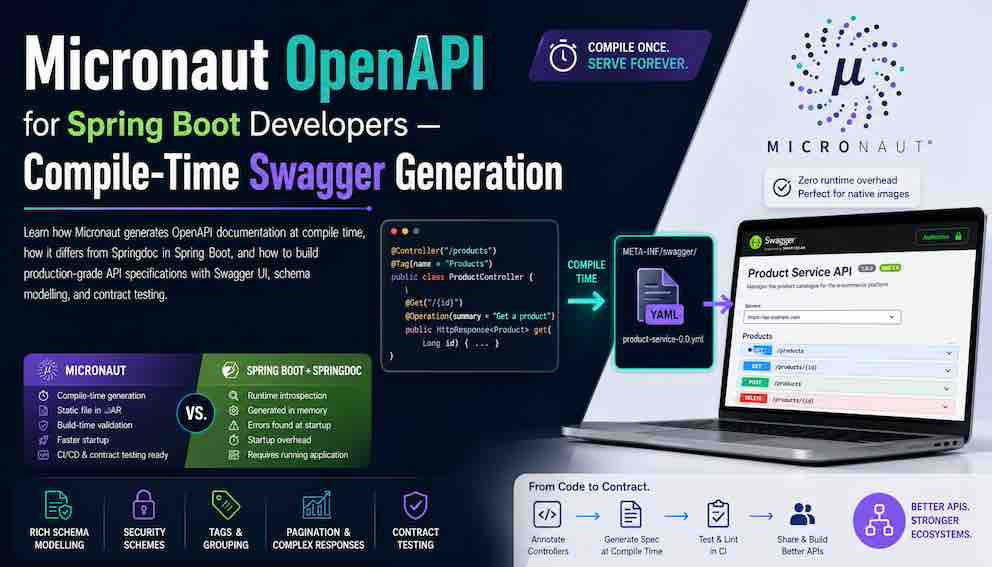
The mental model: compile-time vs runtime
In Spring Boot, Springdoc (springdoc-openapi) scans the classpath and builds the OpenAPI spec by introspecting beans and annotations when the application starts. This works well, but it means the spec exists only while the app is running.
Micronaut works differently:
- The annotation processor reads your controller annotations during the build
- A static OpenAPI file is generated under META-INF/swagger/ in the build output directory and later packaged into the JAR
- The running application serves this pre-built file — there is no runtime classpath scanning or reflection-based API model generation
There are meaningful practical consequences to this approach:
Many OpenAPI generation problems are caught during the build rather than at startup. Some documentation mistakes result in incomplete schemas or warnings rather than a failed build, but catching issues early in CI is still a significant improvement over discovering them at runtime.
The spec is a first-class build artefact. It can be committed to source control, diffed in pull requests, and used as a contract without running the application.
It aligns with GraalVM native image. Because the specification is generated at build time rather than through runtime reflection, OpenAPI generation fits naturally with Micronaut's GraalVM-native architecture.
You can fail CI on a broken or incomplete contract. A consumer team can pin to a specific version of your spec, and your pipeline can reject builds that introduce breaking changes.
For day-to-day development the difference is mostly invisible. You still get Swagger UI in your browser. But for large microservices systems and native builds, the architectural difference matters.
Setup
Dependencies
The most common setup mistake is putting micronaut-openapi under implementation only. It must be an annotationProcessor dependency. Without the annotation processor dependency, Micronaut will not generate the OpenAPI specification.
Minimal configuration
The generated OpenAPI document is typically exposed under a /swagger/*.yml endpoint. The exact URL and configuration options vary across Micronaut versions — consult the version-specific documentation if you need a custom path. Start the application and open /swagger-ui — you should see the full interactive documentation.
API info and global metadata
Document the API itself — title, version, description, contact, and licence — using @OpenAPIDefinition on your Application class:
This is identical to the Spring Boot equivalent in terms of annotation syntax.
What Micronaut infers automatically
Even with zero Swagger annotations, Micronaut infers a usable spec from your controllers:
- HTTP method and path from @Get, @Post, @Put, @Delete
- Path parameters from {id} in the route
- Query parameters from @QueryValue (Micronaut's equivalent of Spring's @RequestParam)
- Request body schema from the @Body parameter type
- Response type from the method return type
Swagger annotations add descriptions, examples, and explicit response codes on top of this inferred baseline. You do not have to annotate everything to get a working spec — but for production APIs, you will want to be explicit about at least @Operation, @Schema, and response codes.
What Micronaut does NOT reliably infer
It is worth knowing the limits before you rely on inference:
Micronaut does not reliably infer complex polymorphic types (class hierarchies where the actual subtype is determined at runtime, like a Payment that could be a CardPayment or PayPalPayment), deep generic structures (nested types like List<PageResponse<Product>> where type information is erased at compile time), custom Serde edge cases (unusual serialisation behaviour you have configured manually via @SerdeImport or custom codecs), or validation constraints in nested objects (for example, @Valid on a field inside a request body class may not propagate constraint metadata into the spec). When in doubt, annotate explicitly.
Documenting controllers
The annotation names are identical to Springdoc. @Operation describes an endpoint — its summary, description, and deprecation status. @ApiResponse documents what the endpoint returns for a given HTTP status code. @Parameter describes a single input — a path variable, query string value, or header. @Tag groups related endpoints together in the Swagger UI sidebar. If you have used these annotations in Spring Boot before, the same knowledge applies here.
Documenting schemas
@Serdeable and @Introspected are Micronaut annotations, not OpenAPI ones. @Serdeable tells Micronaut's serialisation layer how to convert the class to and from JSON without using reflection — the equivalent of Jackson's default behaviour in Spring, but done at compile time. In Micronaut 4 with Micronaut Serialization, @Serdeable is typically sufficient for DTOs that cross the HTTP boundary. @Introspected is still useful when a class must also participate in Micronaut's bean introspection facilities — for example, when used with @Validated or accessed via BeanIntrospection. Neither annotation affects the OpenAPI spec directly, but you will frequently see them alongside @Schema.
Documenting enums
The enumAsRef = true attribute generates a $ref in the spec rather than inlining the enum values everywhere it is used — cleaner for large specs.
Documenting polymorphism
Security scheme documentation
This adds an "Authorise" button to Swagger UI so you can test secured endpoints interactively. For endpoints that should be public, override the global security with an empty @SecurityRequirements:
@Secured and @SecurityRequirements do different things and must be set independently. @Secured is a Micronaut runtime annotation — it controls whether an incoming request is actually allowed through. @SecurityRequirements is an OpenAPI annotation — it only affects what the generated spec says about authentication. Changing one does not change the other. If you mark an endpoint @Secured(IS_ANONYMOUS) but forget @SecurityRequirements(), the endpoint will be publicly accessible at runtime but Swagger UI will still show it as requiring a JWT.
Pagination and complex responses
Because complex generic schemas sometimes need help to produce the desired OpenAPI output, it is often safer to expose a concrete response type rather than a raw generic for paginated models:
Consistent error responses
Define a single error response schema and reference it everywhere:
Request body examples
For rich multi-field examples, use @ExampleObject in the requestBody:
Grouping with tags
Hiding and deprecating endpoints
Bean Validation and the OpenAPI spec
Spring developers expect validation annotations like @NotBlank and @Size to appear in Swagger automatically. Micronaut OpenAPI does the same — it reads Bean Validation constraints from your request classes and reflects them in the generated spec without any extra annotations.
The constraints derived automatically include required fields from @NotNull and @NotBlank, length bounds from @Size, numeric bounds from @Min, @Max, @DecimalMin, and @DecimalMax, and regex patterns from @Pattern. This means your validation rules and your API documentation stay in sync by default — if you tighten a constraint in code, the spec updates on the next build without any manual documentation change.
These are the mistakes that come up most often when teams migrate from Spring Boot:
Forgetting annotationProcessor. Putting micronaut-openapi under implementation only produces no spec and no error. Always double-check your dependency configuration first.
Expecting runtime regeneration. The specification is regenerated during compilation rather than dynamically rebuilt at request time. If you change a controller and the Swagger UI does not update, rebuild the project.
Missing @Serdeable on response classes. Micronaut's serialisation layer needs @Serdeable to work without reflection. If a class is missing it, you may get a runtime error or an empty schema in the spec.
Generic response confusion. If your spec shows an empty or wrong schema for a paginated response, you likely need a concrete subclass as described in the pagination section above.
Stale Swagger UI. Browsers aggressively cache the spec file. If your changes are not showing up, hard-refresh or clear the cache.
Testing the OpenAPI spec
Verifying the spec endpoint
Contract testing with Swagger Parser
Because the spec is a static file, you can load and assert it programmatically as part of your test suite. This acts as a contract test — it catches breaking changes before they reach consumers.
This kind of test is particularly useful for enforcing that every new endpoint has a summary — you can make it a required part of your CI pipeline.
Spring Boot → Micronaut quick reference
Generation approach: Springdoc uses runtime introspection at startup; Micronaut uses compile-time annotation processing.
Spec file location: Springdoc generates the spec in memory and serves it dynamically; Micronaut writes it to META-INF/swagger/ in the build output and serves the static file.
Setup dependency: Spring Boot uses springdoc-openapi-starter-webmvc-ui; Micronaut uses micronaut-openapi as an annotationProcessor plus micronaut-openapi-ui as an implementation dependency.
Swagger UI path config: Spring Boot uses springdoc.swagger-ui.path; Micronaut uses swagger-ui.path.
Global API info, controller grouping, endpoint descriptions, response codes, schema annotations, hiding endpoints, security schemes — all use identical annotation names (@OpenAPIDefinition, @Tag, @Operation, @ApiResponse, @Schema, @Hidden, @SecurityScheme, @SecurityRequirement). Prior Springdoc knowledge transfers directly.
Testing the spec: In Spring Boot you typically test against a running @SpringBootTest context; in Micronaut you can assert the generated file at the build path or hit the /swagger/*.yml HTTP endpoint.
About N Sharma
Lead Architect at StackAndSystemN Sharma is a technologist with over 28 years of experience in software engineering, system architecture, and technology consulting. He holds a Bachelor’s degree in Engineering, a DBF, and an MBA. His work focuses on research-driven technology education—explaining software architecture, system design, and development practices through structured tutorials designed to help engineers build reliable, scalable systems.
Disclaimer
This article is for educational purposes only. Assistance from AI-powered generative tools was taken to format and improve language flow. While we strive for accuracy, this content may contain errors or omissions and should be independently verified.