
Learning Paths
Last Updated: May 21, 2026 at 14:00
Spring Boot CommandLineRunner and ApplicationRunner: The Complete Guide
Choosing the right startup hook, getting execution order right, and knowing when to use something else entirely
Spring Boot provides two interfaces for running initialization code at startup — CommandLineRunner and ApplicationRunner. Both execute after the application context is fully initialized and before traffic arrives, making them the natural home for seeding databases, warming caches, and validating environment configuration. This guide covers the difference between the two interfaces, how to control execution order when you have multiple runners, transaction management pitfalls, testing considerations, and when alternatives like ApplicationReadyEvent and SmartLifecycle are the better choice. Whether you are reaching for a runner for the first time or debugging a startup issue in production, this guide gives you the complete picture.
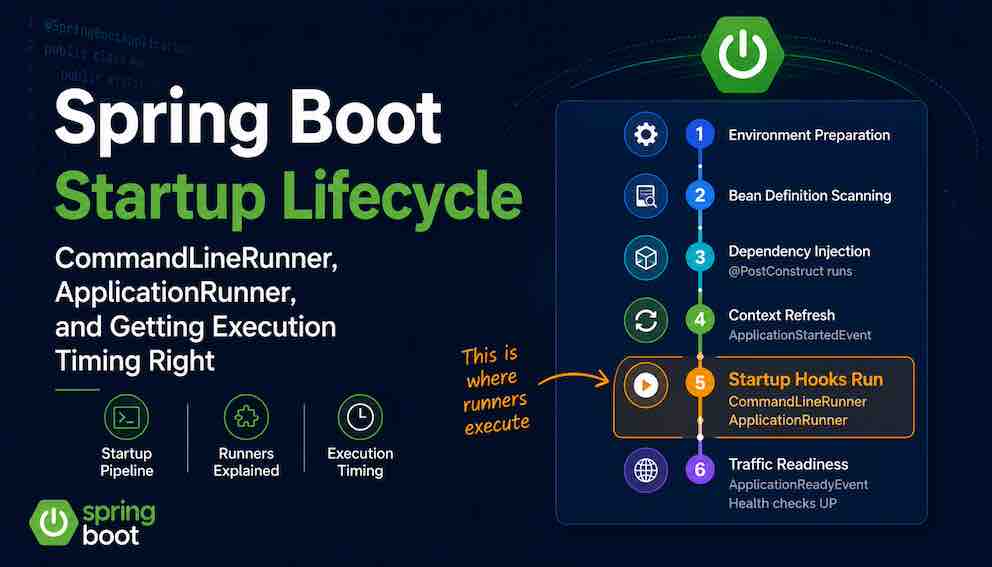
When a Spring Boot application starts, there is a brief window after all beans are wired and before the first request arrives. CommandLineRunner and ApplicationRunner are two interfaces designed for exactly that window — for one-time initialization tasks like seeding a database, warming a cache, or validating environment configuration. Both are discovered automatically by Spring Boot and both do the same job. The question is which to reach for, when to use them at all, and how execution order works when you have more than one.
CommandLineRunner vs ApplicationRunner: Differences and When to Use Each
Both interfaces give you a hook that Spring Boot calls after all beans are wired and the context is fully refreshed, but before ApplicationReadyEvent fires and the application signals readiness to load balancers and health checks. The only difference between them is how they expose command line arguments.
CommandLineRunner
The run method receives command line arguments as a raw String array with no parsing applied. Launching with java -jar myapp.jar --country=usa verbose gives you two strings: "--country=usa" and "verbose". The dashes, the equals sign, the distinction between a named option and a plain value — none of that is interpreted for you. For most startup tasks like seeding, warming, and validation, this is irrelevant because the runner doesn't use arguments at all. When argument parsing does matter, ApplicationRunner is the better choice.
ApplicationRunner
Where CommandLineRunner hands you a raw array and walks away, ApplicationArguments gives you a parsed object. It already understands the difference between named options like --mode=prod and plain values like verbose. Extracting the value of mode is a single method call — args.getOptionValues("mode") — rather than a loop through strings looking for a particular prefix. For runners whose behaviour changes based on startup arguments, this is significantly cleaner and less error-prone.
Which to Choose
If your runner doesn't use command line arguments, the choice is cosmetic — most teams default to CommandLineRunner for its simplicity.
If your runner's behaviour changes based on arguments passed at startup — skipping steps, selecting environments, enabling diagnostic modes — use ApplicationRunner. The structured parsing is more reliable and far more readable than splitting and stripping strings manually.
Running Multiple Runners in Order
You can have as many runners as you want. Spring Boot finds every bean implementing either interface and runs them all. The problem is that without explicit ordering, execution order is not guaranteed.
If your cache-warming runner depends on data that your database-seeding runner creates, you have an implicit ordering dependency. Sometimes they'll run in the right order. Sometimes they won't. That kind of intermittent bug is among the hardest to diagnose in production.
Use @Order to make dependencies explicit:
Lower numbers run first. Negative values are valid and run before zero or positive values. Whenever one runner depends on the result of another, @Order is not optional — it is a correctness requirement.
When to Use CommandLineRunner and ApplicationRunner
The best use of a startup runner is any one-time initialization task that must finish before the application is safe to serve requests, and that can complete in a few seconds.
Database seeding is the canonical example. Fresh environments often need reference data — status codes, currency lists, default roles. A runner checks whether that data exists and inserts it if not. Because all repositories are fully wired by the time runners execute, the database connection is ready and transaction management works correctly.
Cache warming solves a common deployment problem. Without it, the first users after each deployment hit cold cache and experience slow responses. A runner that preloads the most common queries eliminates that penalty.
Environment validation is the kind of runner that pays for itself the first time it catches a misconfigured API key or missing environment variable before a user does. If validation fails, throw an exception — the application should not start.
This is a much better failure mode than a NullPointerException on the first transaction.
Feature flag initialization is subtler. If your application reads feature flags from a remote service, fetching them once at startup — before traffic arrives — prevents the first requests from operating on inconsistent or default flag states.
After a deployment, operations teams often need to confirm that the application started with the correct configuration — the right profile, the expected Java version, the correct database URL. Scattering that information across logs makes it hard to find. A runner that logs key environment details in one place at startup — active profiles, Java runtime version, heap size, critical config values — gives ops a single location to check and makes deployment verification significantly faster.
Transaction Management in Runners
Runners do not start a transaction automatically. Transactional behaviour only applies when you call a method on a proxy-managed bean that carries @Transactional — it does not apply to code running directly inside the runner's run method. Call a repository directly from a runner and expect transaction rollback on failure, and you will be disappointed.
The cleanest solution is to delegate to a @Service that owns the transactional boundary:
The runner calls seedService.seedIfEmpty(). Spring's transaction proxy wraps the call correctly. This is cleaner than adding @Transactional to the runner itself and keeps the transactional boundary close to the data access code where it belongs.
Common Spring Boot Startup Mistakes to Avoid
Runners have a hard constraint: everything they do blocks the readiness signal. Nothing inside a runner can be deferred — it all runs synchronously before the application reports healthy.
The first and most operationally damaging mistake is long-running initialization. Thirty seconds of cache warming means thirty seconds of startup delay. In Kubernetes that frequently means failed readiness probes and a pod that is restarted before it ever serves traffic, leaving the deployment permanently stuck.
A second, more subtle issue is coupling your deployment to external services. A runner that calls an external API without an explicit timeout creates a direct dependency between your startup and that service's availability. If the service is slow or down, your application won't start. External calls in runners should carry short, explicit timeouts, and you should decide in advance whether a failure should abort startup entirely or log a warning and continue.
A third category of misuse is putting business workflows in runners. A runner is for initializing the system — it is not for processing orders, sending emails, triggering reports, or running scheduled jobs. If the code looks like a business process, it belongs in a service called from a request handler or scheduler, not in the startup path.
A useful heuristic: if a runner takes more than two or three seconds, ask whether it truly must block readiness. If it can safely run while the application is already serving traffic, it probably should — and ApplicationReadyEvent with @Async is the right tool for that. The application starts immediately, traffic begins flowing, and the background task completes without delaying the readiness signal.
Better Alternatives for the Right Situations
Runners are not the only option for startup logic. Several alternatives fit specific situations better.
ApplicationReadyEvent with @Async
When initialization can safely happen in the background — while the application is already serving requests — listening for ApplicationReadyEvent and annotating the method with @Async is often the right pattern:
This is appropriate for optional initialization where the application is usable without it from the start — warming a secondary cache, prefetching analytics data, or initializing a recommendation engine.
ApplicationStartedEvent
If you need something to run before CommandLineRunner and ApplicationRunner execute, but after the context is fully refreshed, ApplicationStartedEvent gives you that earlier window. This is useful for infrastructure setup that runners might depend on.
Spring Boot SmartLifecycle: When Runners Are Not Enough
SmartLifecycle is worth knowing about when runners are no longer sufficient. Runners execute sequentially in a single phase — there is no way to say "start this component only after that one is fully ready, and shut it down in reverse order when the application stops." SmartLifecycle fills that gap. You assign each component a phase number, and Spring Boot starts them in ascending phase order and stops them in reverse.
MessageConsumer will never start before ConnectionManager is ready, and on shutdown Spring Boot stops them in reverse — the consumer drains first, then connections close. Runners have no equivalent shutdown hook and no way to express that kind of dependency. For most applications SmartLifecycle is unnecessary complexity. For systems where startup and shutdown order genuinely matters across multiple components, it is the correct tool.
Testing and Environment Considerations
Your runners will execute in any test that loads the full Spring context with @SpringBootTest. That makes tests slower and potentially side-effectful — a seeder that inserts rows in a test database can cause assertion failures in unrelated tests.
The straightforward fix is profile-based exclusion:
Alternatively, make runners conditional on a property, which gives you finer control across environments:
A second common failure is silent ordering bugs. Multiple runners with no @Order might work correctly in development because bean initialization happens to produce the right sequence. In production, under a slightly different classpath or JVM startup state, the order shifts. Always specify @Order whenever one runner depends on the result of another.
The most operationally dangerous gap is forgetting that runners with network calls will also fire in CI. A runner that calls an external service in a pipeline environment with no timeout set will hang until the job times out. Ensure external calls carry explicit timeouts, or exclude the runner from non-production environments entirely.
A Decision Framework for Spring Boot Startup Code
When you're about to write startup code, work through these questions in order.
Does the task use structured command line arguments? Use ApplicationRunner — it saves you from writing argument parsing by hand. If arguments are irrelevant, CommandLineRunner is simpler.
Does the task take more than a few seconds, or involve a call that could block? If it can safely run after traffic starts, reach for ApplicationReadyEvent with @Async instead of a runner.
Does the task absolutely need to complete before the first request? A runner is the right tool — but measure it. Anything that routinely exceeds two seconds deserves a second look.
Does the code look like a business process? It belongs in a service called from a request handler or scheduler, not in the startup path.
Does order matter between runners? Add @Order to every runner in the group, even if today's ordering seems obvious.
Will this code run in integration tests or CI? Add @Profile("!test") or @ConditionalOnProperty before it causes flaky failures or hung pipelines.
Summary
CommandLineRunner and ApplicationRunner both run after the application context is fully initialized and before the readiness signal is sent — making them the right place for tasks that must complete before traffic arrives: seeding reference data, warming caches, validating environment configuration, and logging deployment diagnostics.
The choice between them comes down to one question: do you need structured access to command line arguments? If yes, use ApplicationRunner. If no, CommandLineRunner is sufficient.
When tasks can run in the background after the application is already serving traffic, ApplicationReadyEvent with @Async is a better fit. When multiple components need coordinated lifecycle management, SmartLifecycle is the right abstraction.
And when a runner starts to look like a business process, or takes long enough to delay deployments — move it out of the startup path entirely.
About N Sharma
Lead Architect at StackAndSystemN Sharma is a technologist with over 28 years of experience in software engineering, system architecture, and technology consulting. He holds a Bachelor’s degree in Engineering, a DBF, and an MBA. His work focuses on research-driven technology education—explaining software architecture, system design, and development practices through structured tutorials designed to help engineers build reliable, scalable systems.
Disclaimer
This article is for educational purposes only. Assistance from AI-powered generative tools was taken to format and improve language flow. While we strive for accuracy, this content may contain errors or omissions and should be independently verified.