
Learning Paths
Last Updated: March 31, 2026 at 12:30
How Security Actually Works in Modern Systems
A deep dive into the chain of trust that powers modern applications—and how small failures across layers lead to real-world breaches
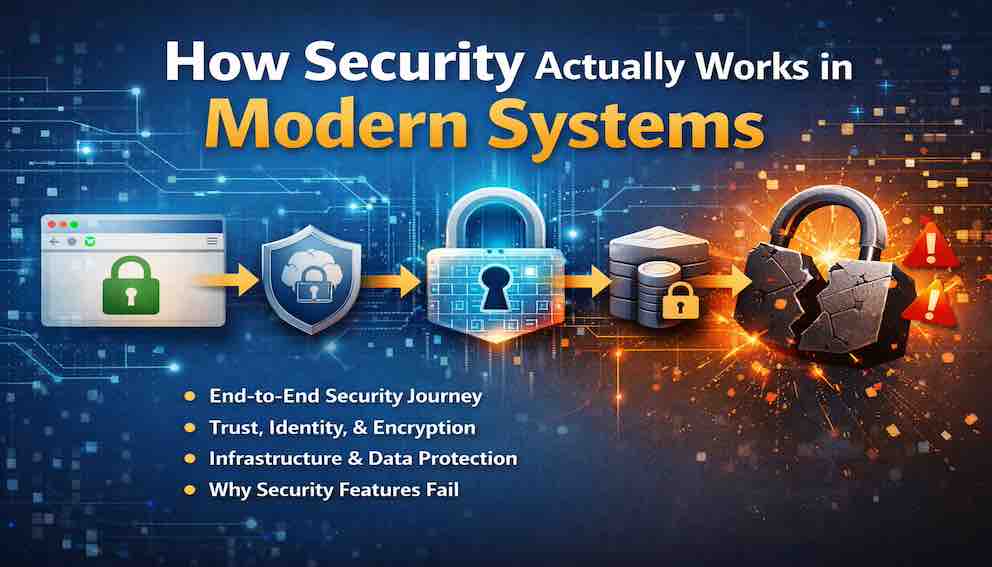
Modern software security is not a single feature but a chain of trust spanning browsers, networks, backend systems, and databases. Each layer performs a specific role—establishing identity, enforcing access, protecting data, and maintaining resilience over time. When these layers work together, security is invisible; when even one fails, the entire system can be compromised. This article builds a mental model of how secure systems actually work—and why they fail in practice
Alex wakes up, picks up a phone, and opens a banking app. One tap. Two seconds. The account balance is on the screen.
It feels simple. It is not.
That two-second action passes through several systems in sequence — the browser, a web server, an application that checks permissions, and a database that holds the actual data. Any one of them can go wrong in ways that put user data at risk. Each system trusts the one before it. When everything works, nobody notices. When something breaks, the damage can be severe.
Here is the uncomfortable truth: most of the time, it works fine. People check balances, send messages, buy things online — and nothing bad happens.
But when something does go wrong, it is rarely because a developer forgot to add security. It is because they did not understand how all the parts fit together. They had individual security features, but not a system that worked as a whole.
This article lays the groundwork for the rest of the series. By the end, readers will have a clear picture of how secure systems are built — and where they break down. Every article that follows builds on this foundation.
This article covers a lot of ground on purpose. It is a map, not a deep dive. Every concept mentioned here will be explained properly in the articles that follow, so if something is unfamiliar right now, it will not stay that way for long.
Part One: The Four Pillars of Software Security
Every secure system rests on four pillars. If you understand these four categories and how they interact, you understand the vast majority of real-world breach patterns — not a precise figure, but a useful way to think about where your attention belongs.

Let us look at each pillar briefly. The rest of this-article series will fill in every detail.
Pillar 1: Identity (Who)
Identity answers the two most fundamental security questions: Who are you? and What are you allowed to do?
Authentication (AuthN) proves who someone is — "You are Alex because you know the password and have the phone."
Authorization (AuthZ) determines what they can do — Alex can check a balance and make a transfer, but cannot touch another customer's account.
The most common pattern in real security breaches is not a sophisticated attack — it is a system where authentication and authorization were confused, incomplete, or missing entirely.
Pillar 2: Cryptography (How)
Cryptography is what makes it possible to communicate securely over the internet — a network that was never designed to be trusted.
It does three things. Encryption ensures only the intended recipient can read a message. Hashing turns a password into a fixed string of characters that cannot be reversed — so systems never store the actual password, only a way to check it. Signatures confirm that a message came from who it claims to, and that nothing was changed along the way.
Without cryptography, every request sent over the internet is readable by anyone watching. With it, the same request is locked, verified, and tamper-proof.
Pillar 3: Infrastructure (Where)
Infrastructure security is about controlling the environment where code runs. A well-written application deployed on a misconfigured server is still a vulnerable application.
This covers three areas. Network security controls which systems can communicate with each other — through firewalls, security groups, and private networks. Compute security locks down the servers and containers the application runs on. Storage security protects data sitting on disk — through encryption, access controls, and backups.
Cloud infrastructure made this both easier and riskier. There are no physical servers to manage, but a single misconfigured setting can accidentally expose a database to the entire internet.
Pillar 4: Operations (When)
Operations security is everything that happens after the code is deployed. A system does not stay secure on its own — it needs ongoing attention.
This starts with access. Knowing who has access to what, making sure they only have what they actually need, and removing access when they no longer need it — when a project ends, when a role changes, or when someone leaves the organisation. Access that is granted and never reviewed is one of the most common ways systems get compromised.
Beyond access, this means logging what happens so problems can be investigated, monitoring for unusual activity so issues can be caught early, and having a clear plan for when something goes wrong. It also means keeping passwords and API keys out of source code, rotating them regularly, and making sure the build and deployment process cannot be tampered with.
People matter here too. An attacker who tricks one employee into sharing their credentials has bypassed every technical control in the system. Regular training, clear processes for reporting suspicious activity, and periodic reviews of who can access what are just as important as any technical measure.
Most security training focuses on identity and cryptography and stops there. But a lock that is never checked, a log that is never read, access that is never reviewed, and a team that cannot spot a phishing email are all open doors.
Identity defines who should have access. Operations is where that decision gets maintained over time — reviewed, updated, and revoked when circumstances change.
Part Two: The Unbroken Chain
If you remember only one idea from this entire article — one model that will help you understand every vulnerability, every architecture decision, every breach you'll ever read about — make it this:
A system is secure only if every layer of the request path correctly performs its security responsibilities and correctly trusts the layers below it. Break any link in the chain, and the entire system is compromised.
We call this The Unbroken Chain Model. It is the lens through which every subsequent article in this series is written. When you understand it, you stop asking "is this component secure?" and start asking "does this component correctly trust, and correctly verify, everything around it?" That is a fundamentally different — and more useful — question.
Follow Alex's request from the moment their finger touches the screen to the moment the database responds. At each step, trust transfers from one component to the next. And at each step, there is an opportunity for the chain to break.
Layer 1: The Browser (Where Trust Begins)
Here is a simplified version:
Layer 1: The Browser (Where Trust Begins)
Alex opens https://yourbank.com. That small "s" after "http" matters more than most people realise.
Before any data is exchanged, the browser and the server go through a handshake. They agree on how to encrypt the connection, and the browser checks that the server's certificate is legitimate — confirming it is actually talking to the bank and not an imposter. By the time the padlock appears in the address bar, that check is already done.
How the chain breaks here: A user clicks through a certificate warning without reading it. A developer turns off certificate checking in a test environment and that setting accidentally makes it to production. Or the certificate itself is fraudulent — in 2015, Lenovo shipped laptops with software(Superfish) that installed a fake certificate authority, which allowed it to silently intercept encrypted traffic on those machines.
Layer 2: The Edge (Where Traffic Is Filtered)
Before a request reaches the application, it passes through an intermediate layer — typically a service that sits between the public internet and the servers running the code. This might be a content delivery network, an API gateway, or a load balancer. At this point the system does not yet know who Alex is, but it is already making decisions.
This layer ends the encrypted connection from the browser, looks for obvious attack patterns, limits how many requests can come from a single source, and blocks traffic from known malicious addresses.
How the chain breaks here: A malformed request slips through the checks undetected. Rate limits are set too loosely, allowing an attacker to try thousands of username and password combinations — in 2019 Dunkin' Donuts confirmed that 70,000 customer accounts were compromised through exactly this method. Or the layer logs more than it should, recording passwords or session tokens that should never appear in a log file.
This layer sees every request that comes in. That makes it powerful — and a valuable target. If an attacker gains control of it, they have visibility over everything passing through.
Layer 3: The Backend (Where Identity Is Established)
Now the request reaches your application server. This is where Alex's session is validated, their identity is determined, and their permissions begin to be evaluated.
The server extracts the session token from the request — usually from a cookie or the Authorization header. It validates that token: checking the signature, checking expiration, checking that the token hasn't been revoked. From that token, the server learns: This request belongs to Alex, user ID 12345.
How the chain breaks here: The token is valid but stolen — an attacker is using Alex's token from a different device entirely. The token was issued with overly broad permissions. The token validation logic has a bug that accepts expired tokens. A particularly dangerous class of bug accepts the none algorithm — a vulnerability class that appeared across multiple JWT libraries around 2015, where a crafted token could claim it had been signed without any signature at all.
Notice something important: the server rarely asks the database "Is this token valid?" for every request. That would be too slow. Instead, the server embeds trust into the token itself using cryptography. This is a deliberate trade-off — performance versus real-time revocation capability.
Layer 4: The Authorization Layer (Where Trust Is Constrained)
Alex is authenticated. The server knows who they are. Now comes the question that causes more data breaches than any other: What is Alex allowed to do?
The server checks whether Alex has permission to view their specific account balance. This might involve checking a role (RBAC), checking attributes (ABAC), or evaluating a policy against the specific resource being requested.
How the chain breaks here: The authorization check is missing entirely — broken access control is consistently the top vulnerability in the OWASP Top 10 for good reason. The check exists but uses a role that's too broad, so any "Customer" can see any other customer's account. The check passes because the developer assumed that valid authentication was sufficient.
Authentication tells you who. Authorization tells you what they can do. They are not interchangeable, and both must exist.
Layer 5: The Database (Where Trust Ends)
The request passes all checks and reaches your database. A query executes: SELECT balance FROM accounts WHERE account_id = 12345.
But the database doesn't know who Alex is. It only knows that a query arrived from your application server with valid database credentials. The database trusts that your application has already performed the authorization checks. All of them.
How the chain breaks here: An attacker who compromises your application server can query anything the server can query. SQL injection bypasses the application's authorization logic entirely, letting an attacker construct their own queries. The database has no per-user access controls because the application was assumed to handle that.
Some systems implement row-level security (RLS) in the database itself, passing user identity through database sessions. This is harder to build but limits blast radius if the application server is ever compromised.
The Complete Failure Map (Use This When Reviewing Systems)
Every layer has a specific job, a specific trust transfer, and a specific failure mode.
When you review any real system — or read any other article in this series — use it to ask:
Which layer does this concern?
Which link does it protect or break?
Browser → Gateway: Confirms the connection is encrypted and that the server is who it claims to be. Breaks when certificate warnings are ignored, certificates are forged, or verification is disabled.
Gateway → Application server: Filters out malicious traffic and limits request volume before anything reaches the application. Breaks when limits are set too loosely or the filters are not sophisticated enough to catch common attacks.
Application server → Authorization check: Works out who the user is based on their token and confirms that token is valid. Breaks when token validation has bugs, the token has been stolen, or the validation logic can be tricked.
Authorization check → Database: Confirms what the identified user is actually allowed to do. Breaks when the check is missing, applies to too broad a group of users, or is skipped because the developer assumed the login check was enough.
Database: The last stop. Breaks when the database has no access controls of its own and relies entirely on the application to enforce them — meaning anyone who compromises the application gets unrestricted access to the data.
Part Three: Five Fallacies That Break Secure Systems
Every developer carries misconceptions about security. Most real-world breaches don't come from exotic, sophisticated attacks. They come from these beliefs — held quietly, rarely examined, and expensive when tested.
The five below have caused more real-world breaches than most technical vulnerabilities combined. Most developers have held at least one of these at some point — often without realising it.
Fallacy 1: "We use HTTPS, so we're secure"
HTTPS encrypts traffic between the browser and your server. That's it. It does not encrypt your database. It does not encrypt your logs. It does not encrypt your backups. It does not prevent SQL injection. It does not fix broken authorization.
HTTPS is table stakes. It protects one link in the chain — the network link between browser and edge. Every other link still needs protection independently.
Covered in: How HTTPS Works (TLS Handshake)
Fallacy 2: "Authentication is enough"
This is the most dangerous fallacy on this list. Systems exist where the team proudly explained they had authentication while every authenticated user could freely access every other user's data. The front door was locked, but every interior door was wide open.
Authentication without authorization is a building with a locked entrance and no locks on any interior rooms. Once someone is inside — legitimately or not — they can go anywhere.
Covered in: What Is Authentication vs Authorization
Fallacy 3: "We can add security later"
Security is not a feature. You cannot apply it at the end like a coat of paint. Security is architectural — it's about how components trust each other, how data flows, where trust boundaries exist. Retrofitting security onto an existing system means rewriting significant portions of it, and most teams never find the time.
The question is never "should we add security?" The question is "what trade-offs are we making right now, and do we understand them?"
Covered in: Threat Modeling for Developers
Fallacy 4: "The internal network is trusted"
This fallacy persists from an era when servers lived in locked datacenters with physical perimeter security. Today, your "internal network" is a software-defined construct running on shared infrastructure. Insider threats exist. Compromised services exist. Misconfigured firewalls exist. And social engineering means an attacker who convinces one employee to click the wrong link can be inside that "trusted" perimeter in minutes.
Zero Trust means exactly what it says: never trust, always verify. Even traffic between your own services should be authenticated and encrypted.
Covered in: What Is Zero Trust Security
Fallacy 5: "We passed compliance, so we're secure"
Compliance audits — SOC 2, PCI-DSS, HIPAA — check for the presence of controls, not their effectiveness. You can have a firewall and still be misconfigured. You can have encryption and still leak keys. You can have logging and never look at it.
Compliance is a baseline, not a destination. It tells regulators you implemented the required controls. It does not tell you whether those controls are working.
Covered in: Compliance Frameworks for Engineers
Part Four: What You Will Be Able to Do After This Series
This series is not theoretical. By the time you finish all 80+ articles, you will have specific, practical capabilities.
Auditing existing systems. You'll be able to walk through any authentication implementation and identify its most common failure points. Review a JWT setup and spot algorithm confusion vulnerabilities. Examine a database schema and identify missing row-level security. Read a cloud infrastructure configuration and find misconfigured security groups.
Designing secure systems from scratch. You'll know how to choose between session-based auth and JWTs based on actual trade-offs rather than cargo-culting. How to design an authorization model that prevents broken access control. How to architect a zero-trust network where every service-to-service call is authenticated. How to build an incident response plan tailored to your system's specific risks.
Responding to incidents. You'll be able to detect credential stuffing before accounts are compromised. Contain a breach without destroying forensic evidence. Rotate compromised secrets across many services. Write a post-mortem that actually prevents recurrence.
Communicating security to your team. You'll have the vocabulary and the mental models to explain why a seemingly secure system is vulnerable, to push back on "we can add security later" with architectural arguments rather than vague concern, and to translate compliance requirements into concrete engineering tasks.
Part Five: Common Objections (And Honest Answers)
"Isn't this overkill for a small startup?"
Maybe — but probably less than you think. You don't need a full-time security team. You don't need every control in this series. But you do need the fundamentals: authentication vs authorization, password storage, TLS, basic logging. The cost of a breach scales with your success. A breach that would be a footnote for a large company can be terminal for a startup.
If you're early-stage: read the first three phases — Foundations, Cryptography, and Authentication System Design, roughly 32 articles. That's enough to avoid catastrophic mistakes. Come back to infrastructure and operations as your startup grows.
"Can't we just use Auth0, Cognito, or Firebase Auth and be done?"
Outsourcing authentication is sensible and you should do it unless you have a specific reason not to. But outsourcing doesn't eliminate your responsibility.
You still need to understand what the service does on your behalf. You still need authorization — Auth0 doesn't know what your users should be allowed to do inside your application. You still need to configure the service correctly. You still need to handle secrets, logging, and incident response.
Using Auth0 is like hiring a security guard for your front door. That's valuable. But you still need to lock the back door, install cameras, train your staff, and know what to do when the alarm goes off.
"My company has a compliance audit — isn't that enough?"
Compliance tells you whether you have a firewall. It does not tell you whether your firewall rules are correct. It does not tell you whether someone has found a way around it. It does not tell you whether your application has SQL injection.
Compliance is necessary in regulated industries. It is not sufficient for security.
"What about AI/LLM security? Post-quantum cryptography?"
This series focuses on foundational, proven security — the core that hasn't changed fundamentally in a decade and won't change in the next one. Authentication, authorization, cryptography, network security, operations.
That said, the series covers emerging topics: AI and LLM security, post-quantum cryptography, eBPF-based observability. Read those when you're ready to look forward.
"How do I know when I'm done?"
You are never done. Security is not a state you achieve — it is a process you maintain. But you can be secure enough for your threat model. A banking application needs more security than a recipe blog. The goal is not perfection. It is resilience: the ability to detect failure, limit damage, recover quickly, and learn.
Part Six: Where We Go From Here
You now have the map — the Four Pillars, the Unbroken Chain, the Fallacies. The next 80+ articles fill in every detail.
Here is what comes immediately next:
What Is Authentication vs Authorization: Why mixing them up causes a disproportionate share of OWASP Top 10 breaches, with real-world examples you can use to explain this to your team.
How Login Systems Actually Work: The complete flow from browser to database with sequence diagrams. You will never look at a login form the same way.
Stateless vs Stateful Authentication: The trade-off between JWTs and sessions that every architect must understand before choosing.
What Is a Token in Authentication Systems: Tokens as claims carriers, trust boundaries, and the misuse patterns that leak data.
Each article will refer back to this foundation. When you encounter a concept — a token, a signature, a security group, a log line — you will know exactly where it lives in the request path and which link of the Unbroken Chain it protects.
Closing: The Chain Is Only as Strong as Its Weakest Link
The most secure system in the world is turned off, locked in a vault, with no network connectivity. It is also useless.
Every real system makes trade-offs. You cannot eliminate all risk. The goal is not perfection — it is resilience. The ability to detect failure, limit damage, recover quickly, and learn for next time.
Alex is going to check their balance again tomorrow. Their data will travel the same path — browser to edge to backend to authorization layer to database. Trust will transfer at every layer. The chain will hold, or it will break.
Your job is to understand every link.
About N Sharma
Lead Architect at StackAndSystemN Sharma is a technologist with over 28 years of experience in software engineering, system architecture, and technology consulting. He holds a Bachelor’s degree in Engineering, a DBF, and an MBA. His work focuses on research-driven technology education—explaining software architecture, system design, and development practices through structured tutorials designed to help engineers build reliable, scalable systems.
Disclaimer
This article is for educational purposes only. Assistance from AI-powered generative tools was taken to format and improve language flow. While we strive for accuracy, this content may contain errors or omissions and should be independently verified.