
Learning Paths
Last Updated: May 13, 2026 at 19:00
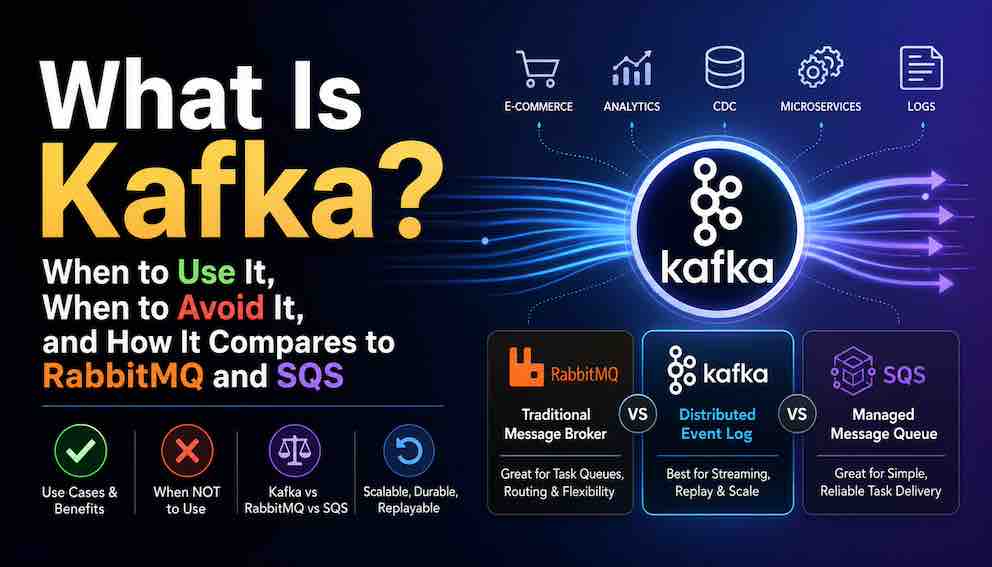
What Is Kafka? When to Use It, When to Avoid It, and How It Compares to RabbitMQ and SQS
A practical guide to Apache Kafka — what it actually is, where it shines, how it differs from RabbitMQ and SQS, and why many teams adopt it long before they truly need it.
Apache Kafka is one of the most powerful technologies in modern distributed systems, but it is also one of the most misunderstood. This guide explains what Kafka actually is, why its replayable event log model differs fundamentally from traditional message queues like RabbitMQ and AWS SQS, and where it delivers exceptional value. You will learn the real strengths of Kafka — event streaming, fan-out, replayability, and large-scale data pipelines — along with the operational complexity and architectural tradeoffs that come with it. By the end, you will have a clear framework for deciding when Kafka is the right choice, when it is overkill, and when a simpler messaging system will serve your team better.
Introduction: Why This Article Exists
You have probably heard that Kafka is powerful. You have also probably heard that it is complicated. Both are true, and that tension is exactly the problem.
Kafka's reputation is well-earned — but so is its complexity. The same architecture that makes it exceptional for high-throughput event streaming can become a significant overhead burden when the problem it is solving is actually a better fit for RabbitMQ or even a Postgres table with polling.
This article is not a tutorial on how Kafka works internally. It is a decision guide. By the end, you will have a clear, honest framework for deciding whether Kafka solves a real problem for you — or whether a simpler tool gets you there with a fraction of the operational cost.
Start With a Story
Before any definitions, let us walk through a concrete scenario, because it is the fastest way to understand what Kafka is actually good at.
Imagine you work at an e-commerce company. When a customer places an order, several things need to happen:
- The inventory service must reserve the item.
- The fraud detection service must score the transaction.
- The email service must send a confirmation.
- The analytics service must record the sale.
- The recommendations service must update what it suggests to that customer next time.
You have one event — OrderPlaced — and five different systems that need to react to it.
How do you connect them?
One option is to have the orders service call each downstream service directly over HTTP. That works at first, but it creates tight coupling. If the email service is slow, your order service slows down. If the analytics service is down, your order fails. You are now responsible for retrying failed calls, handling partial failures, and managing the chain of dependencies.
Another option is a traditional message queue like RabbitMQ. You publish the OrderPlaced event once, and each downstream service has its own queue that receives a copy. This is better — the services are decoupled. But there is a hidden problem. Those queues delete messages after consumption. If the analytics team deploys a new service six months later and it needs to rebuild its internal state from historical orders, those past events are simply gone.
Kafka solves both problems. The event is published once to a named channel, and every service reads it independently. Nothing is deleted immediately. Events stay on disk for as long as you configure. A new service joining the system today can read every event from the past thirty days and catch up to the present moment.
That is the core insight. Kafka is not just a message transporter. It is a durable, replayable log of everything that has happened in your system.
What Kafka Actually Is: A Distributed Event Log, Not a Traditional Queue
The easiest way to misread Kafka is to think of it as a fancy queue. It is not.
A traditional message queue works like a conveyor belt. A message arrives, a worker picks it up, and it disappears. Only one worker ever sees that message. Once it is processed, it is gone.
Kafka works like a ledger. Every new message is appended to the end of a log. Nothing is ever deleted immediately. Instead, messages stay for a configured retention period — an hour, a day, a week, or indefinitely. Every service that wants to read from the log keeps its own bookmark, tracking where in the log it has read up to.
Service A might be at position 1,000. Service B might be at position 5,000. Neither one deletes the messages they read. They just advance their own bookmark.
This one design decision changes everything. It turns Kafka from a transporter of messages into a durable source of truth — a complete, ordered history of what happened in your system, available to any service that wants to read it.
Kafka vs RabbitMQ vs SQS: Key Differences Explained
To understand when to use Kafka, you first need to understand what makes it fundamentally different from systems like RabbitMQ, ActiveMQ, or AWS SQS.
Traditional brokers follow a common pattern. A message arrives. The broker holds it until a consumer picks it up. The consumer processes it and sends an acknowledgement. The broker deletes the message. Done.
Kafka breaks this pattern in several important ways.
Messages are not deleted after consumption. They persist on disk until the retention period expires. This means ten different services can all read the same message, each at their own pace, without any copying or duplication. RabbitMQ supports pub-sub through exchanges and routed queues, but each consumer usually reads from its own queue containing its own copy of the message. Kafka takes a different approach: the event is stored once in a shared log, and every consumer group tracks its own position independently.
Consumers control their own position. Because messages stay on disk, consumers can rewind. If your analytics service had a bug and produced incorrect results for three hours, you fix the bug, reset the consumer offset to before the problem started, and reprocess. The correct results flow through automatically. With a traditional broker, those messages are long gone.
Kafka is optimised for throughput over flexibility. Traditional brokers like RabbitMQ are what you might call smart brokers. They manage complex routing rules, exchanges, bindings, delivery confirmations, and priority queues. All of that intelligence is useful, but it comes at a cost in raw throughput. Kafka takes the opposite approach — it calls itself a dumb broker with smart consumers. The broker just stores messages. Consumers decide where to read from. This simplicity is what enables Kafka to handle hundreds of thousands or even millions of events per second reliably.
Fan-out is a first-class citizen. In Kafka, multiple independent consumers can each read the same topic simultaneously without any coordination or interference. One might be the real-time fraud detection pipeline. Another might be the analytics warehouse ingestion. A third might be the audit log archiver. They do not interfere with each other. Adding a new consumer has no impact on the performance or correctness of existing ones.
Put differently: RabbitMQ optimises for delivery mechanics. Kafka optimises for durable event streams at scale. Neither is universally better. They solve different problems, and confusing them is how teams end up in six months of operational pain.
Kafka vs RabbitMQ vs SQS: A Side-by-Side Comparison
Here is how the three systems compare across the dimensions that matter most for the decision.
Message retention Kafka retains messages on disk for a configurable period (hours, days, or indefinitely), regardless of whether they have been consumed. RabbitMQ deletes messages once a consumer acknowledges them. SQS deletes messages after successful acknowledgement, with a maximum retention of 14 days.
Replay capability Kafka supports full replay — consumers can rewind their offset to any point in the retention window and reprocess past messages. RabbitMQ has no replay; once a message is acknowledged it is gone. SQS has no replay capability.
Fan-out (multiple consumers) Kafka handles fan-out natively: every consumer group reads the full topic independently at its own pace, with no message copying. RabbitMQ requires a separate queue per consumer, with messages routed as copies to each. SQS requires SNS fan-out or separate queues to distribute the same message to multiple consumers.
Throughput ceiling Kafka is designed for sustained high throughput — hundreds of thousands to millions of events per second per cluster. RabbitMQ handles millions of messages per day comfortably for most workloads but is not designed for infrastructure-scale streaming. SQS scales horizontally but is optimised for reliable task delivery rather than raw streaming throughput.
Message ordering Kafka guarantees ordering within a partition. Global ordering across all messages requires a single partition, which sacrifices horizontal scale. RabbitMQ guarantees ordering within a single queue. SQS standard queues offer best-effort ordering; SQS FIFO queues guarantee ordering within a message group but cap throughput.
Operational complexity Kafka requires significant upfront investment: partition design, retention configuration, consumer group management, monitoring, and schema governance. RabbitMQ is considerably simpler to operate for moderate workloads, with mature management tooling. SQS is a fully managed service with almost no operational overhead.
Best suited for Kafka is best suited for event streaming, stream processing, CDC, fan-out to many independent consumers, and use cases where replay matters. RabbitMQ is best suited for task queues, job dispatch, request routing, and workloads with complex routing logic. SQS is best suited for simple, reliable task queues in AWS-native architectures where operational simplicity is the priority.
Kafka vs Job Queues: A Critical Distinction
Kafka remembers history. Job queues forget history on purpose.
That single difference changes almost everything about how the two systems behave. They look similar on the surface — both move messages between services — but they are solving fundamentally different problems.
In a job queue (RabbitMQ, SQS, Celery), a message represents a unit of work. One worker claims it, processes it, and acknowledges it. The message disappears. If the worker crashes before acknowledging, the message reappears for another worker to claim. The queue actively manages delivery, retries, visibility timeouts, and dead-letter handling.
In Kafka, a message represents something that happened — an event. It is not claimed by a worker. It is read by consumers who each track their own position in the log. If a consumer crashes, it restarts from where it left off. The broker does not manage retries for you — your consumer code does.
You can force Kafka into a job queue pattern. Teams do it all the time. But it is awkward. You have to manage your own retry logic and deal with the fact that each slice of a topic can only be consumed by one consumer at a time, which limits your parallelism in ways that feel unnatural for task dispatch.
The simple rule: use Kafka when the same event needs to be seen by multiple independent consumers, when you need replay, or when you are dealing with event streams. Use RabbitMQ or SQS when each message is a task that should be processed exactly once by one worker and then discarded.
If your mental model of a message is "I need someone to send this email," that is a job. Use a job queue. If your mental model is "this order was placed, and I want my inventory, fraud, email, and analytics systems all to know about it," that is an event and Kafka may be a good choice.
The Benefits of Kafka
Now that you understand the mental model and the key distinction, let us go through the concrete benefits that make Kafka worth the complexity.
Scalability That Very Few Systems Match
Kafka was designed for a world where event volume becomes infrastructure-scale rather than application-scale. Clusters routinely sustain hundreds of thousands to millions of events per second, and scaling throughput is a matter of adding more capacity to the cluster rather than rewriting your application.
This is worth comparing honestly. RabbitMQ handles millions of messages per day comfortably for most use cases. Redis Pub-Sub has extremely low latency. But sustained, high-volume, durable streaming at the scale of billions of events per day, with replay, is Kafka's domain. Newer systems like Apache Pulsar and Redpanda also operate at this scale and are worth evaluating. But Kafka has a decade of production hardening and tooling that no other system matches in maturity.
Replayability Changes How You Think About Data
The ability to go back and reprocess past messages changes your relationship with data in a profound way.
On a traditional broker, a bug in your processing logic is a data loss event. On Kafka, it is just rewinding your position in the log.
You can onboard a brand new service to your architecture today, and it can consume every event from the last X days to build its initial state. You cannot do that with a traditional broker. Those events are gone.
You can recover from data corruption bugs. If your pipeline writes bad data for two hours because of a logic error, fix the code, rewind to before the problem started, and reprocess. This is a routine operation on Kafka. On a traditional broker, it is a crisis requiring manual data recovery.
You can build audit trails that actually work. Every event is stored until retention expires. Compliance teams, security teams, and debugging engineers can all inspect exactly what happened and when.
Replayability fundamentally shifts how you build systems. You stop treating past events as lost history and start treating your Kafka topics as a source of truth you can query from any point in time.
Exactly-Once Processing — With Important Caveats
Traditional messaging systems give you a choice between two imperfect guarantees. At-most-once means a message might be lost but will never be delivered twice. At-least-once means a message will never be lost but might be delivered multiple times. For financial transactions or inventory updates, duplicates cause real damage.
Kafka offers exactly-once semantics, but you need to understand precisely what this means and what it does not mean.
The guarantee applies within Kafka's own boundaries — when reading, processing, and writing all happen inside Kafka's pipeline. This is a strong and valuable guarantee for internal stream processing.
What exactly-once does not guarantee is external side effects. If your consumer reads a message and writes to a database, sends an email, or calls a payment API, those operations are outside Kafka's transaction scope. You are responsible for making those operations idempotent — designed so that running them twice produces the same result as running them once.
This is a subtle but important distinction. Exactly-once in Kafka solves a hard distributed systems problem, but it does not replace the need for idempotent design in your application code.
In practice, idempotent processing often solves the business problem more simply — and is worth considering before reaching for Kafka's exactly-once semantics. If your consumer checks whether it has already processed a message ID before writing to the database, you get safety without the overhead of Kafka transactions. Exactly-once in Kafka is a powerful tool — but it is also often a more complex solution than the problem requires.
Exactly-once becomes genuinely important when the critical path stays inside Kafka — fraud detection pipelines, financial ledger aggregations, and stream joins where correctness matters more than simplicity.
Tolerance for Consumer Lag
In an in-memory broker, if consumers fall behind, the broker's memory fills up. At some point, it starts dropping messages or applying back-pressure on producers. Neither is acceptable when you need reliability.
Kafka's answer to this problem is simple: stop holding messages in memory and put them on disk. A slow consumer becomes a consumer with a large offset gap — not a crisis. New messages continue to arrive and be stored. The slow consumer catches up at its own pace.
This makes Kafka an excellent buffer for workloads with unpredictable volume — flash sales, viral events, or batch processing pipelines that run on schedules. The spike arrives, Kafka absorbs it, and your consumers work through the backlog without dropping a single event.
A Complete Ecosystem
Kafka is not just a broker. It is a platform with a mature ecosystem of surrounding tools.
Kafka Connect provides pre-built, configurable connectors to hundreds of systems — databases, data warehouses, object stores, search engines. Streaming changes from PostgreSQL into Elasticsearch becomes a configuration file, not a bespoke pipeline.
Kafka Streams is a Java library for processing topics in real time. You can filter, transform, aggregate, and join streams with exactly-once guarantees and without running a separate processing cluster. The library handles fault tolerance and state management for you.
ksqlDB lets you run SQL queries against streaming data. You write a SELECT statement and watch the results update as new messages arrive. This makes stream processing accessible to anyone who knows SQL.
Schema Registry manages Avro or Protobuf schemas for your messages. As producers evolve their message formats, Schema Registry enforces compatibility rules so consumers do not silently break.
No other messaging system offers this depth of integrated tooling at the same level of maturity.
Common Kafka Use Cases
Benefits are abstract. Use cases are concrete. Here is where Kafka delivers exceptional value in practice.
Real-Time Stream Processing
Stream processing means transforming and analysing data as it flows — not after it lands somewhere. Kafka Streams and ksqlDB make this practical.
A fraud detection system joins a stream of transactions with a stream of risk scores in real time. Any transaction above a threshold triggers an alert in milliseconds. An analytics pipeline aggregates click events into per-user engagement metrics as the clicks arrive. A logistics system tracks package location by joining GPS events with shipment records.
This kind of processing is difficult to build on traditional brokers. The absence of replayability means bugs in your processing logic corrupt data permanently. The lack of exactly-once guarantees means you cannot reliably aggregate financial figures. Kafka's combination of durability, replay, and exactly-once stream processing makes it the right foundation for these workloads.
Choose Kafka for streaming when you need low-latency processing with replay, when you need exactly-once aggregations, or when your stream processing logic needs to join multiple event streams.
Event-Driven Microservices
In a microservices architecture, services need to react to events that happen elsewhere without being tightly coupled to the service that produced them. Kafka is the natural backbone for this pattern.
When an OrderPlaced event lands in Kafka, your inventory, fraud, email, shipping, analytics, and recommendations services all read it independently through their own consumer groups. Adding a new service that needs to react to orders requires no changes to the orders service and no new queues. The new service creates a consumer group and starts reading.
The replay benefit is particularly powerful here. A new service that joins six months later can read the entire event history and build its initial state before going live. This is simply impossible with traditional brokers.
Choose Kafka for event-driven microservices when you have more than a handful of consumers for the same event type, when you anticipate adding new consumers in the future, or when late-joining services need to catch up from history.
Change Data Capture
Change Data Capture, or CDC, means streaming every insert, update, and delete from a database into other systems — search indexes, caches, analytics pipelines, reporting databases.
The standard approach combines Debezium with Kafka. Debezium reads the database transaction log and writes every change to a Kafka topic. Downstream systems consume those changes. If a consumer falls behind, Kafka retains the change events. If a consumer has a bug, you rewind the offset and reprocess.
Without Kafka, reliable CDC requires building your own change tracking, offset management, and failure handling. It is a significant amount of work. With Kafka and Debezium, it is mostly configuration.
Choose Kafka for CDC when you need to stream database changes to multiple downstream systems, when you cannot afford missed changes, or when you want replay capability for your change events.
Log Aggregation
Centralised logging makes debugging and monitoring possible at scale. Kafka handles this well because it absorbs high volumes of log data without dropping events, even when downstream consumers like Elasticsearch are slow.
Each service writes to a dedicated Kafka topic. Multiple consumers can read the same log stream for different purposes — real-time alerting from one consumer, archival to S3 from another, and Elasticsearch indexing from a third. All from a single stream of data, without any duplication in the producer.
If Elasticsearch slows down or goes down entirely, Kafka retains the logs on disk. When Elasticsearch recovers, the consumer catches up. You do not lose log lines during outages.
Choose Kafka for log aggregation when you generate substantial log volume, need guaranteed delivery, or want to fan out the same logs to multiple destinations. For small setups, direct delivery to your observability tool is simpler and perfectly fine.
Data Lake Ingestion
Many data architectures land raw events in a data lake — S3, GCS, or HDFS — before transformation and analysis. Kafka serves as the buffer between high-speed producers and the slower batch jobs that write to the lake.
Producers write events to Kafka continuously. A periodic job reads in large batches and writes compacted files to S3. Because Kafka retains messages, the batch job can run hourly or daily without losing events. If the data lake write fails, the job retries from the same offset.
This pattern is common in ad-tech, IoT, and mobile analytics where event volume is high and data needs to be archived for years.
Fan-Out at Scale
When one event needs to reach many independent teams or systems, Kafka's design is uniquely efficient. The message is stored once. Every consumer group reads it independently. There is no copying of messages to multiple queues.
A large e-commerce company might have an orders topic consumed by a dozen different teams — inventory, fraud, shipping, finance, analytics, recommendations, customer support tooling, data science, compliance, and more. Each team controls its own consumer group and its own offset. One team pausing for maintenance does not affect any other team. One team rewinding to reprocess does not affect any other team.
When Not to Use Kafka: The Warning Signs
Many teams evaluate Kafka by asking: can Kafka do this?
Almost anything can be made to work on Kafka with enough effort. The right question is whether Kafka's operational model naturally fits the problem you are solving — or whether you would be constantly working around its design to get what you need.
Kafka's power comes with real costs. There are clear signals that Kafka is the wrong choice, and recognising them early saves a great deal of pain.
Technical Requirements That Kafka Cannot Meet
Some requirements are simply incompatible with Kafka's design, and no amount of configuration changes this.
Global message ordering. Kafka guarantees ordering only within a single partition. If you need every message in your entire system to arrive in a single, globally ordered sequence, the only option is to use one partition — which eliminates your throughput scaling entirely. You cannot have global ordering and horizontal scale simultaneously in Kafka. Choose one. For global ordering requirements, a traditional database with a monotonically increasing sequence number is more appropriate.
Message priorities. In RabbitMQ, you can assign priorities so that urgent messages are processed before routine ones. Kafka has no priority concept. Every message in a partition is processed in arrival order. If a high-priority event arrives behind a thousand low-priority ones, it waits its turn.
Scheduled or delayed delivery. Kafka has no native mechanism to produce a message now and have it consumed thirty minutes later. Workarounds exist — separate delay topics, scheduled consumer loops — but they are awkward and add significant complexity. SQS delay queues and RabbitMQ delayed message exchanges handle this pattern cleanly.
Request-reply patterns. Kafka is fire-and-forget. A producer sends a message and moves on. You can build request-reply on top of Kafka using reply topics and correlation IDs, but it is an anti-pattern that adds latency, complexity, and developer frustration. For synchronous communication where a caller needs a response, use HTTP or gRPC.
Very low latency. Kafka optimises for throughput over latency. It batches messages and writes to disk. Tail latencies at p99 can reach tens of milliseconds, which is unacceptable for some use cases. Redis Pub-Sub delivers sub-millisecond latency at the cost of durability. If your requirement is speed over persistence, Redis or similar in-memory systems are more appropriate.
Large message payloads. Kafka's default maximum message size is one megabyte. You can increase this, but large messages pressure broker memory, slow replication, and reduce throughput. Kafka is designed for small, frequent events — not for transferring images, videos, or large document blobs. The standard pattern is to store large objects in S3 and publish a Kafka message containing only the reference.
Operational Complexity: The Hidden Tax
Even when Kafka is technically the right fit, the operational complexity may be the wrong fit for your team.
Kafka does not fail silently. It fails in ways that require deep system knowledge to diagnose and fix. That is an important thing to understand before committing to it.
Kafka requires careful configuration. Retention policies, replication factors, and cluster sizing all need to be set correctly for your workload. Wrong settings cause performance degradation or, in the worst case, data loss. This is not a set-and-forget system.
Your partitioning strategy is one of the most permanent decisions you will make. It determines how load is distributed across the cluster and what ordering guarantees you can provide. A poor choice — partitioning by a key that is heavily skewed toward one value — concentrates all your traffic onto a single node and eliminates the throughput benefits you chose Kafka for in the first place. Changing the strategy later means creating a new topic and migrating data, which is a significant operational project.
In other words: partition strategy is a design decision masquerading as a configuration option. Treat it accordingly.
Monitoring Kafka is harder than monitoring most systems. When something goes wrong, the error messages are often cryptic and require Kafka-specific knowledge to interpret. You need dedicated observability tooling and engineers who have invested time in understanding how the system behaves under pressure.
Schema evolution requires discipline. If a producer changes its message format without coordination, every consumer that reads that topic can break silently. Managing this across teams requires either rigorous conventions or a Schema Registry — which adds another component to deploy, operate, and monitor.
The honest summary: if your team has two or three engineers with no dedicated operations support, Kafka will slow you down. The operational overhead consumes engineering time that could be building features.
When Your Scale Simply Does Not Need It
Many teams choose Kafka for workloads that do not come close to requiring it. That is a mistake. The complexity you import does not scale down with your traffic.
If you process fewer than a few thousand messages per second, RabbitMQ or SQS handles it with far less complexity. Redis Pub-Sub handles simple pub-sub with extremely low latency and minimal ops burden. A Postgres table with a polling worker handles background job processing reliably and lets you use your existing database tooling.
Do not use Kafka because it is impressive. Use it because your requirements justify the cost.
Managed Kafka as a Middle Path
If you genuinely need Kafka's capabilities but do not have the team to operate it, managed Kafka is worth serious consideration.
AWS MSK (Managed Streaming for Apache Kafka), Confluent Cloud, and Redpanda Cloud all provide Kafka-compatible clusters without requiring you to manage the underlying infrastructure. You still need to understand partitions, consumer groups, offsets, and schema management — the operational burden is reduced, not eliminated. But you offload broker provisioning, patching, replication monitoring, and disk management.
For teams earlier in their Kafka journey, starting with a managed service and moving to self-hosted later (if cost becomes a driver) is a reasonable approach.
Conclusion
Kafka is a remarkable piece of engineering. It combines high-throughput transport, durable storage, replay, and stream processing in a way that few other systems match. For the right use cases — streaming pipelines, event-driven microservices, CDC, fan-out at scale — it is genuinely transformative.
But Kafka is not a default choice. It carries real operational weight. It will punish you if you choose it for the wrong reasons, underestimate its complexity, or ignore its constraints on message size, ordering, and partition strategy.
Use the framework in this guide. Be honest about your scale, your team's capacity, and your actual requirements. If Kafka fits, it will serve you beautifully. If it does not, choose something simpler and revisit when the requirements demand it.
About N Sharma
Lead Architect at StackAndSystemN Sharma is a technologist with over 28 years of experience in software engineering, system architecture, and technology consulting. He holds a Bachelor’s degree in Engineering, a DBF, and an MBA. His work focuses on research-driven technology education—explaining software architecture, system design, and development practices through structured tutorials designed to help engineers build reliable, scalable systems.
Disclaimer
This article is for educational purposes only. Assistance from AI-powered generative tools was taken to format and improve language flow. While we strive for accuracy, this content may contain errors or omissions and should be independently verified.