
Learning Paths
Last Updated: May 14, 2026 at 15:00
Sharding vs Partitioning vs Replication Explained: How Modern Databases Scale
A practical guide to the three database scaling techniques every engineer encounters eventually — what problems they actually solve, the tradeoffs they introduce, and why choosing the wrong one creates operational pain that is hard to reverse
Replication, partitioning, and sharding each solve distinct scaling problems. Replication copies data to multiple servers for read scalability and availability. Partitioning organizes data within a single server to make large tables manageable. Sharding distributes data across multiple servers when write throughput exceeds what one server can handle. Not every database supports all three, but understanding the concepts helps you choose the right technique at the right time.
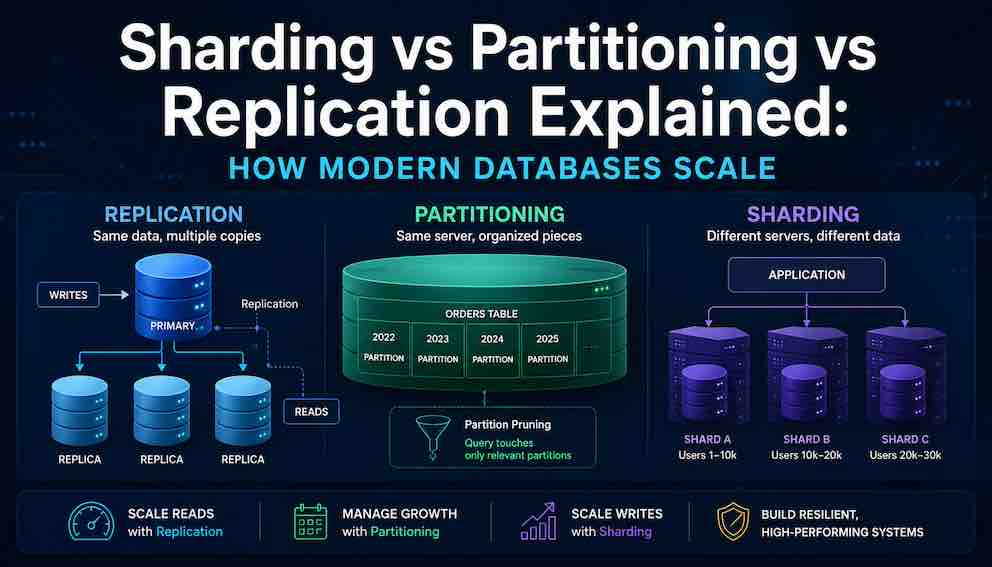
Imagine a database that works perfectly on day one. Queries return in milliseconds. Backups finish quickly. Nobody thinks about it. Then the product grows. A year later, the same database is struggling. Queries take seconds. Backups overlap with each other. A single slow query freezes everything else. The team starts hearing words like partitioning, sharding, and replication, often from colleagues who use them interchangeably, which adds confusion on top of an already stressful situation. These are not interchangeable terms. They solve different problems.
Here is a clear summary before the details:
replication copies data to multiple servers,
partitioning organises data within a single server,
and sharding distributes data across multiple servers.
A production system can use all three simultaneously.
Not all databases support every technique here. Whether your specific database offers them natively or requires additional tooling is a separate question to check in your documentation.
Understanding Replication
What Is Replication?
Replication means keeping exact copies of the same data on more than one database server. One server is designated as the leader, sometimes called the primary or master. In the most common scenario, all writes — inserts, updates, deletes — go to this server. The other servers, called replicas or secondaries, receive a continuous stream of those changes and apply them to their own copy of the data.
What Problem Does Replication Solve?
Replication primarily solves two problems.
The first is read scalability. Most applications read data far more often than they write it. A social media feed, a product catalogue, a news website — these are read thousands of times for every single write. Without replication, every one of those reads competes for time on the same single server that is also handling writes. With replication, reads can be spread across many replicas, each independently answering queries.
The second is availability. If the leader server crashes, a replica can be promoted to take its place. The database keeps running. Without replication, a single server failure takes the entire database offline until the server recovers.
A third often-overlooked benefit is the ability to run heavy operations on a replica without impacting production. Backups, reporting queries, and data exports can all run on a dedicated replica while the leader handles normal traffic uninterrupted.
The Consistency Problem That Replication Creates
Replication sounds straightforward, but it introduces a subtle and genuinely tricky problem: consistency.
With a single database, consistency is automatic. A row gets written, and the very next read sees that row. That is called read-after-write consistency, and most developers assume it as a given without ever thinking about it.
With replication, that assumption can break. Here is why: most replication is asynchronous by default. When a write happens on the leader, the leader immediately tells the application that the write succeeded. It does not wait for any replica to confirm that it has received the change. The replicas catch up in the background, usually within milliseconds, but sometimes longer.
Now consider what happens when a user submits a form, and the application immediately redirects them to a page that reads from a replica. If that replica has not yet received the write, the user sees a page that looks like their change never happened. They try again. The change appears. They assume the application is broken. From their perspective, it is.
This delay between when a write happens on the leader and when it appears on replicas is called replication lag. It is measured in milliseconds and usually very small, but under high write load or network issues it can grow significantly.
There are two ways to address this. The first is synchronous replication, where the leader waits for at least one replica to confirm it has received the write before telling the application it succeeded. This guarantees the replica is never behind — but it increases write latency because every write now requires a network round trip to a replica. If that replica is slow or unreachable, writes can stall or fail entirely. This is a real availability risk.
The second approach is routing specific reads to the leader when freshness matters. A financial balance must always be read from the leader. A product catalogue can safely come from a replica. Deciding which reads get which treatment is a deliberate architectural decision, not something that happens automatically.
When to Use Replication
Replication should be set up very early, often from the first week of production. The operational benefits — failover, backup isolation, read offloading — justify it even for small databases. A read replica is not a scaling technique reserved for large systems. It is basic operational hygiene.
The caution is understanding consistency requirements before routing reads to replicas. A general rule: reads can safely come from replicas when seeing slightly stale data is acceptable. When the data must be absolutely current — account balances, inventory levels, anything with financial or transactional consequences — reads should go to the leader.
What Replication Does Not Solve
In single-leader replication — the most common setup — adding replicas does not improve write throughput. Every write still goes through the single leader. (Other replication architectures like multi-leader or leaderless can scale writes, but they introduce their own complexity.)
Understanding Partitioning
What Is Partitioning?
Partitioning means splitting a single large table into smaller physical pieces, all stored on the same database server, but organised so the database engine can work with each piece independently.
From the application's perspective, nothing changes. Queries still reference the same table name. The database handles routing internally. But behind the scenes, the data is divided into chunks, and the database can choose to touch only the relevant chunk for a given query rather than scanning the entire table.
To use an analogy: imagine a library that organises books by decade published. The library looks like one collection from the outside, but the librarian knows exactly which shelf to walk to based on when a book was published. If a patron asks for books from the 1990s, the librarian does not search the whole building — they go directly to the right section.
Horizontal vs Vertical Partitioning
There are two types of partitioning, and they work very differently.
Horizontal partitioning means splitting a table by rows. Different rows go into different partitions. This is what almost everyone means when they talk about partitioning in a scaling context. A table of customer orders might be horizontally partitioned by year: rows from 2022 go into one partition, rows from 2023 into another. Each partition has the same columns but different rows.
Vertical partitioning means splitting a table by columns. Some columns go into one table, other columns into a separate table. A user profile table might be vertically partitioned so that the frequently-accessed columns like username and email stay in a small, fast table, while large and rarely-needed columns like biography and preferences go into a separate table joined when needed. This is less common as a scaling technique and more often a deliberate data modelling choice.
For the rest of this article, "partitioning" refers to horizontal partitioning, which is the standard meaning in distributed systems discussions.
Partition Strategies
The most common partitioning strategy is range partitioning, where rows are divided based on a range of values. A date column is the classic example: January goes here, February goes there. Range partitioning is intuitive and makes it easy to drop old data — to delete a month's worth of records, the partition can simply be dropped in milliseconds rather than deleting millions of rows one by one.
List partitioning divides rows by explicit values. A region column might partition rows into Europe, North America, and Asia Pacific.
Hash partitioning applies a hash function to a column value and distributes rows evenly based on the result. This produces more uniform distribution than range partitioning but loses the ability to efficiently query a range of values.
What Problem Does Partitioning Solve?
Partitioning is primarily a manageability tool for large tables. When a single table grows into hundreds of gigabytes or terabytes, several things become painful in ways that are not obvious until they happen.
Backup and maintenance operations that once took minutes now take hours. Deleting old records — say, purging data older than three years for compliance reasons — requires scanning and deleting millions or billions of rows, which locks the table and causes production slowdowns. Rebuilding indexes becomes an overnight job. Vacuum and optimisation operations fall behind.
Partitioning solves all of this. Old data can be dropped by dropping a partition, which is a near-instant operation. Index maintenance can be run on one partition at a time. Each partition is a more manageable unit for backups and operations.
Partitioning also improves query performance when queries align with the partition key. If a table is partitioned by date and a query includes a date filter, the database engine performs partition pruning — it identifies which partitions can possibly contain matching rows and skips all the others. A query for last month's orders does not touch the previous three years of data at all. For time-series data and audit logs, this effect can be dramatic.
The Key Design Decision: Choosing the Partition Key
The partition key determines everything about whether partitioning actually helps. A good partition key must match the queries being run against the table.
If a table is partitioned by date but most queries filter by customer ID with no date filter, partition pruning cannot happen. Every query scans every partition, which is actually slower than no partitioning at all because the database now has extra overhead managing multiple partition metadata objects.
A simple test: look at the most common queries run against a table. What column appears in the WHERE clause most consistently? That column is the candidate partition key. If there is no single column that appears consistently, partitioning may not be the right tool.
One important caution with range partitioning on time columns is the concept of a hot partition. All new writes go to the partition that represents the current time period. That partition is always the busiest, receiving every new insert. In a heavily write-intensive workload, this can create an imbalance where one partition is under much more pressure than the others.
When to Use Partitioning
Partitioning becomes worth considering when tables grow beyond several gigabytes. The right threshold depends on the database engine and server hardware. More practical signals: if backup windows are growing unacceptably, if deleting old records causes noticeable production slowdowns, or if index maintenance jobs are taking hours and affecting peak-time performance, those are signals that partitioning is worth implementing.
Partitioning is low-risk and reversible compared to sharding. It involves no application changes in most cases, and it can be tested on a staging environment before production deployment.
What Partitioning Does Not Solve
Partitioning does not help with write throughput. All the partitions still live on the same server, which has the same CPU, memory, and disk limits as before. If the database is running out of write capacity, partitioning provides no relief.
Partitioning also does not help with queries that span many partitions. A query that must scan across all partitions is slower than a query on a single unified table, not faster.
Understanding Sharding
What Is Sharding?
Sharding takes the concept of horizontal partitioning and adds one critical difference: the partitions — called shards — live on entirely separate database servers. Each server is responsible for a subset of the data and has no knowledge of the data on other servers.
This means sharding is a distributed systems problem, not just a database configuration decision. The application must know which server to contact for any given piece of data. There is no single database server that can answer any question — queries must be directed to the right place, or the data simply will not be found.
The typical model works like this: a shard key is chosen — say, customer ID. Customers 1 through 10,000 live on Server A. Customers 10,001 through 20,000 live on Server B. The application, or a routing layer in front of the database, must calculate which server to contact before sending any query.
What Problem Does Sharding Solve?
Sharding solves one specific problem: write throughput that exceeds the capacity of a single database server.
This is a much narrower use case than most people assume. A single modern database server can handle a very large amount of write traffic before reaching its limits. The ceiling is much higher than most applications will ever reach. But for systems at genuine scale — applications with millions of active users generating continuous writes — a single server does eventually become the bottleneck, and no amount of hardware upgrades can solve it forever.
When that ceiling is hit, sharding distributes writes across multiple servers. Each server handles only a fraction of the total writes. Adding more servers increases total write capacity proportionally.
What Sharding Does Not Solve (And Often Makes Worse)
Sharding does not automatically improve read performance. In fact, for queries that need data from multiple shards, sharding makes reads significantly slower.
Consider a query that asks for the top ten orders by value across all customers. In a sharded database, this query must be sent to every shard, each shard must return its top ten locally, and then the application must merge and re-rank all the results. This scatter-gather pattern adds latency and complexity. The more shards there are, the more this compounds.
Sharding also makes transactions much harder. On a single database server, transactions are straightforward — either everything succeeds or everything rolls back. When a transaction spans data on two different shard servers, coordination becomes a distributed systems problem. Distributed transactions exist, but they are slow, complex, and not supported by all databases.
Joins across shards face the same issue. Data that lives on different servers cannot be joined by the database engine — it must be fetched from multiple sources and combined in application code.
The Rebalancing Problem
Adding a new shard does not automatically redistribute existing data. Data must be moved from existing shards to the new shard, and this process — rebalancing — is operationally dangerous.
Moving large volumes of data takes time, consumes CPU, disk IO, and network bandwidth, and competes with production traffic while it is happening. Adding a shard specifically because the cluster is overloaded, then running rebalancing on that already-overloaded cluster, is a situation where the cure makes the problem temporarily worse before it gets better. In severe cases, the additional load from rebalancing pushes an already-stressed cluster into a failure state.
Different databases handle rebalancing very differently. Some automate it with throttling controls. Others require manual planning and coordination.
When to Use Sharding
Sharding should be considered only after every other option has been exhausted. That means: queries have been optimised, appropriate indexes are in place, replication has been set up for read traffic, partitioning has been applied to the largest tables, and the server has been scaled up to the largest available instance size. If write throughput is still the bottleneck after all of that, sharding becomes a serious conversation.
The operational complexity of a sharded system is substantial. It requires solid monitoring infrastructure, experienced engineers comfortable with distributed systems, and incident response procedures for problems that do not exist in single-server deployments.
Premature sharding — implementing it before it is needed — introduces all of that complexity with none of the benefit. It slows feature development, complicates debugging, and makes simple queries harder to reason about. The cost is real and ongoing.
Note: In many NoSQL systems, partitioning and sharding are effectively built into the database architecture itself, which is why the terminology often overlaps or becomes interchangeable.
How Consistency Works Across All Three Techniques
Consistency — the guarantee that reads reflect the most recent writes — is the thread that connects all three techniques, and it deserves careful attention rather than an afterthought.
On a single unsharded, unreplicated database, consistency is automatic and invisible. Write something, read it back, and it appears. Most developers internalise this so completely that they never consciously think about it.
Replication breaks this guarantee by default. The leader has the latest data. Replicas are slightly behind. A read from a replica might not reflect a write that just happened on the leader. The solution is to deliberately route reads to the leader when freshness matters, accept that some reads from replicas will be slightly stale, or use synchronous replication at the cost of higher write latency.
Partitioning does not create consistency problems in itself, because all partitions live on the same server and use the same transaction engine. Queries that span multiple partitions see a consistent view.
Sharding creates the hardest consistency challenges. Data on different shards cannot participate in the same transaction without distributed coordination mechanisms, which most databases do not offer or offer only in limited forms. Application code must handle the reality that two related pieces of data — say, a user's account balance and a transfer record — might live on different shards and cannot be updated atomically without careful design.
For most applications, the practical approach is to design around these constraints: shard data in a way that keeps related data together on the same shard, so cross-shard transactions are rare rather than common.
Knowing When Not to Scale
One of the more underappreciated skills in database architecture is recognising when none of these techniques are needed.
A database that comfortably fits on a single server with acceptable query performance and manageable operational overhead should stay on that single server. The simplicity of a single-server database — fully consistent transactions, arbitrary joins, no routing logic, straightforward debugging — is a genuine competitive advantage for a team moving quickly.
Many companies run successful and profitable applications on a single PostgreSQL or MySQL instance for years. The instinct to introduce replication, partitioning, and sharding early because they feel "more scalable" is one of the most common sources of unnecessary architectural complexity in software teams.
The right framing is this: each of these techniques is a response to a specific problem. Replication responds to the need for read scalability or high availability. Partitioning responds to tables becoming too large to manage. Sharding responds to write throughput exceeding a single server's capacity. In the absence of those specific problems, the techniques add complexity without adding value.
A Note on Practical Realities
In production, each technique comes with common failure modes. Replication can suffer from lag that causes stale reads; partitioning fails when queries ignore the partition key and scan everything; sharding often creates hot shards that become new bottlenecks. Monitoring metrics like replica lag, partition size variance, and shard imbalance catches these before they escalate. The standard evolution path for most systems is predictable: start on a single server, add a read replica early, partition large tables when operations become painful, and shard only when there is no other choice.
Summary
Replication, partitioning, and sharding are not alternatives to each other. They solve different problems and belong to different phases of a system's growth.
Replication should be set up early, not as a scaling technique but as an operational baseline. It provides fault tolerance, offloads backups, and separates read-heavy analytical work from production traffic. Its primary constraint is replication lag, which requires deliberate management of which reads need to be routed to the leader.
Partitioning should be applied when specific tables grow large enough to make management painful. It requires a thoughtful choice of partition key that matches real query patterns, and it delivers the most benefit for time-series and append-heavy data access patterns. It does not help with write throughput.
Sharding should be delayed as long as possible, implemented only after read replicas, partitioning, and hardware scaling have all been tried and still proven insufficient. It solves write throughput at the cost of substantial operational complexity, the loss of cross-shard transactions, and the permanent need for a routing layer between the application and the data.
The path forward for almost every system looks the same: start on a single server, add a read replica early, partition large tables when operations become painful, and shard only when there is no other choice. Each step in that progression is justified by a real problem, not by a desire to build a more sophisticated-looking architecture.
About N Sharma
Lead Architect at StackAndSystemN Sharma is a technologist with over 28 years of experience in software engineering, system architecture, and technology consulting. He holds a Bachelor’s degree in Engineering, a DBF, and an MBA. His work focuses on research-driven technology education—explaining software architecture, system design, and development practices through structured tutorials designed to help engineers build reliable, scalable systems.
Disclaimer
This article is for educational purposes only. Assistance from AI-powered generative tools was taken to format and improve language flow. While we strive for accuracy, this content may contain errors or omissions and should be independently verified.